Stability AI Image Models
The landscape of AI image generation has been rapidly advancing, transforming creative fields and pushing the limits of digital art. A common question among creators is: what is the best ai image generator? While answers vary, Stability AI stands at the forefront of this movement by making powerful image generation models accessible through open-source image generation models. Their strategy emphasizes openness, adaptability, an active user community, and enterprise readiness. This empowers both individuals and companies to experiment with generative ai freely, exploring everything from text to image models to image to image ai transformations.
What is Stability AI? The Philosophy of Openness
Stability AI is dedicated to creating open artificial intelligence tools that anyone can use, customize, and host on personal hardware. Unlike proprietary platforms such as OpenAI’s Dall-e, Midjourney, or Google’s Imagen, which often limit access behind closed APIs and subscriptions, Stability AI offers models with open weights. This means users gain full liberty to deploy and tailor these tools to their needs without dependency on cloud providers. This open model encourages innovation by allowing users to train models from scratch or fine-tune existing ones for specific applications, providing far greater flexibility and control than closed systems like Meta's or Adobe Firefly.
![Image Arena Win Rates highlighting Stability AI’s FLUX.1 models. FLUX.1 [pro] delivers an impressive 67% win rate, outperforming Midjourney v6.1, Ideogram v2, and all Stable Diffusion versions, and securing a top position in blind user preference tests.](https://cdn.prod.website-files.com/65b8f370a600366bc7cf9b20/68cd6453c251ccfb9f2a7c68_2ee003d5.webp)
The Model Suite: From Stable Diffusion to Stable Image
The foundation of Stability AI’s success is the Stable Diffusion (SD) family, a leader among diffusion-based image generation technologies. The lineup includes SD 1.5, which established the community favorite baseline, followed by SD 2.1 that improved quality, and culminating in Stable Diffusion XL (SDXL), a leap forward in resolution and prompt understanding.
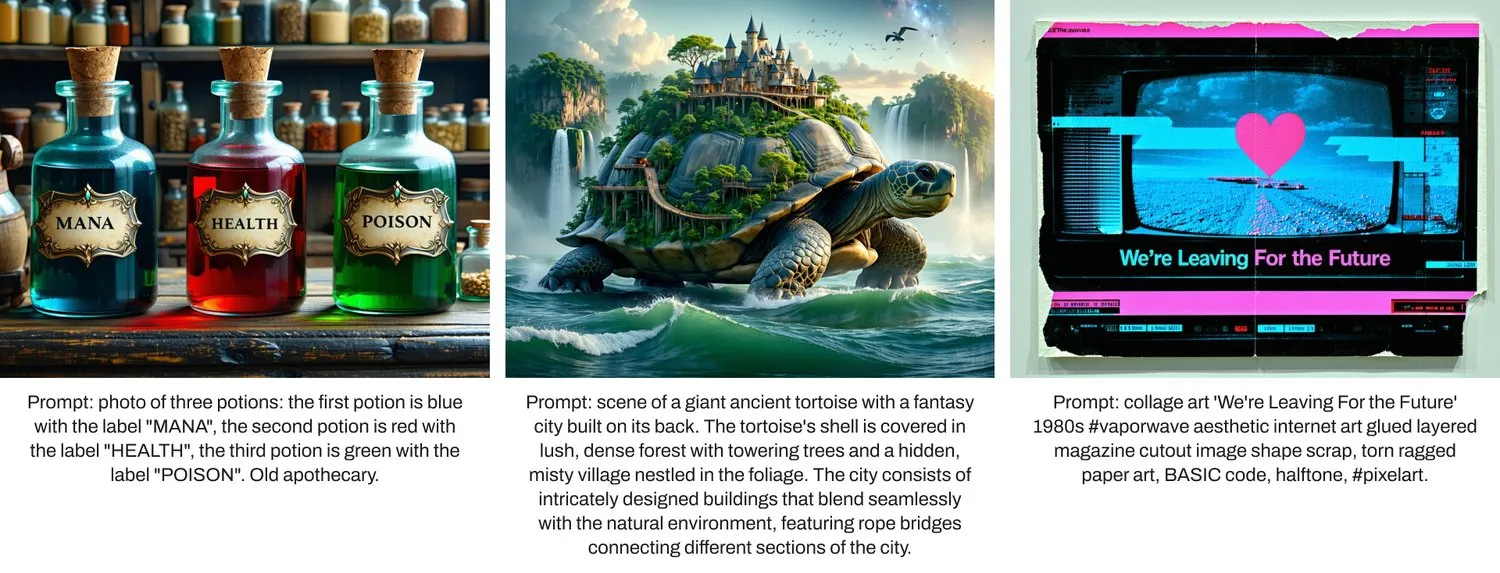
The latest flagship, Stable Diffusion 3, offers further enhancements, particularly in generating coherent typography and detailed imagery, competing with other new models like Gemini and Imagen 3. Complementing this is Stable Image, designed for commercial scalability, making it ideal for businesses that require reliable solutions, such as creating stock photos.
The Unbeatable Advantage: Ecosystem and Customization
One of the most significant strengths of Stability AI lies in its ecosystem. Platforms such as CivitAI host a vast repository of community-shared ai generator models, including specialized ai models female and artistic styles. Users can fine-tune models or apply LoRA techniques to adapt outputs for specific concepts, a process central to how do ai image generators work at a technical level. For precise control, extensions like ControlNet enable detailed guidance of the ai image generation process. Moreover, features that facilitate image to 3d model creation illustrate how Stability AI embraces a broad set of generative ai image models, expanding the creative new lens through which we see ai art.
Stability AI vs. The Competition: A Balanced Comparison
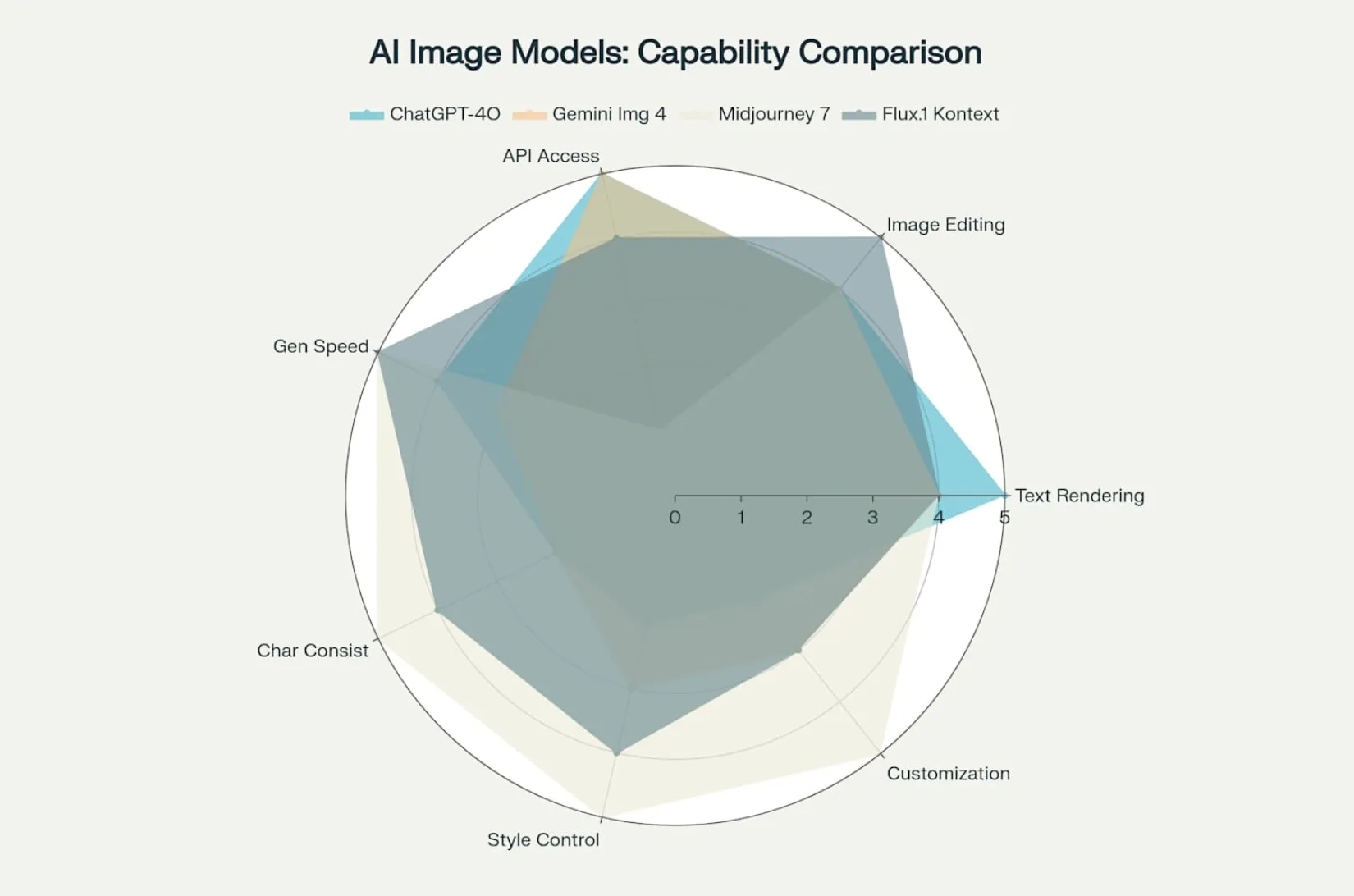
When evaluating Stability AI alongside rivals like Midjourney, Dall-e 3, and Google ai image generator (Imagen), key differences become apparent.
Stability AI stands out by providing open-source model weights, enabling extensive customization and self-hosting. Its artistic output is shaped by a vibrant community. In contrast, Midjourney is known for its distinct artistic style but is a closed service. DALL·E 3 excels in prompt adherence but offers no open weights.
Imagen and Gemini lead in certain metrics of realism and prompt understanding but are less accessible. This comparison highlights why Stability AI is often a top choice for those prioritizing flexibility, while competitors may better suit those seeking a straightforward free AI image generator experience or distinct artistic effects. Other notable tools in the space include Recraft AI for design, Getimg and Gencraft for generation, Meshy AI for 3D, and Lucidpic for AI model images.

Practical Applications and Use Cases
- For Developers & Researchers: Local integration for building custom applications, leveraging open source image generation models to train your own ai image generator. They can delve into how does generative ai work and develop tools like an ai image variation generator.
- For Businesses: Creation of brand-specific assets, product prototyping, and generating stock images or generated photos for e-commerce at scale through Azure AI Foundry or AWS.
- For Creators: Generation of unique artwork, concept art, and visual content using community-shared models on CivitAI or exploring other platforms like nano banana, flux ai, or fal. They can create everything from wall e image generator concepts to photorealistic scenes.
Important Considerations: Licensing and Ethics
Stability AI's licenses, such as for SD3, provide flexibility for personal and commercial use, though users must adhere to ethical guidelines. The company is actively developing a creator-first marketplace to address intellectual property concerns and promote responsible usage. Users are reminded of their responsibility for how generated content is applied, especially in sensitive contexts, which is a crucial consideration for any public-facing tool.
Conclusion: The Future is Open
Stability AI has fundamentally transformed generative image technology by prioritizing openness, community involvement, and user control. By empowering people to not just consume but also innovate and build upon its tools, the company is shaping the future landscape of creative AI. For anyone seeking customizable, transparent, and scalable solutions, Stability AI represents a compelling and forward-looking choice, embodying a new era where creativity is democratized through open-source innovation and solidifying its position as a top contender.
Unlock the power of open-source creativity with Stability AI image models. Integrate via AI/ML API and start generating unique, scalable visuals today.
Frequently Asked Questions (FAQ)
Q: How to speed up image generation in AI models?
A: Optimize hardware (use GPUs with more VRAM), lower the iteration or step count, reduce image resolution, use faster samplers, enable performance settings like memory-efficient attention, and try optimized models like Stable Diffusion Turbo designed for faster generation.
Q: How to stop image generation in AI models?
A: In most user interfaces, you can interrupt generation by clicking a stop or cancel button. If running locally, terminating the process or interrupting the execution command stops generation immediately.
Q: How do diffusion models work in AI image generation?
A: Diffusion models generate images by gradually removing noise through iterative denoising steps. Starting from random noise, they progressively refine the image over many steps until the final output forms.
Q: How to run AI image models locally?
A: Download open-source model weights (e.g., Stable Diffusion), install required dependencies (Python, PyTorch), and use local inference tools or UIs like AUTOMATIC1111 to run generation on your GPU or CPU.
.webp)