
GPT Image 2.6 Review: Flare vs Sunburst, GIFs and API Pricing
GPT Image 2.6 is OpenAI's newest image model, and it now makes animated GIFs, not only still images. OpenAI released it on November 4, 2026, in ChatGPT as ChatGPT Images 2.6 and in the API as Flare and Sunburst.
You can run both models through AI/ML API with the model IDs openai/gpt-image-2.6-flare and openai/gpt-image-2.6-sunburst. They cost the same per token as GPT Image 2.5: $5 per million input tokens and $30 per million output tokens.
In our test, a 12-frame GIF of 512 × 512 cost $0.055 at medium quality, and Flare made it in 12 seconds. At low quality, a still image cost 4 times more than on GPT Image 2.5, because 2.6 spends more tokens on each picture.
We ran our API tests and checked all prices and benchmark scores on November 6, 2026.
What is GPT Image 2.6?
GPT Image 2.6 is an image model from OpenAI that makes still images and short animated GIFs from text and images. It comes as two models at one price per token: Flare for fast drafts and edits, and Sunburst for detailed images and long editing rounds.
It's the third GPT Image release this year, after GPT Image 2 in April and GPT Image 2.5, the first version with Flare and Sunburst, in September. In ChatGPT and Codex, Images 2.6 is available on every plan, and OpenAI says it makes images 50% faster than before.
GPT Image 2.6 pros and cons
Pros:
- Makes looping GIFs from text or from an image
- Flare is up to twice as fast as GPT Image 2.5 Flare
- Spelled every word right in our images and GIFs
- Scores above every non-OpenAI model on Arena's text-to-image board
Cons:
- Costs more than GPT Image 2.5 at low and medium quality
- Flare didn't move the camera in our GIF test when asked
- GIFs over 16 frames need several requests
- Ranks below GPT Image 2.5 Sunburst on most Arena boards for now
GPT Image 2.6 specs
Every GIF from the API loops forever, and our files came out at 0.5 to 1.5 MB.
What changed in GPT Image 2.6 vs 2.5
The new version adds GIF output: set output_format to gif, and the model returns a looping animation. It works on both the generations and the edits endpoints, so you can animate a text prompt or an image you already have.
The API got a new complexity setting. It controls how much the model plans the picture before it draws, separately from quality. OpenAI recommends low complexity for most edits and medium or high for scenes with many objects. Markup edits came to the API in the same release: you send a second image with a mark, like a red circle, to show where to change the picture. They work with GPT Image 2.5 too.
2.6 Flare was faster than 2.5 Flare at all three quality levels we tested. In our test, it made a 1024 × 1024 image in 8 to 11 seconds, against 12 to 22 seconds on GPT Image 2.5 Flare. At high quality, it took half the time: 11 seconds against 22.
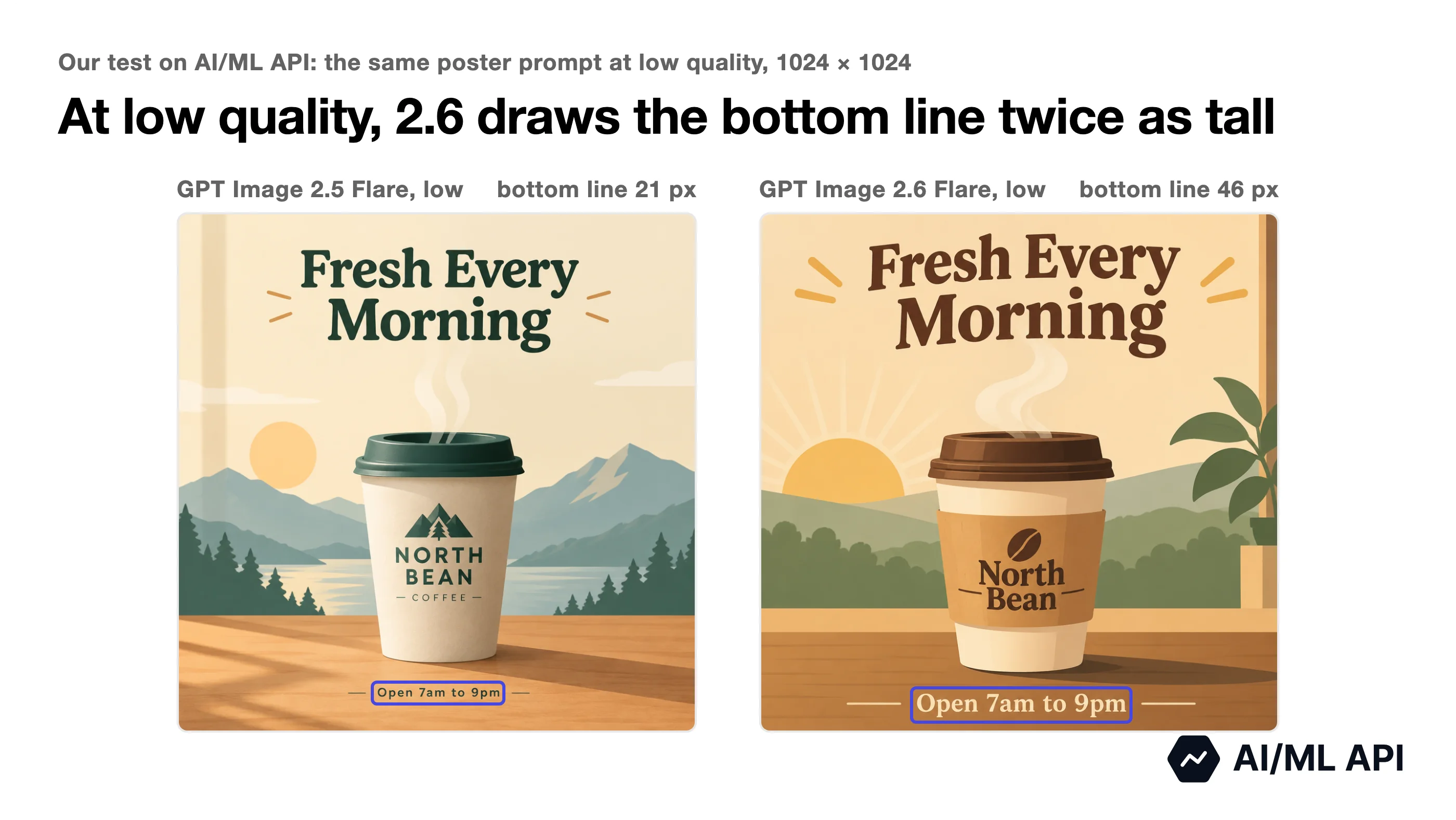
In our poster test, GPT Image 2.6 drew small text larger. We asked GPT Image 2.5 and 2.6 for the same coffee poster with three lines of text. At every quality setting, its bottom line, "Open 7am to 9pm", came out bigger on 2.6: at low quality, it was 46 pixels tall against 21 on 2.5. All eight GPT Image posters in our test had every line of text spelled right.
How did we test GPT Image 2.6?
We sent 30 requests to GPT Image 2.6, GPT Image 2.5, Nano Banana 2.1 and Gemini Omni 1.2 Flash through AI/ML API on November 6, 2026. Separately, we made GIFs in ChatGPT on a free account.
Times are full request times, costs are what AI/ML API billed, and each setting ran once.
What is GPT Image 2.6 pricing on AI/ML API?
On AI/ML API, both GPT Image 2.6 models cost $5 per million text input tokens and $30 per million output tokens. Cached text input costs $1.25 per million.
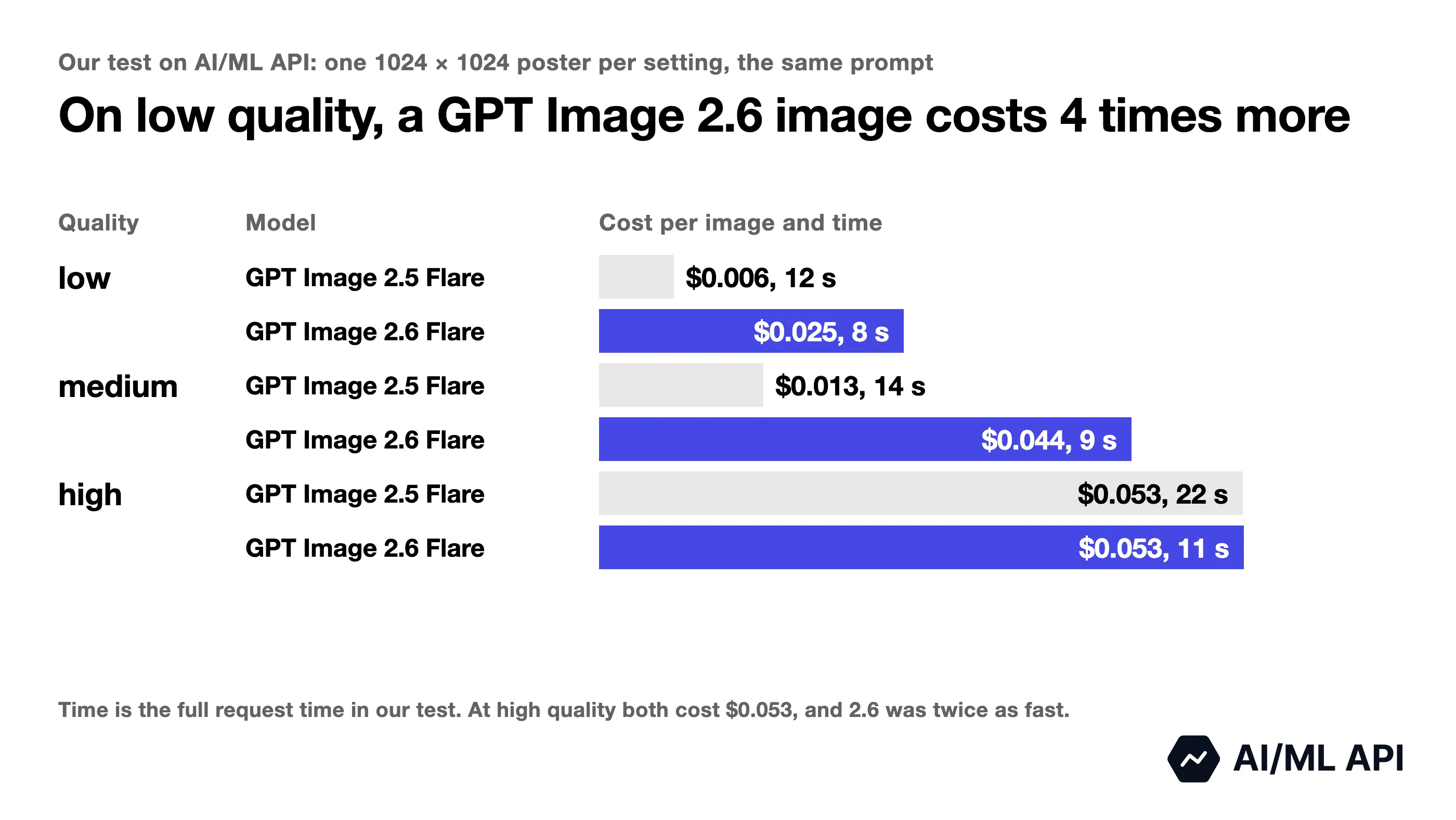
In our test, a 1024 × 1024 image on GPT Image 2.6 cost $0.025 at low quality and $0.044 at medium, against $0.006 and $0.013 on GPT Image 2.5, and both cost $0.053 at high. A GIF costs the same as one image the size of all its frames together: 12 frames of 512 × 512 cost $0.055 at medium and $0.067 at high, and 16 frames of 720 × 720, the largest size, cost $0.147.
GPT Image 2.6 Flare vs Sunburst
Pick Flare when you need speed and Sunburst when the result has to follow your prompt closely. In our test, Sunburst followed a GIF prompt more exactly, but it took 2.2 to 3.2 times longer than Flare, at the same price.
OpenAI says Flare can return an image in as little as 6 seconds at low quality and lays out posters and product images better than before. At medium or high quality, Sunburst holds a picture more consistently from one edit to the next.
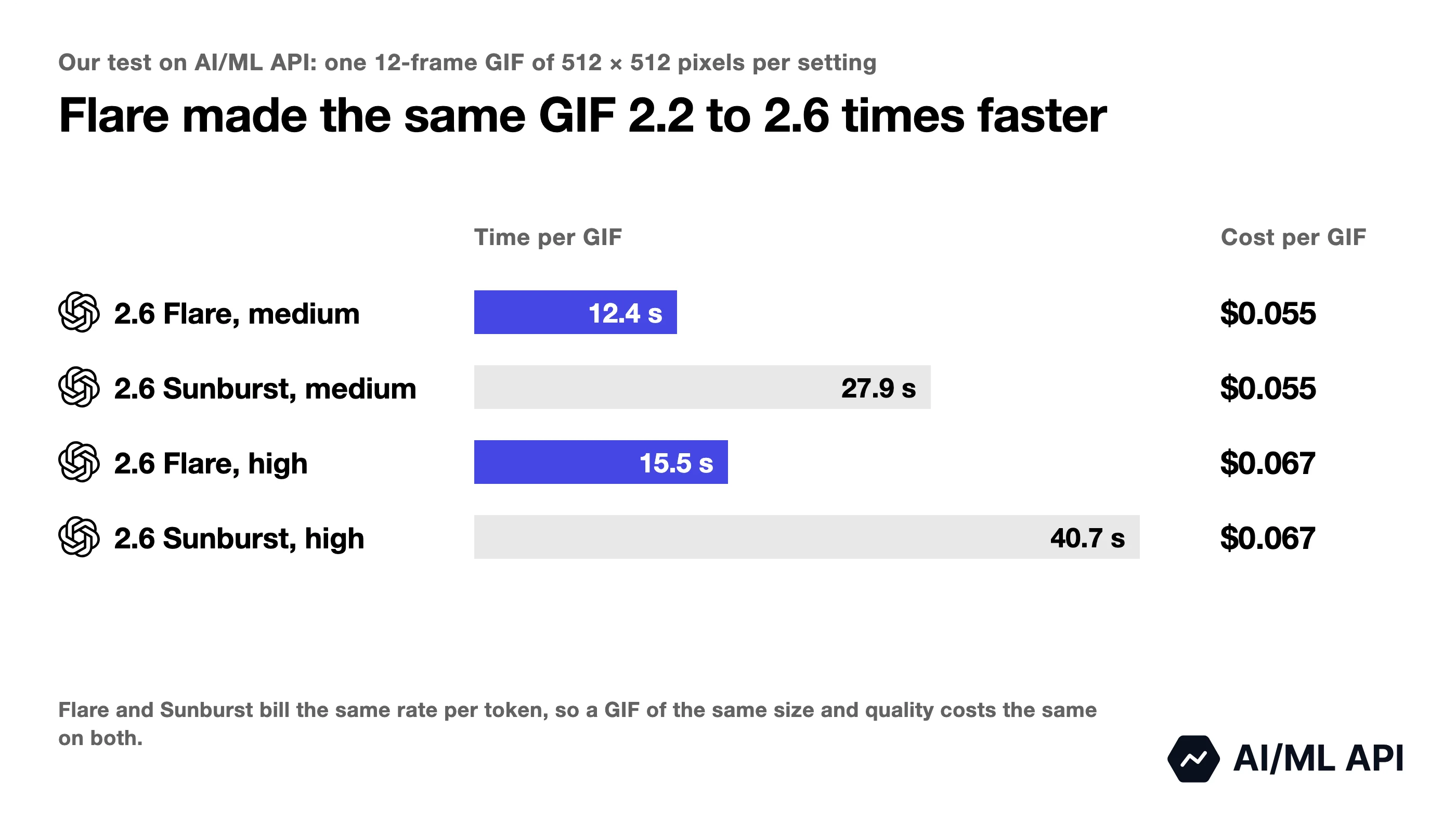
On still images at high quality, the gap was even bigger: a 1024 × 1024 poster took 11 seconds on Flare and 49 on Sunburst. At medium quality, it was 9 seconds against 26.
Our prompt asked a fox to run in, jump over a log, land and look back at the camera. It also said the camera does not move. Sunburst did all of it and kept the scene the same size in every frame. Flare made the jump, but after it the shot zoomed in until the fox filled half the frame.
On a neon sign that lights up letter by letter and spells GPT IMAGE 2.6, both models spelled the text right in every frame, but Sunburst lit about one letter per frame, as the prompt asked, and Flare lit two or three at a time.
What are the GPT Image 2.6 benchmark results?
Arena ranks image models by blind votes: people enter a prompt, see two images without the model names and pick the better one. On its text-to-image leaderboard, GPT Image 2.6 Sunburst is second, 20 points behind GPT Image 2.5 Sunburst, and both 2.6 models score above every model from outside OpenAI.
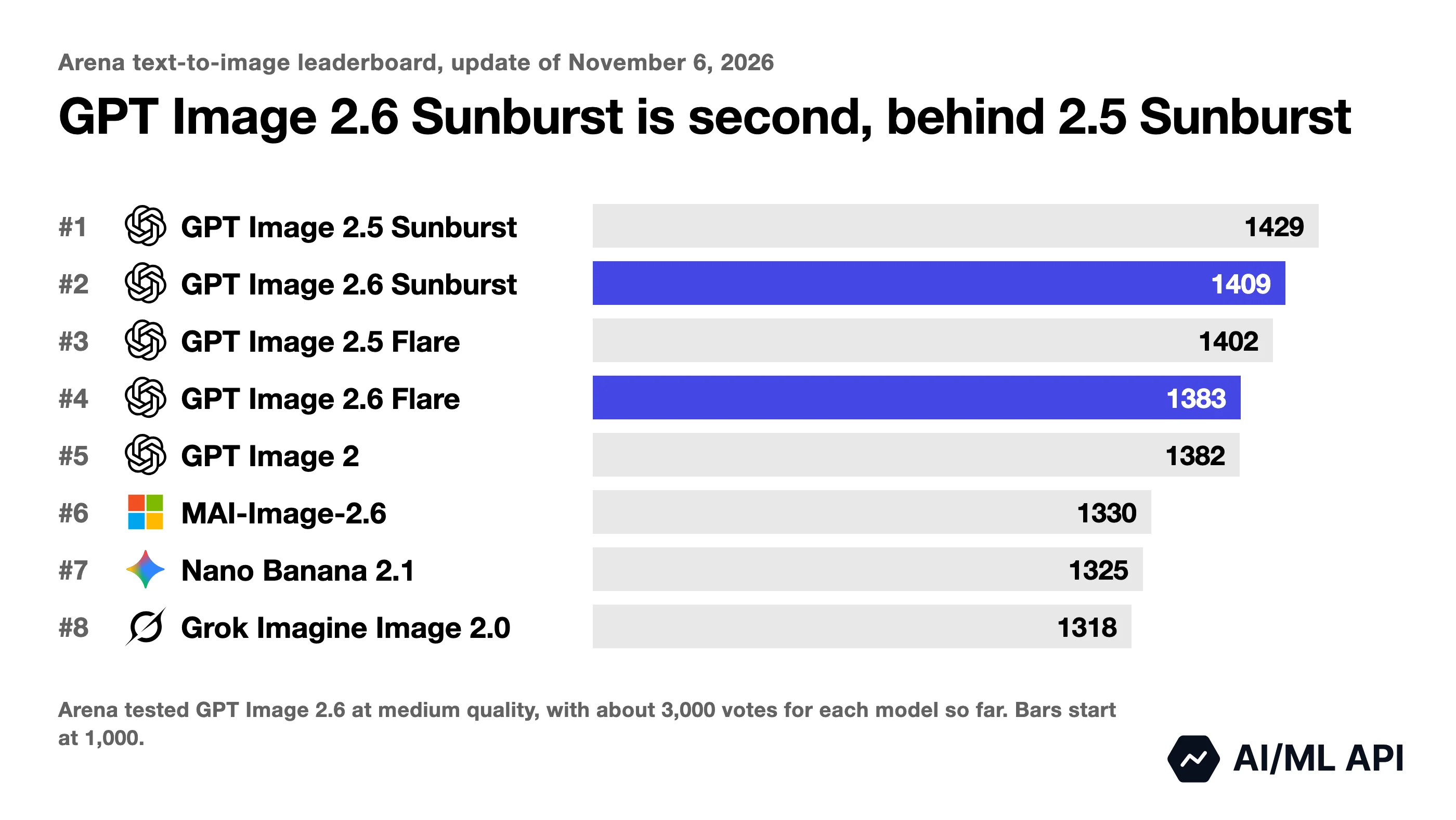
GPT Image 2.6 on the Arena leaderboard
Arena listed both 2.6 models before the release, in its November 2 update, tested at medium quality. The scores below are from its November 6 update. Artificial Analysis hasn't scored GPT Image 2.6 yet, and its text-to-image leaderboard still has GPT Image 2.5 Sunburst first.
Each 2.6 score is based on only 840 to 3,850 votes, and its margin of error, ±10 to ±23 points, is larger than the 9-point lead GPT Image 2.6 Sunburst has on the cartoon, anime and fantasy board.
GPT Image 2.6 vs Nano Banana 2.1
GPT Image 2.6 scores higher than Nano Banana 2.1 on every Arena board above, and it makes GIFs. Nano Banana 2.1 can search the web for recent information while it makes an image, if you turn on enable_web_search.
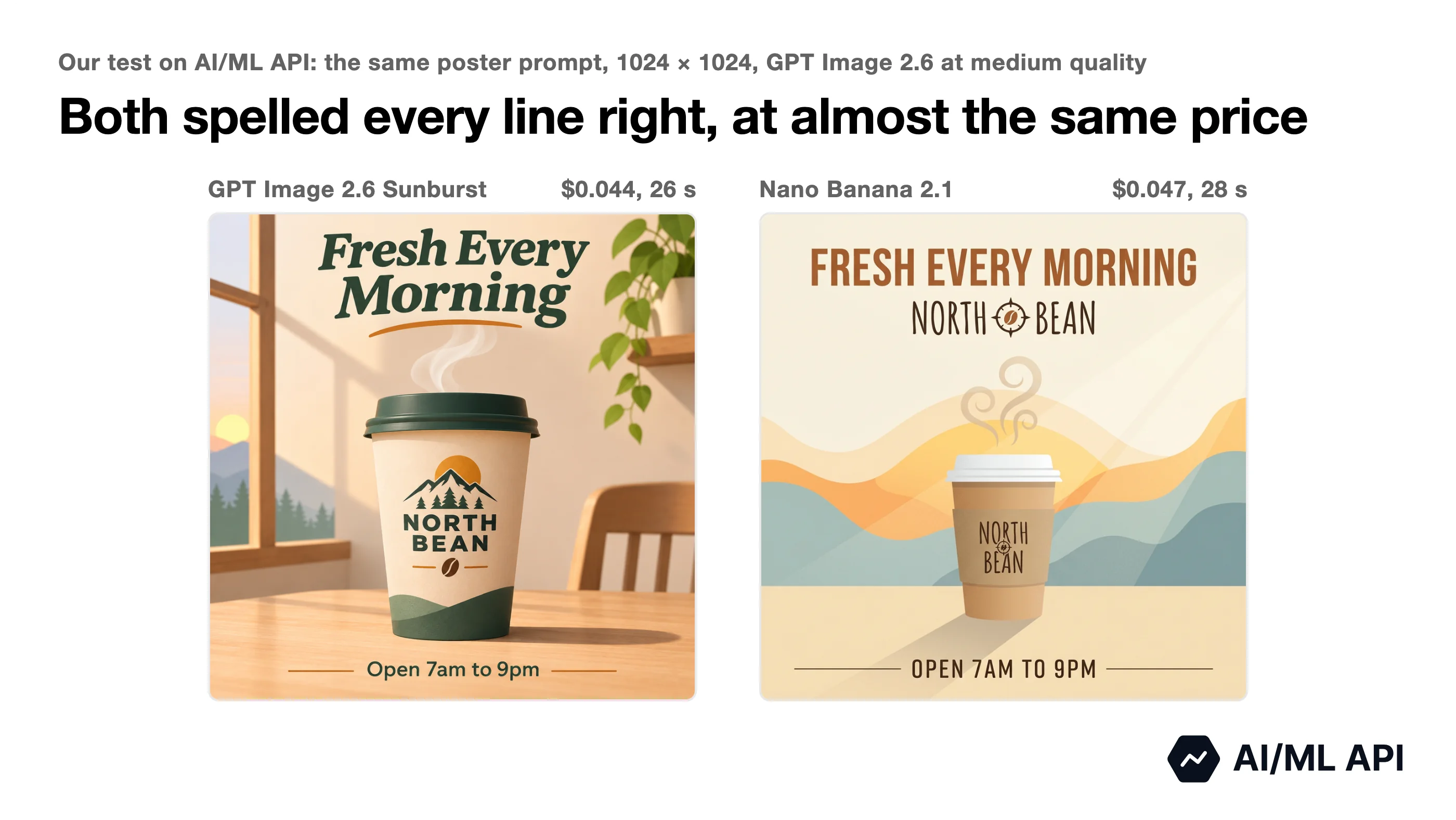
We gave Nano Banana 2.1 our poster prompt, and both models spelled all three lines right. GPT Image 2.6 Sunburst kept the headline as "Fresh Every Morning", like in the prompt, but drew a cafe scene with light and shadow instead of the flat colors we asked for. Nano Banana 2.1 kept the colors flat and set every line in capital letters.
At high quality, a GPT Image 2.6 image cost a little more than one from Nano Banana 2.1, and at low quality about half as much.
GPT Image 2.6 vs Gemini Omni 1.2 Flash
Gemini Omni 1.2 Flash is Google's video model, and it came to AI/ML API on November 5, the same day as GPT Image 2.6. We gave it our two fox prompts: the log jump from our Flare vs Sunburst test and a run where "the camera moves with the fox, so the fox stays in the center". It made both as 5-second 720p videos with sound, kept the camera still on the jump and moved it with the running fox.
Take GPT Image 2.6 for loops, stickers and sprites, and a video model for scenes with camera moves or sound.
What did our GPT Image 2.6 GIF test show?
GPT Image 2.6 returned a GIF for every request within its limits, from text and from an image.
Image to GIF
From an image, Sunburst kept our poster exactly as it was. The cup, the colors, the background and all three lines of text stayed the same in all 12 frames, and only the steam above the cup moved. The steam moved so little that the GIF looks almost still. This GIF took 29 seconds.
For a clip longer than 16 frames, send the last frame to the edits endpoint as the start of the next GIF, and say how big your subject is in every prompt, for example "about one quarter of the frame height". Without that, our fox got bigger at every join.
GPT Image 2.6 GIF prompts that worked
The loop works when the prompt describes the motion in order and says how it ends. With this prompt, Sunburst made a clean loop at medium and high quality:
For an image to GIF, name the one thing that moves and list what must stay. Our prompt for the poster GIF said "Only the steam above the cup moves" and "Keep the cup, the text, the colors and the framing exactly the same".
A still camera has to be in the prompt too. Sunburst kept its framing in every GIF that said "The camera does not move", and Flare in all of them except the fox jump.
How to use the GPT Image 2.6 API
You can try GPT Image 2.6 in the AI/ML API Playground or call it from your code.
Option 1: Test GPT Image 2.6 in the Playground
Open GPT Image 2.6 Flare or GPT Image 2.6 Sunburst in the AI/ML API Playground, sign in and type a prompt. For GIF settings like the number of frames, use the API example below.
Option 2: Call GPT Image 2.6 through the API
You need an AI/ML API key and Python 3.10 or later with the OpenAI SDK and httpx (pip install openai httpx). Create a key on the API keys page and save it in the AIMLAPI_KEY environment variable. This code makes the robot GIF from our test:
AI/ML API returns a link to the finished file, and the code downloads it with httpx. The link redirects to the file, so keep follow_redirects=True.
To animate an image you already have, send it to /v1/images/edits with the same GIF fields. Every parameter GPT Image 2.6 accepts is listed in our GPT Image 2.6 API docs.
Who should use GPT Image 2.6?
GPT Image 2.6 fits anyone who needs an AI GIF generator for short loops. OpenAI names brand mascots, reactions, memes and animated storyboards as uses for GIFs, and the example prompts in its announcement ask for a sprite sheet of a cartoon character. In our test, Flare made a 12-frame GIF in 12 to 18 seconds. For still images that need fresh facts from the web, pick Nano Banana 2.1, and for clips with camera moves or sound, a video model like Gemini Omni 1.2 Flash.
If you use GPT Image 1.5 or GPT Image 1 Mini, plan the move now. OpenAI shuts both down on December 1, 2026 and names the 2.6 models as their replacement. To try GPT Image 2.6, create an AI/ML API key and call openai/gpt-image-2.6-flare.
FAQ
Is GPT Image 2.6 free?
In ChatGPT, yes: Images 2.6 is on every ChatGPT plan, and our free account made a GIF in about 30 seconds. Through the API, you pay per token. On AI/ML API, the 24 GPT Image 2.6 requests in our test cost $1.69 together.
How do I make a GIF in ChatGPT Images 2.6?
Ask for a GIF in your prompt, for example "Create a GIF of a robot waving". In our test, ChatGPT returned 9 frames that play in about a second. To get more frames, write the number in the prompt: "exactly 24 frames" gave us 24 frames of about 250 × 250 pixels. Through the API, one request returns up to 16 frames, so a GIF with more frames takes several requests.
Can GPT Image 2.6 make videos?
No. It makes GIFs, not video files. For video, use a video model on AI/ML API: in our test, Gemini Omni 1.2 Flash made a 5-second clip with sound for $0.35, and Seedance 2.5 is another option.
Is GPT Image 2.6 better than Nano Banana 2.1?
On Arena, yes: GPT Image 2.6 scores higher on all five boards in our table, and of the two, only it makes GIFs. In our poster test, both spelled every line right, but Nano Banana 2.1 kept to the flat colors we asked for. Pick Nano Banana 2.1 and turn on its web search when an image needs fresh facts from the web.
When was GPT Image 2.6 released?
OpenAI released GPT Image 2.6 on November 4, 2026, and it came to AI/ML API on November 5. It arrived eight weeks after GPT Image 2.5 (September 8) and 28 weeks after GPT Image 2 (April 21).
How do I get a GPT Image 2.6 API key?
Sign up on AI/ML API and create a key on the API keys page. The same key works for GPT Image 2.6 and every other model in our catalog.
Key takeaways
- GPT Image 2.6, released by OpenAI on November 4, 2026, makes animated GIFs from text or from an image.
- On AI/ML API, a 1024 × 1024 image cost $0.025 at low quality and $0.053 at high in our test, and a 12-frame 512 × 512 GIF cost $0.055 at medium.
- At low quality, that's 4 times more than GPT Image 2.5, which cost $0.006; at high quality, the two cost the same.
- Flare made GIFs 2.2 to 3.2 times faster than Sunburst, but Sunburst followed the prompt more closely.
- On Arena, GPT Image 2.6 Sunburst ranks second, behind GPT Image 2.5 Sunburst.
- Call it through AI/ML API with the model ID
openai/gpt-image-2.6-flareoropenai/gpt-image-2.6-sunburst.