Happy Horse 1.1: Specs, Pricing, and API Guide
Quick Verdict
What Happy Horse 1.1 Is
Happy Horse 1.1 is an AI video model from Alibaba's ATH team (Taotian Group) that turns text prompts, still images, or reference photos into short video clips — complete with synchronized audio — in a single generation pass. The "1.1" tag marks it as the second major release in the Happy Horse family, refining the architecture that first made noise when an unnamed model briefly topped the Artificial Analysis Video Arena leaderboard in early 2026.
The thing that actually sets it apart from most competitors isn't the resolution or the motion quality, though both are solid. It's the audio architecture. Where tools like Kling or older Runway builds generate a silent clip first and add sound later, Happy Horse uses a unified 40-layer self-attention Transformer that processes video and audio tokens together. You get dialogue, ambient sound, music, and Foley effects built into the output clip from the start — not layered on in post.
That design decision flows through to one of its most practical features: phoneme-level lip-sync across seven languages — English, Mandarin, Cantonese, Japanese, Korean, German, and French. Write lines in your prompt, and the model generates mouth movements to match. For anyone producing content for multiple markets, that capability alone saves a meaningful amount of editing time.
For Whom It Works Best
- Social media creators who publish frequently and need audio-complete clips fast
- E-commerce teams turning product images into short video ads
- Short-drama and content studios experimenting with multi-shot narrative sequences
- Marketing teams producing multilingual campaign assets from a single workflow
- Developers and engineers who want an open-source video model to integrate or fine-tune
What Changed from 1.0 to 1.1
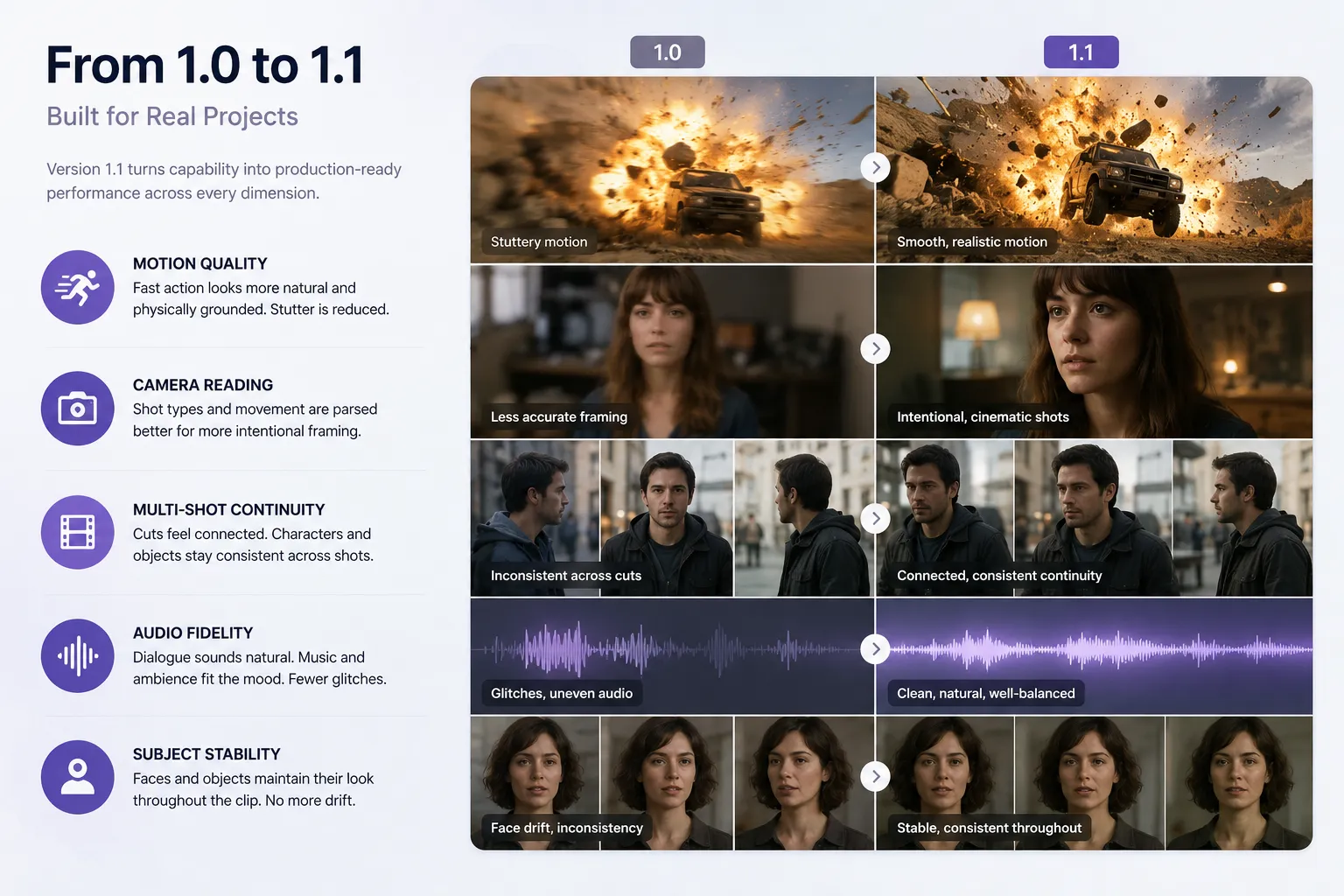
Version 1.0 proved the concept worked. Version 1.1 makes it useful for real projects. Here's what the upgrade actually addressed:
Motion quality. The biggest visible improvement. Fast action — explosions, particle effects, dynamic weather, rapid movement — looks more physically grounded in 1.1. The stuttery feel that sometimes appeared in version 1.0 is noticeably reduced.
Camera reading. The model parses shot directives better. Tracking shots, close-ups, and shot-reverse-shot sequences (the back-and-forth framing common in dialogue scenes) come out more cleanly and feel more intentional.
Multi-shot continuity. Cuts between shots feel more connected. Characters and objects hold their visual identity more consistently across a sequence, which is critical for any story-driven content.
Audio fidelity. Dialogue pacing sounds more natural. Background audio and music match the visual mood better. Lip-sync drift, a real problem in 1.0, is less common. Random audio glitches have been reduced.
Subject stability. Faces and objects hold their look across the duration of a clip more reliably. The morphing or drift that appeared in 1.0 on longer clips is largely resolved.
Core Specs at a Glance
Benchmarks and Evaluation
Happy Horse's reputation in the benchmark space started with a dramatic moment: in early 2026, an anonymous model appeared on the Artificial Analysis Video Arena — a blind, human-voted leaderboard — and ranked first in both text-to-video and image-to-video categories before anyone knew who made it. Alibaba later confirmed it was Happy Horse.
Artificial Analysis Video Arena Results
These rankings are based on blind pairwise comparisons by human evaluators, which makes them harder to game than automated metric benchmarks. The model outperformed closed competitors including Seedance 2.0, Ovi 1.1, and LTX 2.3 at the time of ranking.
What the Scores Mean in Practice
The Elo rankings reflect perceived quality across a broad range of prompts — motion coherence, subject fidelity, and audio-visual alignment all factor in. The scores don't guarantee that Happy Horse 1.1 wins on every individual task. Closed models with higher compute budgets may still outperform it on photorealistic portraits or complex physics simulations. But for the breadth of real-world short-video use cases, the leaderboard position is meaningful.
Technical Performance
The DMD-2 distillation approach is worth flagging separately. By reducing denoising from the typical 50+ steps down to just 8, the model reaches 1080p output in approximately 38 seconds on an H100 GPU — fast enough for iterative prompt testing without long wait times. At lower resolutions (256p), generation time drops to roughly 2 seconds for a 5-second clip.
Key Features

Text-to-Video
Type a scene description — subject, action, camera move, lighting, mood — and the model builds a clip. The more specific the prompt, the tighter the output. This is the fastest mode for concept testing and social content hooks.
Image-to-Video
Upload a still and Happy Horse animates it while preserving the subject. Good for product photography, character work, and any situation where you already have a visual identity you want to keep consistent.
Reference-to-Video
Feed in up to nine reference images to lock subject identity across shots. Each reference can be named (character1 through character9) so the model knows which face or object to track. This is the feature that makes multi-scene narrative work possible without losing character consistency between cuts.
Joint Audio-Video Synthesis
The defining feature of the architecture. Dialogue, ambient sound, music, and Foley effects are generated in the same pass as the visuals — not added in post. A clip arrives already mixed to the action. For creators who would otherwise spend time in an audio editor syncing sound to picture, this is a genuine time saver.
Multi-Language Lip-Sync
Write spoken lines in your prompt and select a lip-sync language. The model generates phoneme-level mouth movements to match the audio in any of the seven supported languages. Particularly useful for creating the same content asset in multiple market languages without re-shooting.
Multi-Shot Sequencing
Sequence multiple shots in a single generation by using timecode ranges in the prompt (e.g., 00-05 for the first segment, 05-10 for the next). Each segment can have its own action and framing directive. This is how Happy Horse approaches longer narrative arcs within the 15-second limit.
Pricing and Cost Examples
Happy Horse 1.1 runs on a credit-per-second model on supported platforms, which makes budgeting straightforward. You pay for exactly what you generate.
Standard Rate
Cost Examples
Platform Pricing Tiers
AI/ML API Pricing
Smart workflow tip: Draft at 720p to spend 25% fewer credits per second, then select your best clips for a final 1080p render. This simple habit can meaningfully reduce your per-project cost.
How to Run Happy Horse 1.1 via API
Happy Horse 1.1 is available through multiple API-enabled platforms. On aimlapi.com, access follows the standard endpoint pattern. Here's a minimal working setup.
Endpoint
POST
https://api.aimlapi.com/v2/generate/video/hailuo/generation
Authentication
Pass your API key in the request header:
Authorization: Bearer YOUR_AIMLAPI_KEYSample Request (cURL)
curl -X POST "https://api.aimlapi.com/v2/generate/video/hailuo/generation" \
  -H "Authorization: Bearer YOUR_AIMLAPI_KEY" \
  -H "Content-Type: application/json" \
  -d '{
    "model": "happy-horse-1-1",
    "prompt": "A woman in a red jacket walks through a rain-soaked Tokyo street at night, neon signs reflected on the pavement. Camera tracks slowly behind her. Ambient city sounds and light rain.",
    "resolution": "1080p",
    "aspect_ratio": "16:9",
    "duration": 5,
    "generate_audio": true
  }'
Sample Response
{
  "status": "processing",
  "generation_id": "gen_abc123xyz",
  "model": "happy-horse-1-1",
  "estimated_seconds": 38,
  "poll_url": "https://api.aimlapi.com/v2/generate/video/hailuo/generation/gen_abc123xyz"
}
Poll the poll_url until status returns "complete", then retrieve the video URL from the response payload.
SDK-Style Example (JavaScript)
const response = await fetch(
  "https://api.aimlapi.com/v2/generate/video/hailuo/generation",
  {
    method: "POST",
    headers: {
      "Authorization": `Bearer ${process.env.AIMLAPI_KEY}`,
      "Content-Type": "application/json",
    },
    body: JSON.stringify({
      model: "happy-horse-1-1",
      prompt: "Product reveal: a sleek white sneaker rotates on a clean surface with soft studio lighting. Sound: light ambient hum, no music.",
      resolution: "1080p",
      aspect_ratio: "1:1",
      duration: 5,
      generate_audio: true,
    }),
  }
);

const data = await response.json();
console.log("Generation ID:", data.generation_id);
Production Notes
- Poll at 5-second intervals rather than hammering the endpoint — 1080p generation takes ~38 seconds on H100 hardware.
- For batch workloads, queue jobs in groups of 5–10 rather than sending all requests simultaneously to avoid rate-limit responses.
- Store
generation_idvalues server-side so you can retrieve results asynchronously without keeping a connection open. - The
generate_audioflag defaults totrueon most platforms; set it explicitly if your use case doesn't need sound, since silent generation is marginally faster.
Refer to the aimlapi.com models documentation for current rate limits, updated endpoint schemas, and platform-specific model string names.
Use Cases
Where Happy Horse 1.1 Loses
Being honest about the downsides matters. Here's where the model doesn't lead.
Clip length is the ceiling. 15 seconds is the hard limit per generation. For anything longer, you're stitching clips, which introduces cut-editing work that doesn't exist with purpose-built long-form video tools.
No native 4K. The maximum output is 1080p. Seedance 2.0 and some Kling configurations push to 2K. For broadcast, cinema, or large-format display work, that gap is real.
Prompt sensitivity is high. Results vary significantly based on how precisely you write the prompt. Vague, short descriptions often produce generic or drifting clips. The model rewards specific shot descriptions, camera directives, lighting notes, and audio cues — which means there's a learning curve for new users.
Still maturing in production. As a relatively recent release, Happy Horse 1.1 has fewer third-party integrations, fewer published workflow guides, and less community troubleshooting than older tools like Runway or Kling. Early adopters will encounter more rough edges.
Not ideal for hyper-realistic portraits. For close-up, photorealistic human faces under scrutiny, the kind of detail a casting headshot requires, closed models with higher-resolution pipelines may still outperform it.
Comparison with Alternatives
Happy Horse 1.1 vs Seedance 2.0: Happy Horse generates audio jointly with video; Seedance does not do this natively. Seedance leads on maximum resolution and overall visual polish, but faced copyright complications that slowed its rollout in early 2026. For teams that need a reliable, open pipeline for short audio-enabled clips, Happy Horse 1.1 is the more predictable choice right now.
Happy Horse 1.1 vs Kling: Motion realism is competitive. Happy Horse wins on built-in audio and multilingual lip-sync. Kling has a longer track record and more community resources. If audio isn't a requirement, Kling is a reasonable alternative — but if it is, Happy Horse is the cleaner path.
Happy Horse 1.1 vs Google Veo 3: Veo 3 also generates audio with video and has strong realism. But it's closed, tied to Google's ecosystem and pricing, and not self-hostable. Happy Horse 1.1 wins on open-source flexibility and per-second pricing transparency. Veo 3 wins on raw visual fidelity.
FAQ
Is Happy Horse 1.1 free to use?Most platforms offer free credits for new users to test the model. After that, you buy credits and pay per second of video generated. There's no monthly subscription lock-in on the main platforms — you pay for what you make.
What's the actual difference between Happy Horse 1.0 and 1.1?Version 1.1 specifically improves motion on fast action, camera direction following, multi-shot continuity, audio quality, and subject stability across a clip. The core model architecture is the same 15B-parameter Transformer — 1.1 is a targeted refinement, not a rebuild.
Can I self-host Happy Horse 1.1? Yes. The base model, distilled model, super-resolution module, and inference code are all publicly available under an open-source license with commercial use rights. Self-hosting requires GPU infrastructure — H100 or equivalent for production-speed 1080p generation.
What languages does the lip-sync support? Seven: English, Mandarin, Cantonese, Japanese, Korean, German, and French. Lip-sync operates at the phoneme level, meaning mouth shapes match the spoken sounds of the target language rather than just approximating mouth-open/mouth-closed motion.
Can I use Happy Horse 1.1 output commercially? Yes, commercial use is cleared. If you're accessing through a platform like Artlist or aimlapi.com, verify that your specific plan tier covers commercial distribution, as platform-level licensing terms may apply additional conditions.