Mistral OCR 3 vs Mistral OCR 4: Features, API & Use Cases
Document processing has always been one of those problems that looks simpler than it is. Pull text from a PDF, extract a table, read a scanned invoice — easy enough in principle, deeply annoying in practice. Traditional OCR engines get you partway there, and then you spend the rest of your afternoon patching the gaps.
Mistral's OCR models take a different approach. Rather than treating a page as a grid of pixels to transcribe, they understand the structure of documents — what's a header, what's a table cell, what's a footer to be ignored. The result is clean, structured, machine-ready output that slots directly into modern AI pipelines.
- Quick verdict: Mistral OCR 4 is the stronger choice for complex, structured, or multilingual documents and for anything going into a RAG pipeline. Mistral OCR 3 is faster and more cost-efficient for simpler extraction tasks where bounding boxes and block classification aren't required.
What Is Mistral OCR?
Mistral OCR is a family of AI-native document understanding models built by Mistral AI. They go well beyond character recognition.
Classic OCR engines were built to solve one problem: read the characters on a page. They do that reasonably well for clean printed text, but they fall apart the moment you hand them a scanned invoice with rotated stamps, a multi-column legal brief, or a financial table with merged cells. The output is usually a flat wall of text that you then have to parse again yourself.
Mistral's models treat a document the way a person would read it: as something organized with intent. A heading means something different than body text. A table cell relates to the header above it. A signature at the bottom of a page is not the same as a paragraph. By capturing these relationships, Mistral OCR produces output that's immediately useful downstream, whether you're feeding it into a retrieval pipeline, populating a database, or triggering an automated workflow.
How It Differs from Traditional OCR
The practical difference shows up fast. Where Tesseract returns a string, Mistral OCR returns a structured representation: typed blocks, bounding boxes, confidence scores, and markdown-formatted text. For developers building on top of the output, especially in RAG or agentic workflows, that extra metadata is the difference between hours of post-processing and a pipeline that just works.
Both OCR 3 and OCR 4 are multimodal models. They accept PDFs, scanned images, photographed pages, and common office formats. Output comes back as structured text, JSON, or markdown depending on how you've configured the request.
Mistral OCR 3: Solid Foundation for Document Extraction
Released as Mistral's first production-grade AI OCR model, OCR 3 brought genuine document understanding to an API for the first time and it's still highly capable for a wide range of tasks.
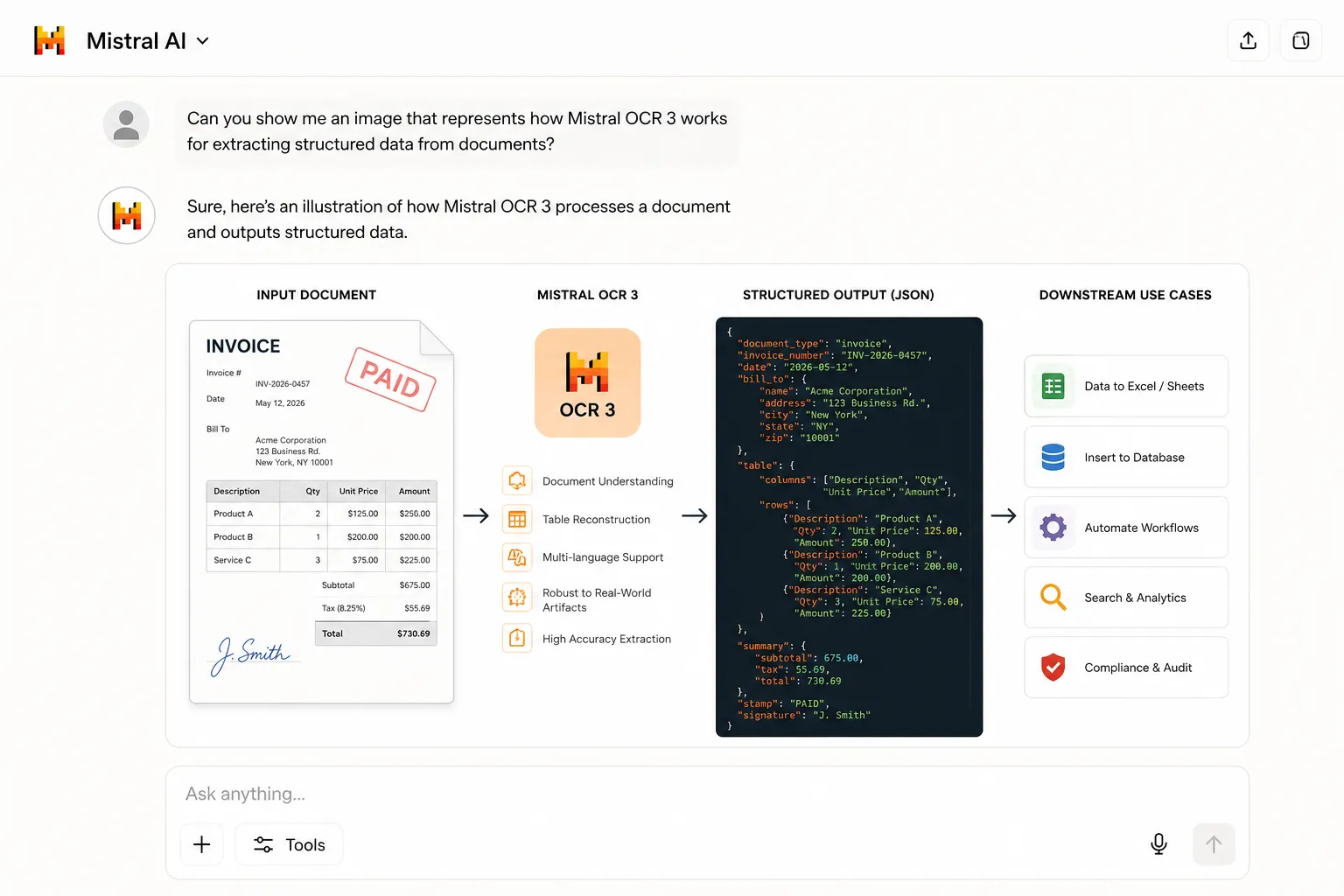
OCR 3 was designed with a clear brief: reliably extract text and structure from real-world documents, including all the messy stuff that traditional OCR chokes on. Handwritten notes on a typed form, a rotated stamp across a contract page, a scanned copy of a scanned copy, OCR 3 handles these without requiring manual preprocessing.
What OCR 3 Does Well
Table extraction is one of its standout capabilities. Instead of flattening rows and columns into a string of space-separated words, it reconstructs the relational structure of a table — headers, cells, and nested sections stay intact. This matters enormously for financial reports, scientific papers, and government forms where the table's geometry carries as much information as the numbers inside it.
It also performs well across multiple languages, which makes it practical for global organizations processing documents from different regional offices without needing a separate model per locale.
Supported Formats and Output
OCR 3 accepts PDFs, scanned images, and photographed documents. Output is returned as structured text or JSON, depending on how you've configured the request. The JSON output includes the extracted content organized by logical sections, ready to be consumed by downstream processes.
Where OCR 3 Makes Sense
If your pipeline involves relatively clean documents, standard layouts, and high-volume throughput where cost matters, OCR 3 is still a solid pick. At $2.60 per 1,000 pages for standard OCR (via AI/ML API), it's meaningfully cheaper than OCR 4, and for use cases that don't require bounding boxes, block classification, or the latest multilingual gains, that cost difference adds up quickly at scale.
Mistral OCR 4: Structured Document Intelligence
Released on June 23, 2026, Mistral OCR 4 is a significant step forward — not just in accuracy, but in what the model actually gives you back.
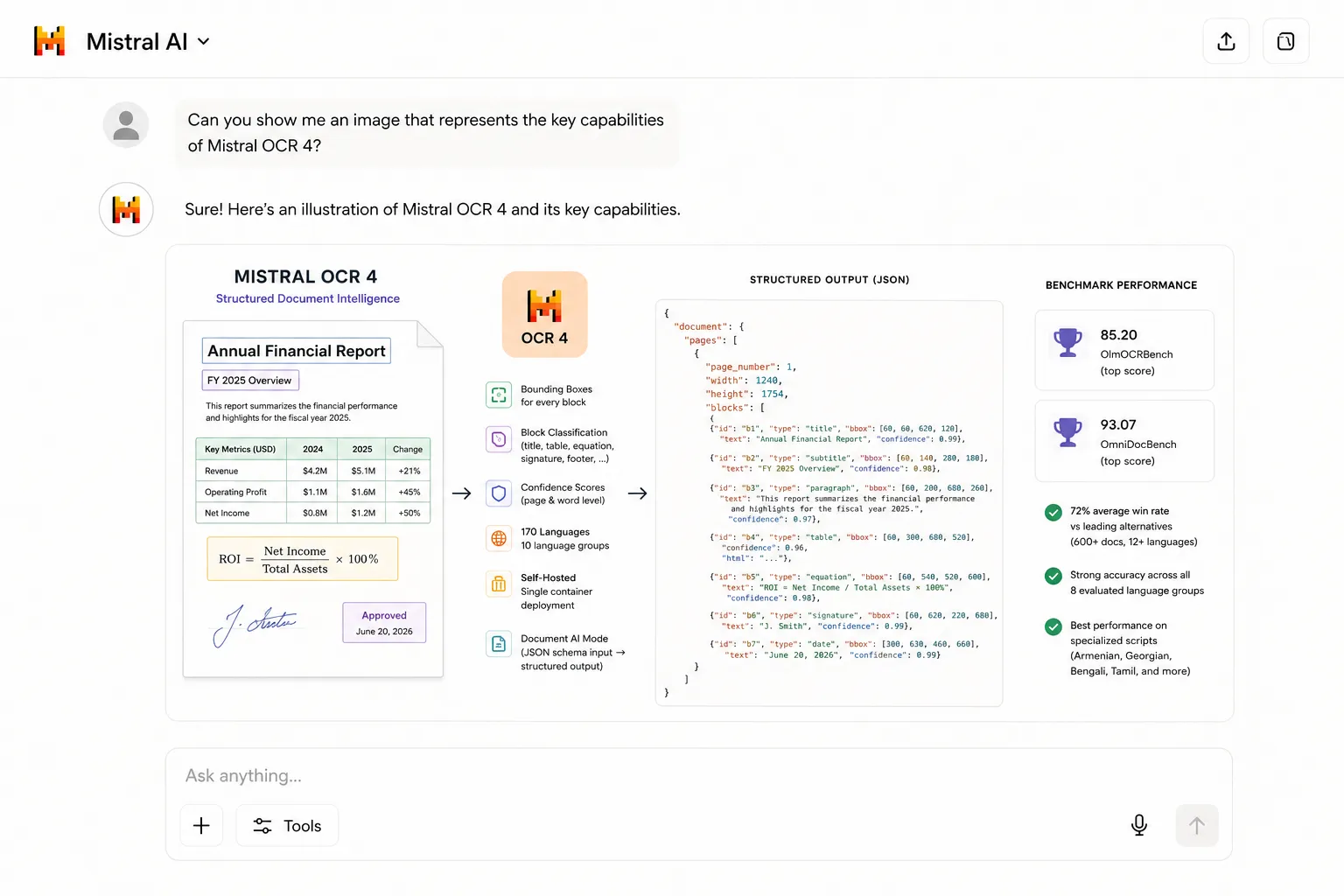
The core shift with OCR 4 is that it returns a structural representation of a document, not just its text. Every extracted block comes with a bounding box (localizing exactly where on the page it lives), a block type (title, table, equation, signature, footer, and more), and an inline confidence score at both the page and word level. That's a qualitatively different kind of output, one that unlocks workflows that weren't practical before.
Bounding Boxes and Block Classification
These were the most-requested features from OCR 3 users, and OCR 4 delivers both. Bounding boxes let downstream systems highlight source regions in context, critical for citation-grounded answers, redaction pipelines, and human-in-the-loop review. Block type labels mean your pipeline can treat a table differently from a paragraph without any post-processing logic on your end.
Expanded Language Coverage
OCR 4 extends coverage to 170 languages across 10 language groups, including specialized and low-resource languages where competing systems tend to degrade significantly. Internal benchmarks show OCR 4 maintaining strong accuracy across all eight evaluated language groups — with the widest gap over competitors appearing in specialized scripts like Armenian, Georgian, Bengali, and Tamil.
Benchmark Performance
Independent annotators preferred OCR 4 output over every leading alternative across 600+ documents in 12+ languages, with an average win rate of 72%. On the public OlmOCRBench, it achieves a score of 85.20 — the top result among models tested — and 93.07 on OmniDocBench. Mistral is candid that some of these automated benchmark scores carry known artifacts (particularly around math notation and multi-column reading order), and recommends evaluating on your own documents.
Self-Hosted Deployment
OCR 4 is compact enough to run in a single container, which means organizations with strict data residency or sovereignty requirements can deploy it within their own infrastructure. This is available to enterprise customers and is a meaningful differentiator from cloud-only alternatives.
Document AI Mode
On top of raw OCR, OCR 4 supports a Document AI mode that lets you pass a JSON schema alongside your document. The extracted content is then reshaped by mistral-small-2603 into a structured output matching your spec, effectively turning any document into a filled-in data model. This is the same underlying OCR endpoint with additional parameters, not a separate model.
Mistral OCR 3 vs Mistral OCR 4: Key Differences
Here's how the two models stack up across the dimensions that matter most when choosing between them.
Key Features of the Mistral OCR Models
Both models share a core set of capabilities that set them apart from traditional OCR and OCR 4 extends several of them meaningfully.
Use Cases for Mistral OCR API
Mistral's OCR models are built for production workloads, not demos. Here's where they're seeing real adoption across industries.
Finance
Invoice & Statement Processing
Extract line items, totals, vendor fields, and payment terms from invoices and bank statements with structural precision. OCR 4's confidence scores make it easy to flag items for review.
Legal
Contract Digitization & Clause Extraction
Parse contracts, regulatory filings, and case documents while preserving formatting hierarchies. Block classification keeps clause references accurate and auditable.
Healthcare
Medical Forms & Records
Convert handwritten clinical notes, intake forms, and scanned records into structured data. Self-hosted deployment keeps sensitive patient information inside your own infrastructure.
Enterprise Automation
Document Workflows & Archive Digitization
Turn paper-based processes into automated data pipelines. Whether you're modernizing a records department or routing inbound documents, OCR 3 handles volume; OCR 4 handles complexity.
AI & RAG
Knowledge Bases & Retrieval Pipelines
OCR 4's classified, citation-ready blocks slot directly into semantic chunking workflows. Integrated with Mistral's Search Toolkit, it becomes a first-class ingestion layer for enterprise search.
E-Commerce & Logistics
Product Data & Shipping Documents
Extract product specifications from manufacturer PDFs, parse customs documentation, and digitize packing lists without manual re-keying.
Research & Academia
Scientific Paper Digitization
Preserve equations, citations, figures, and section structures when converting scanned research materials. OCR 4 handles complex multi-column academic layouts that trip up simpler tools.
Government & Public Sector
Records Modernization
Process citizen-facing forms, archive historical documents, and build searchable knowledge repositories — with multilingual support for regions serving diverse populations.
How to Use the Mistral OCR API via AI/ML API
Both models are accessible through AI/ML API with a single endpoint and standard REST calls — no separate accounts or complex setup required.
AI/ML API gives you unified access to Mistral OCR 3, Mistral OCR 4, and 500+ other models under one API key. This means you can experiment with both OCR models in the same pipeline and switch between them with a single parameter change.
OCR 3 — Basic Extraction Request
The simplest use case: send a document URL or base64-encoded file and receive structured text back.
// Node.js · Mistral OCR 3 via AI/ML API
const response = await fetch("https://api.aimlapi.com/v1/ocr", {
  method: "POST",
  headers: {
    "Authorization": "Bearer YOUR_AIMLAPI_KEY",
    "Content-Type": "application/json"
  },
  body: JSON.stringify({
    model: "mistral-ocr-3",
    document: {
      type: "url",
      url: "https://your-domain.com/document.pdf"
    }
  })
});

const data = await response.json();
console.log(data.pages[0].markdown);   // structured markdown per page
OCR 4 — Extraction with Bounding Boxes and Block Types
OCR 4 returns additional metadata by default — no extra parameters needed for bounding boxes and classification.
// Node.js · Mistral OCR 4 via AI/ML API
const response = await fetch("https://api.aimlapi.com/v1/ocr", {
  method: "POST",
  headers: {
    "Authorization": "Bearer YOUR_AIMLAPI_KEY",
    "Content-Type": "application/json"
  },
  body: JSON.stringify({
    model: "mistral-ocr-4",
    document: {
      type: "url",
      url: "https://your-domain.com/invoice.pdf"
    }
  })
});

const data = await response.json();

// Each block includes: text, bbox, block_type, confidence
data.pages[0].blocks.forEach(block => {
  console.log(block.block_type, block.confidence, block.text);
});
OCR 4 — Document AI with JSON Schema
For structured output shaped to your own data model, pass a json_schema alongside the document. The model extracts the document and then maps the content to your schema automatically.
// Structured invoice extraction · OCR 4 Document AI
body: JSON.stringify({
  model: "mistral-ocr-4",
  document: {
    type: "url",
    url: "https://your-domain.com/invoice.pdf"
  },
  json_schema: {
    type: "object",
    properties: {
      vendor:      { type: "string" },
      invoice_no:  { type: "string" },
      total_amount:{ type: "number" },
      line_items: {
        type: "array",
        items: {
          properties: {
            description: { type: "string" },
            quantity:    { type: "number" },
            unit_price:  { type: "number" }
          }
        }
      }
    }
  }
})
Why Use AI/ML API for Mistral OCR?
AI/ML API handles the infrastructure layer — authentication, rate limiting, multi-model routing — so you don't have to manage separate credentials for each model provider. It's particularly useful when you want to run Mistral OCR alongside other models (GPT-5, Claude, Gemini) within the same application without juggling multiple API keys and billing accounts.
Mistral OCR vs Other OCR APIs in 2026
There are several strong options in the AI OCR space. Here's how Mistral's models compare on the dimensions that typically decide which one wins in a real project.
Mistral OCR 4 vs Google Vision API
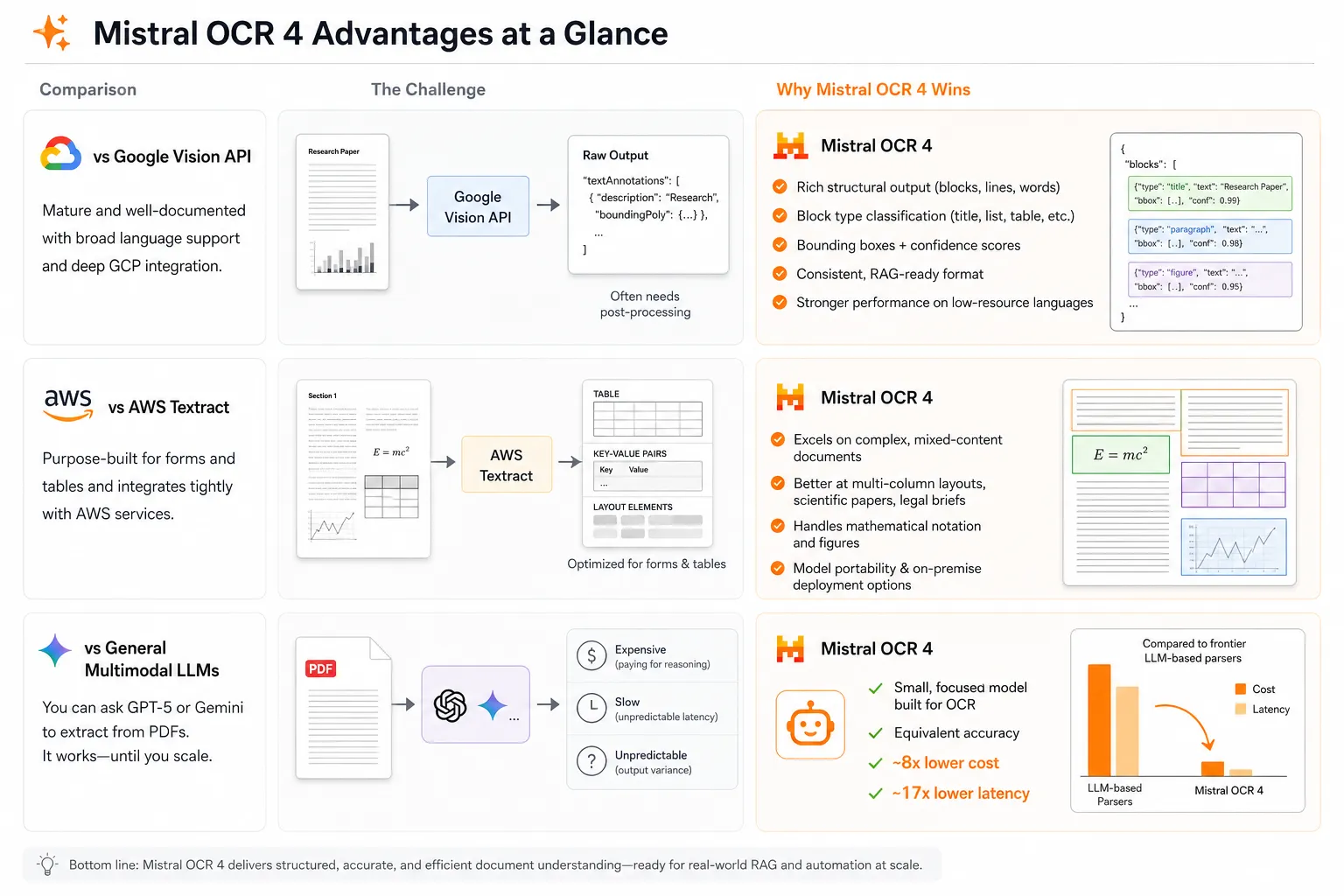
Google Vision is a mature, well-documented service with broad language support and deep GCP integration. It's a natural choice if you're already inside Google's ecosystem. Mistral OCR 4's advantage is in structural depth: bounding boxes, block type classification, and confidence scores are all returned in a consistent format that RAG pipelines can consume without additional parsing. Google Vision's output often requires a layer of post-processing to achieve the same result. For multilingual coverage, OCR 4's performance on low-resource languages is meaningfully stronger.
Mistral OCR 4 vs AWS Textract
Textract is purpose-built for forms and tables and integrates tightly with AWS services. For teams deeply embedded in AWS, it's often the path of least resistance. Mistral OCR 4's differentiation comes through on complex, mixed-content documents — scientific papers, multi-column legal briefs, documents with mathematical notation — and in deployments where you want model portability or on-premise options that AWS can't easily provide.
Mistral OCR vs General Multimodal LLMs
You could point GPT-5 or Gemini at a PDF and ask it to extract information. For small volumes, that works surprisingly well. At scale, it becomes expensive, slow, and unpredictable — you're paying for reasoning capability you don't need for document extraction. Mistral OCR is a small, focused model built specifically for this task. An AI engineer at Rogo put it concisely in Mistral's own testing data: equivalent accuracy at roughly 8x lower cost and 17x lower latency compared to frontier LLM-based document parsers.
Which Mistral OCR Model Should You Choose?
The answer comes down to what you're building and how your documents behave. Here's the clearest way to think about it.
Best for → Speed & Cost Efficiency
Mistral OCR 3
- High-volume pipelines where cost per page matters
- Standard document layouts (invoices, forms, simple PDFs)
- When you don't need bounding boxes or block labels
- Teams already comfortable post-processing structured text
- Budget-sensitive projects and early-stage exploration
Best for → Complex Docs & Enterprise
Mistral OCR 4
- RAG, semantic chunking, and enterprise search ingestion
- Agentic workflows that act on document structure
- Complex layouts: multi-column, scientific, legal, financial
- Multilingual corpora including low-resource languages
- Compliance-sensitive environments requiring self-hosting
- Pipelines that need confidence-based human review
- Source-grounded citations and redaction workflows
If you're unsure, a practical approach is to start with OCR 3 on a sample of your actual documents, note where the output requires the most post-processing, and run the same sample through OCR 4. The delta in output quality will make the pricing decision straightforward.
Both models are available immediately via AI/ML API — you can test either with the same API key and switch between them in a single line of code.
Frequently Asked Questions
What is Mistral OCR 4 used for?
Mistral OCR 4 is designed for AI-native document processing workflows — extracting structured text and metadata from PDFs, scanned documents, forms, and images. Its primary use cases include RAG pipeline ingestion, invoice processing, legal document digitization, enterprise search, and agentic workflows where documents need to become machine-readable data.
Can Mistral OCR extract tables from PDFs?
Yes, both models handle table extraction well. Rather than flattening table content into a sequence of words, they reconstruct the relational structure — headers, rows, and cells remain organized and can be consumed directly by a database, spreadsheet, or downstream AI model. OCR 4 additionally classifies blocks as "table" type, making it straightforward to filter tables programmatically from the response.
What's the difference between OCR 3 and OCR 4?
OCR 4 introduces three major capabilities OCR 3 doesn't have: bounding boxes (localizing text on the page), block type classification (labeling blocks as titles, tables, equations, signatures, etc.), and inline confidence scores. It also expands language coverage to 170 languages, adds support for more input formats (DOC, PPT, OpenDocument), enables Document AI mode with custom JSON schemas, and offers self-hosted deployment. The trade-off is price — roughly double OCR 3's rate, though the gap narrows significantly with batch processing.
Which version should I choose: OCR 3 or OCR 4?
Choose OCR 3 if you need high-volume, cost-efficient extraction from relatively standard documents and don't need bounding boxes, block labels, or custom schema output. Choose OCR 4 if you're building RAG pipelines, working with complex or multilingual documents, need source-grounded citations, require confidence-based human review, or are in a regulated industry where self-hosting is a requirement.
Can I use Mistral OCR 4 in a RAG pipeline?
Yes, and it's one of OCR 4's explicit design targets. The classified, typed blocks it returns make natural semantic chunking units — a "table" block and a "title" block are better retrieval boundaries than arbitrary token windows. OCR 4 is also integrated as an ingestion layer in Mistral's open-source Search Toolkit, which handles retrieval and evaluation for RAG and enterprise search pipelines.