
How to Run Kimi K3.1 Pro via API: Pricing and Benchmarks
Kimi K3.1 Pro is Moonshot AI's new reasoning model for coding agents and document work. You can use Kimi K3.1 through AI/ML API with the model ID moonshot/kimi-k3-1-pro. It costs $2 per million input tokens and $10 per million output tokens.
What is Kimi K3.1 Pro?
Kimi K3.1 Pro is a post-trained version of Kimi K3, released on October 23, 2026. Moonshot calls it a 3T-class model and targets work that takes many steps, such as changing a codebase or answering questions across financial documents. Pro is the first model in the K3.1 series. Moonshot's release post
| Specification | Kimi K3.1 Pro on AI/ML API |
|---|---|
| Model ID | moonshot/kimi-k3-1-pro |
| Developer | Moonshot AI |
| Base model | Kimi K3 |
| Context window | 1,048,576 tokens shared by the request and completion |
| Input | Text and images |
| Output | Text |
| Reasoning | Always on; low, high or max effort |
| Default reasoning effort | max |
| Tool calling | Supported |
| Streaming | Supported |
| Release date | October 23, 2026 |
The context limit includes the conversation and the model's generated tokens. A large input leaves less room for reasoning and the answer. Set an output budget that fits the remaining window; a 1M-token context does not give you a separate 1M-token completion. AI/ML API model catalog
For the previous release, see our Kimi K3 model page. K3.1 Pro uses its own API model ID, so an existing K3 integration needs an explicit model change.
Kimi K3.1 Pro benchmarks
Moonshot's launch comparison puts K3.1 Pro against Claude Opus 5.5, GPT-6 Astra and DeepSeek V4.1 Flash 1017. Higher is better in each row. Launch benchmark chart and methodology
| Evaluation | Kimi K3.1 Pro | Claude Opus 5.5 | GPT-6 Astra | DeepSeek V4.1 Flash 1017 |
|---|---|---|---|---|
| Terminal-Bench 4.0, terminal tasks | 65.7 | 66.4 | 58.2 | 42.3 |
| SWE-Marathon v1.1, long coding tasks | 51.7 | 46.3 | 42.5 | 40.0 |
| Agents' Last Exam v1.1, professional tool tasks | 43.2 | 42.6 | 32.8 | 37.7 |
| OfficeQA Pro v2, financial PDF questions | 64.4 | 62.2 | 54.4 | 40.4 |
| BenchCAD with tools, 3D reconstruction Voxel IoU | 92.7 | 96.2 | 95.9 | 81.6 |
K3.1 Pro leads SWE-Marathon in Moonshot's comparison. Claude Opus 5.5 scores higher on Terminal-Bench. BenchCAD measures how closely a reconstructed 3D shape matches its reference.
Moonshot's direct predecessor comparison also shows progress on its internal Kimi Code Bench 3.0 Long-horizon: K3.1 Pro scores 61.2 against K3's 55.95. K3.1 Pro release results
Moonshot combines its own evaluations with vendor and leaderboard scores. The agent software differs between some models: Agents' Last Exam uses Kimi Code for Kimi and Claude Code for DeepSeek; OfficeQA uses Codex for GPT-6 Astra and Claude Code for the others. Moonshot evaluated open models on a 1,000-case subset for BenchCAD. Small gaps can reflect the setup. We have not measured K3.1 Pro latency through AI/ML API.
How does it compare on factual accuracy?
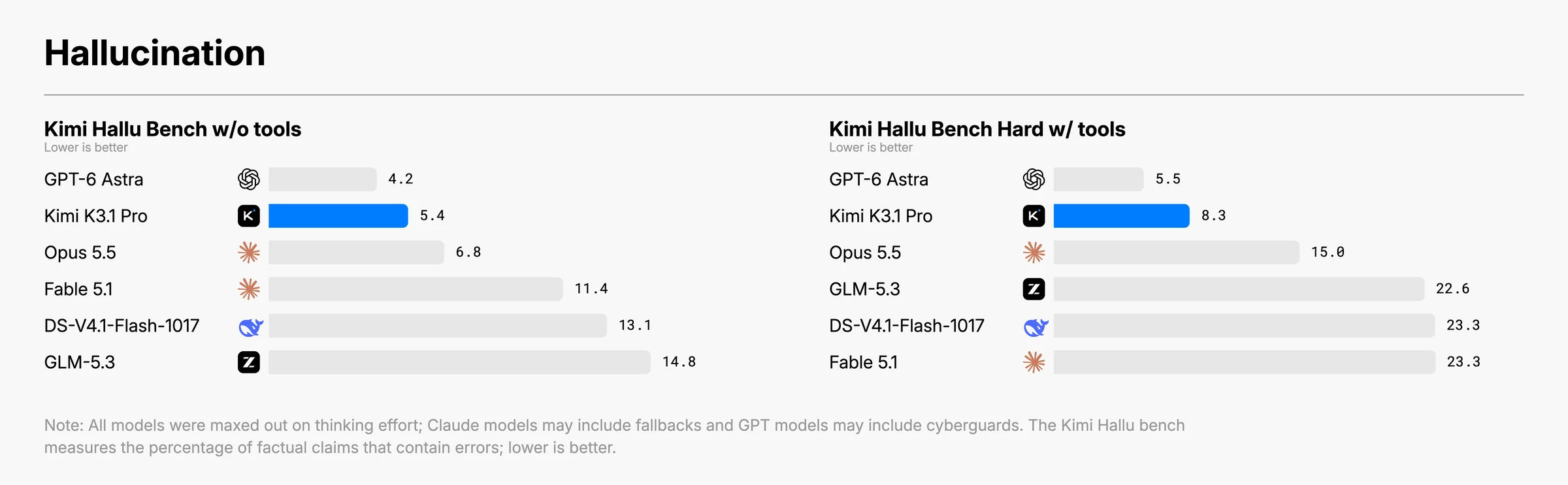
Moonshot also reports claim-level factual error rates on its internal Kimi Hallu Bench. Lower is better. The regular and Hard columns use different test sets, so they are not a before-and-after test of adding tools. Moonshot's factual accuracy results
| Model | Kimi Hallu Bench, no tools | Kimi Hallu Bench Hard, with tools |
|---|---|---|
| Kimi K3.1 Pro | 5.4% | 8.3% |
| GPT-6 Astra | 4.2% | 5.5% |
| Claude Opus 5.5 | 6.8% | 15.0% |
| DeepSeek V4.1 Flash 1017 | 13.1% | 23.3% |
GPT-6 Astra has the lower error rate on both sets. These stress tests target prompts that are prone to factual mistakes; they do not give the percentage of everyday answers that will be wrong. For document analysis, ask for the supporting passage and check calculations against the source.
Kimi K3.1 Pro pricing
On AI/ML API, Kimi K3.1 Pro costs $2 per million input tokens and $10 per million output tokens. Cached input costs $0.20 per million. Reasoning tokens have the same $10 output rate. AI/ML API pricing catalog
These are AI/ML API's published text-token rates in USD per million tokens, checked on October 23, 2026. Some models also list separate per-use charges, so the table alone does not give the full cost of a tool-assisted task.
| Model | Input | Output | Cached input |
|---|---|---|---|
| Kimi K3.1 Pro | $2 | $10 | $0.20 |
| Claude Opus 5.5 | $4 | $20 | $0.20 |
| GPT-6 Astra | $10 | $50 | $1 |
| DeepSeek V4.1 Flash | $0.30 | $1.20 | $0.006 |
| Kimi K3 | $3 | $15 | $0.30 |
The DeepSeek price applies to the current deepseek/deepseek-v4.1-flash route. The benchmark table names the dated 1017 build. Current model rates
For example, a K3.1 Pro request with 10,000 uncached input tokens and 2,000 total output tokens costs $0.04. That output total includes reasoning and the final answer.
The max_completion_tokens limit covers reasoning and the final answer, so an 8,192-token budget can produce a much shorter visible answer. Compare total completion usage when testing effort levels. Kimi API guide
Run the same task through each candidate model and record its total token usage. Divide the total cost by the number of accepted results. A lower price per token can still cost more per finished task if a model reasons longer or needs another attempt.
How to use Kimi K3.1 Pro through AI/ML API
You need an AI/ML API key and the OpenAI Python library. The model runs on hosted infrastructure, so there are no weights to download. Create a key on the API keys page and store it in the AIMLAPI_KEY environment variable.
Install the library and set the key on macOS or Linux:
pip install openai
export AIMLAPI_KEY="your-api-key"
Point the client at AI/ML API and use the exact model ID:
import os
from openai import OpenAI

client = OpenAI(
    base_url="https://api.aimlapi.com/v1",
    api_key=os.environ["AIMLAPI_KEY"],
)

response = client.chat.completions.create(
    model="moonshot/kimi-k3-1-pro",
    reasoning_effort="low",
    max_completion_tokens=8192,
    messages=[
        {
            "role": "user",
            "content": (
                "Write a Python function that merges overlapping time intervals. "
                "Include tests for touching intervals and an empty input."
            ),
        }
    ],
)

print(response.choices[0].message.content)
print(response.usage)
The example sets low effort for an initial integration check. Leave out reasoning_effort to use the default max, or compare high on tasks that fail at low. K3.1 Pro always reasons; none and medium are not supported values for this route. See the model-specific request schema before carrying over settings from another model.
With stream=True, iterate over response chunks instead of using the two print lines above.
Your application must execute each requested function and return its result. Preserve the complete assistant message between steps, including reasoning_content when returned. Kimi's tool-calling guidance
To try a prompt without writing code, open Kimi K3.1 Pro in the Playground.
Should you use Kimi K3.1 Pro?
Test K3.1 Pro on a code change that requires several patches, using the same agent and checks as your current model.
For financial PDF questions, supply the source documents and require page references. The benchmark used PDFs rendered as images, so a pipeline that extracts text first uses a different setup.
Compare Claude Opus 5.5 if terminal work or CAD reconstruction drives your choice. Include GPT-6 Astra when factual errors would make an answer unusable. Both have higher input and output token rates on AI/ML API.
If your short calls need a non-thinking mode, K3.1 Pro cannot provide it.
For a first evaluation, create an AI/ML API key and call moonshot/kimi-k3-1-pro with your existing OpenAI client.
Frequently asked questions
Is Kimi K3.1 the same as Kimi K3.1 Pro?
Kimi K3.1 is the series name. Pro is its first released model, launched on October 23, 2026. Use moonshot/kimi-k3-1-pro to select it on AI/ML API.
Can I turn off thinking in Kimi K3.1 Pro?
No. K3.1 Pro reasons on every request. On AI/ML API, choose low, high or max with reasoning_effort; the default is max.
Does it have a 1M-token output limit?
AI/ML API lists up to 1,048,576 completion tokens, within the same 1,048,576-token context window. The input and conversation use part of that space. Reasoning also counts toward the completion budget.
Does a Kimi subscription include AI/ML API access?
Use an AI/ML API account and its API key for the endpoint in this guide. A Kimi chat subscription belongs to Moonshot's service. It does not provide an AI/ML API key.
Can I run Kimi K3.1 Pro locally?
Moonshot has announced the full weights for release by November 4, 2026. Check the released repository and its license before planning a self-hosted deployment. Weight-release announcement
Is Kimi K3.1 Pro Highspeed the same API model?
Moonshot lists Highspeed as a separate model. This guide and the AI/ML API model ID above cover regular K3.1 Pro. Highspeed's advertised performance does not describe this route.