
Local LLM vs Cloud API: Speed, Cost, and Quality Compared
Local LLM inference runs a model on hardware controlled by the user. Cloud inference sends requests to a hosted model. This benchmark compares both methods on the same invoice-extraction task and includes a third configuration with local processing and cloud fallback.
Local LLM vs Cloud API at a Glance
The benchmark used 30 synthetic supplier invoices. The model extracted 14 fields from each invoice and returned them as JSON. Every invoice was processed locally on an RTX 4090, through AIMLAPI, and through a hybrid workflow that called AIMLAPI only when the local result failed validation. The test was repeated five times with the same prompt, settings, and validation rules.
All three configurations extracted every field correctly. Cloud had the lowest median processing time, while Local and Hybrid had the lowest measured cost.
| Configuration | Fully correct | Silent errors | Rejected | Median time | p90 time | Cost for 150 documents | Cost per correct document | Documents sent to cloud |
|---|---|---|---|---|---|---|---|---|
| Local | 150/150 | 0 | 0 | 10.75 s | 17.21 s | $0.0309 | $0.000206 | 0% |
| Cloud | 150/150 | 0 | 0 | 6.96 s | 14.73 s | $0.4339 | $0.002893 | 100% |
| Hybrid | 150/150 | 0 | 0 | 10.70 s | 17.19 s | $0.0307 | $0.000205 | 0% |
Each configuration produced 150 document-runs: 30 invoices processed five times. These were repeated measurements of the same 30 documents, not 150 independent invoices.
Local cost includes GPU board energy at $0.1831/kWh, based on the July 2026 U.S. residential average from the EIA. It excludes non-GPU power and hardware purchase price.
One Task, Three Configurations
The test set included eight layouts across six currencies, with traps such as quoted old invoices, previous balances, and a customer VAT ID printed near the seller's details.
The dataset contained 40 fictional invoices with gold labels. Ten invoices were used to set up the acceptance checks, and the remaining 30 formed the test set. The gold labels were removed from the GPU machine before inference, so neither the model nor the checks could access them.
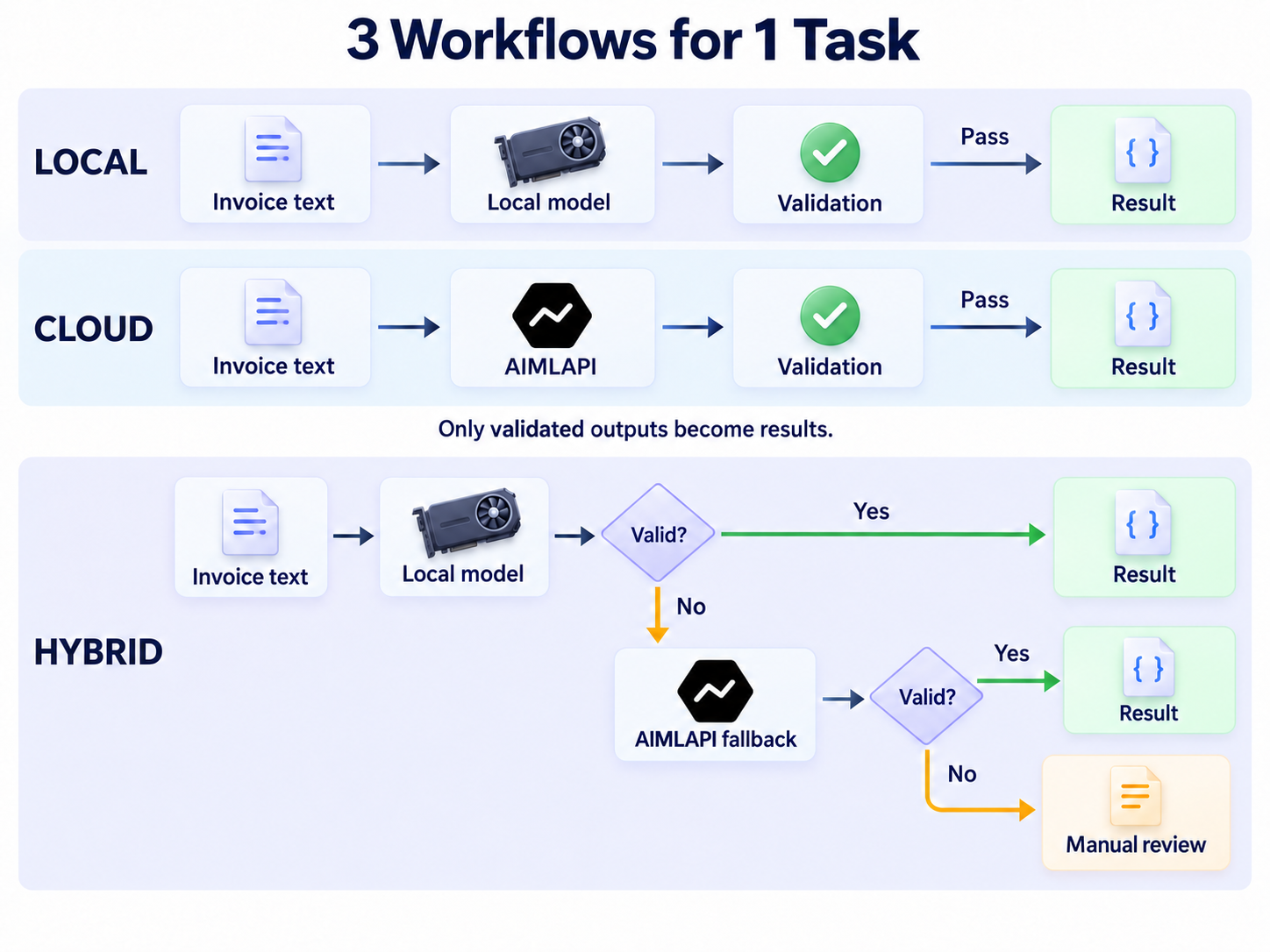
Local and Cloud used Qwen3.8-27B with the same prompt and sampling settings. Local loaded Qwen3.8-27B-AD-Q4_K_M.gguf through Atomic Chat's llama.cpp engine. Cloud used alibaba/qwen3.8-27b through AIMLAPI. The local file was quantized, while the precision used by the cloud hosts was not exposed. The comparison covers deployment methods rather than bit-identical weights.
Both sides used:
- temperature: 0, top_p: 1, and seed 1234
- a 2,048-token output limit
- thinking disabled and verified at zero reasoning tokens
- streaming with usage returned in the final chunk
- up to three retries for network errors, HTTP 429 responses, and server errors
All 450 measured outputs parsed as JSON. No request required a retry.
Test environment:
| Environment | Measured setup |
|---|---|
| GPU | NVIDIA GeForce RTX 4090, 24,564 MiB, driver 570.172.08 |
| Host | AMD EPYC 7B13 allocation, 21 vCPU, 41 GB RAM |
| OS | Ubuntu 24.04.3 LTS, kernel 6.8.0-71 |
| Client | Python standard library, sequential requests, Chicago region |
Five tuning invoices per configuration served as warm-up and were excluded. The measured test consisted of five passes over the 30 held-out invoices. Configuration order rotated between passes; document order was shuffled for each pass and remained the same across Local, Cloud, and Hybrid.
Local-Only with Atomic Chat
The local workflow was: invoice text → local Qwen model → checks → result.
The local server used the linux-x64-cuda-12.4 binary from Atomic Chat's TurboQuant llama.cpp release b10269-1.6.0.
The model ran fully on an RTX 4090 with a 16,384-token context, one parallel slot, and fp16 KV cache. Atomic Chat exposes an OpenAI-compatible local endpoint, so the benchmark client could send the same message array used for the cloud request. The server command was:
llama-server -m Qwen3.8-27B-AD-Q4_K_M.gguf \
  -ngl 999 -c 16384 -np 1 --jinja --metrics --no-webui
Server startup to the first valid answer took 8.6 seconds. The 8.6-second cold start was excluded from per-document timing.
Cloud-Only with AIMLAPI
The cloud workflow was: invoice text → AIMLAPI → checks → result.
Qwen3.8-27B cost $0.61893 per million input tokens and $4.40128 per million output tokens. The 150 cloud calls averaged 1,017 input tokens and 514 output tokens per invoice.
Requests used https://api.aimlapi.com/v1/chat/completions, and the model ID was alibaba/qwen3.8-27b.
Local First with Cloud Fallback
Hybrid ran the local model first. A failed check triggered one cloud call with the same input, prompt, and sampling settings. The cloud answer then passed through the same checks. If it failed, the document was sent to manual review and remained in the sample.
The benchmark script implemented Hybrid routing; Atomic Chat did not provide it. The application controlled both validation and cloud transfer.
Extraction Quality
All three configurations achieved identical extraction quality on the benchmark, which is not surprising. Local, Cloud, and Hybrid each extracted all 2,100 fields correctly across 150 document-runs, with no missing or invented values.
Local and Cloud also produced identical parsed JSON for every document, despite occasional differences in raw output formatting. Hybrid accepted all local results without calling the cloud.
| Quality measure | Local | Cloud | Hybrid |
|---|---|---|---|
| Correct fields | 2,100/2,100 | 2,100/2,100 | 2,100/2,100 |
| Correct outputs | 150/150 | 150/150 | 150/150 |
Speed from Request to Verified Result
Cloud processed individual invoices faster than Local, with a median of 6.96 seconds per document compared with 10.75 seconds. Hybrid performed almost identically to Local because all documents passed local validation and no cloud fallback was needed.
| Speed measure | Local | Cloud | Hybrid |
|---|---|---|---|
| Median per document | 10.75 s | 6.96 s | 10.70 s |
| IQR | 9.22–13.41 s | 5.18–10.46 s | 9.22–13.44 s |
| p90 per document | 17.21 s | 14.73 s | 17.19 s |
| Fastest 30-document run | 345 s | 200 s | 346 s |
| Slowest 30-document run | 347 s | 390 s | 347 s |
Cloud was faster on a typical document but showed greater variation between runs. Its total processing time ranged from 200 to 390 seconds for the same 30-document workload, compared with 345–347 seconds for Local.
| Call metric | Local, 300 calls | Cloud, 150 calls |
|---|---|---|
| TTFT p50 | 0.89 s | 1.08 s |
| TTFT p90 | 1.06 s | 2.32 s |
| TTFT max | 1.25 s | 7.52 s |
| Decode rate p10 | 48.1 tok/s | 39.2 tok/s |
| Decode rate p50 | 48.2 tok/s | 80.0 tok/s |
| Decode rate p90 | 48.2 tok/s | 230.7 tok/s |
The RTX 4090 decoded at almost exactly 48.2 tokens/s throughout the test. AIMLAPI used auto routing, which spread the 150 calls across 15 upstream hosts. Median call time per host ranged from 3.17 seconds to 19.46 seconds.
For a task like this, featuring predictable, clean invoices, extrapolating the measured median times to 1,000 invoices gives an illustrative processing-time saving of approximately 63 minutes for Cloud compared with Local. At 1,000 invoices per day, that would amount to about 5.3 hours per five-day workweek or 21 hours over a 20-day working month. This estimate uses median times, not total processing times. In the slowest cloud run, total processing time was longer than with Local.
Cost per Document
Local processing had substantially lower measured costs than Cloud. Processing 150 invoices cost $0.0309 in GPU electricity, compared with $0.4339 in cloud API charges.
| Cost measure | Local | Cloud | Hybrid |
|---|---|---|---|
| Cost for 150 documents | $0.0309 | $0.4339 | $0.0307 |
| Cost per 1,000 documents | $0.21 | $2.89 | $0.20 |
| Documents sent to cloud | 0% | 100% | 0% |
In other words, local processing was approximately 14 times cheaper than Cloud in the measured costs.
Is a GPU Worth Buying for Local AI?
Local inference was approximately 14 times cheaper than the cloud API in our benchmark, based on measured GPU electricity costs. But lower cost per request does not necessarily make buying a GPU a good investment.
Using our invoice extraction benchmark as a reference, here is how long it would take to recover a $2,073 RTX 4090:
| Documents per month | Monthly savings | GPU payback period |
|---|---|---|
| 1,000 | $2.69 | 64 years |
| 10,000 | $26.87 | 6.4 years |
| 50,000 | $134.33 | 15 months |
| 100,000 | $268.65 | 8 months |
For someone experimenting with local models, building side projects, or making occasional API calls, the savings alone are unlikely to justify buying a dedicated GPU. Even a substantial reduction in cost per request means little if the monthly API bill is already small.
The economics become more interesting when a GPU is used regularly across multiple AI workloads. Running local assistants, processing documents, experimenting with models, and powering personal applications can all contribute to hardware utilization.
A GPU can also be worth owning for reasons unrelated to API savings: running models offline, keeping data on your own machine, avoiding API dependencies, or experimenting with models and inference settings.
How to Run This Benchmark
If you want to run this benchmark for yourself using the same invoice dataset, model, and validation rules across Local, Cloud, and Hybrid, here's how you can do it.
The three configurations use the same extraction task but differ in where the model runs:
- Local: Processes invoices on the local GPU.
- Cloud: Sends invoices to AIMLAPI for processing.
- Hybrid: Processes invoices locally first and sends them to AIMLAPI only if the local result fails validation.
1. Configure the model endpoints
Both Local and Cloud use OpenAI-compatible chat-completions APIs. Set the endpoints and model identifiers as follows:
LOCAL_URL = "http://127.0.0.1:8080/v1/chat/completions"
CLOUD_URL = "https://api.aimlapi.com/v1/chat/completions"

LOCAL_MODEL = "AtomicChat/Qwen3.8-27B-GGUF:AD-Q4_K_M"
CLOUD_MODEL = "alibaba/qwen3.8-27b"
Local requires the model to be downloaded and running through Atomic Chat.
Both configurations use the same prompt, request format, and sampling settings. Thinking is disabled using chat_template_kwargs.enable_thinking: false for Local and reasoning_effort: "none" for Cloud.
2. Configure the Hybrid workflow
Hybrid uses Local as the primary extraction method and Cloud as a fallback.
After each local response, the controller validates the extracted invoice data. If the result passes, it is returned immediately without a cloud request. If validation fails, the controller retries the document using Cloud.
local = call(LOCAL_URL, LOCAL_MODEL, document)
local_ok, local_json, local_errors = validate(local, document)

if local_ok:
    return local_json

cloud = call(CLOUD_URL, CLOUD_MODEL, document)
cloud_ok, cloud_json, cloud_errors = validate(cloud, document)

if cloud_ok:
    return cloud_json

return {"status": "manual_review", "errors": cloud_errors}
The validator checks the required 14 fields, invoice arithmetic, dates, currency, and whether extracted values are supported by the source document.
If both Local and Cloud fail validation, Hybrid flags the invoice for manual review rather than returning an unverified result.
3. Run the benchmark
Once the local model is running and AIMLAPI is configured, run the following commands from the project directory in order.
Generate the invoice dataset:
python3 data/make_docs.pyCheck the cloud connection:
python3 remote/selftest.pyRun a small local test before the full benchmark:
python3 remote/run.py smoke --side local --docs tuneRun the benchmark:
bash remote/go.shCalculate the quality, latency, and cost metrics:
python3 score.py results/bench_main.jsonl --kwh 0.1831The --kwh parameter sets the electricity price in USD per kWh. Replace 0.1831 with your local electricity rate if needed.
Calculate the hardware payback estimates:
python3 payback.py results/bench_main.summary.jsonThe benchmark results are saved in results/bench_main.jsonl, and the scoring step produces the summary used for the payback calculation.
Reproducibility
To compare your results with this benchmark, use the same model versions, invoice dataset, extraction prompt, validation rules, and sampling settings. Local setup instructions are available in Atomic Chat. For Cloud, see the AIMLAPI Quickstart and model catalog for API configuration and current pricing.
Which Setup Should You Use?
Choose a local setup if you already have a capable GPU and want to run models on your own hardware. It had lower measured operating costs and more consistent processing times, although it was slower than Cloud on a typical document. You also need to run and maintain the local server.
Choose a cloud setup if you do not own a GPU or only need inference occasionally. There is no hardware to buy or local model to maintain. It was faster at the median in our test, but response times varied, and requests were processed outside the local machine.
Choose a hybrid setup if you use local inference by default and call the cloud when local validation fails. In this benchmark, every local result was correct, so Hybrid behaved almost exactly like Local. Its potential advantage is handling harder inputs without sending every request to the cloud, but we did not measure how well that works on more challenging documents.
For your own projects, the choice depends on your hardware, how often you run inference, whether your data can leave your machine, and whether you need cloud fallback. Our results show that local inference can match cloud quality on this workload, but they do not establish that the same will hold for every model or task.
Frequently Asked Questions
Is local LLM inference cheaper than an API?
Local LLM inference cost $0.000206 in GPU board electricity per correct invoice. AIMLAPI cost $0.002893 per correct invoice. Buying an RTX 4090 for this task only produced a short payback period at tens of thousands of invoices per month; the local estimate excludes whole-PC power and maintenance.
Does cloud fallback improve accuracy?
Cloud fallback improves accuracy only when validation detects a local error and the cloud model corrects it. Hybrid made no cloud calls in this test because all local answers passed validation.
Can a hybrid workflow keep every document private?
A Hybrid workflow keeps every document private only when its transfer policy blocks restricted inputs before fallback. A validator by itself isn't a privacy control: if a local answer fails and the router automatically retries in the cloud, the source document leaves the machine.