
Best AI photo editor models compared: GPT Image 2, Nano Banana 2, Seedream 5.0, FLUX.2
10+ Best AI Photo Editing Models (2026)
This guide covers 11 AI models that handle photo editing — from prompt-only edits to masked inpainting and restoration. For each one you'll find what it does best, its API model ID and price per image, the parameters the endpoint takes, its limitations, and examples.
Quick Answer
- GPT Image 2 is the best AI photo editing model for most production use cases. It ranks #1 on blind-preference leaderboards, handles text rendering better than any competitor, and offers an editing endpoint with mask support.
- Choose Nano Banana 2 if cost is your primary constraint — it's the cheapest model in this list at $0.067 per image and the fastest.
- Use Seedream 5.0 Pro when you need region-precise selection — point, lasso, box, and doodle tools are built into the model.
Best AI Photo Editing Models
1. GPT Image 2
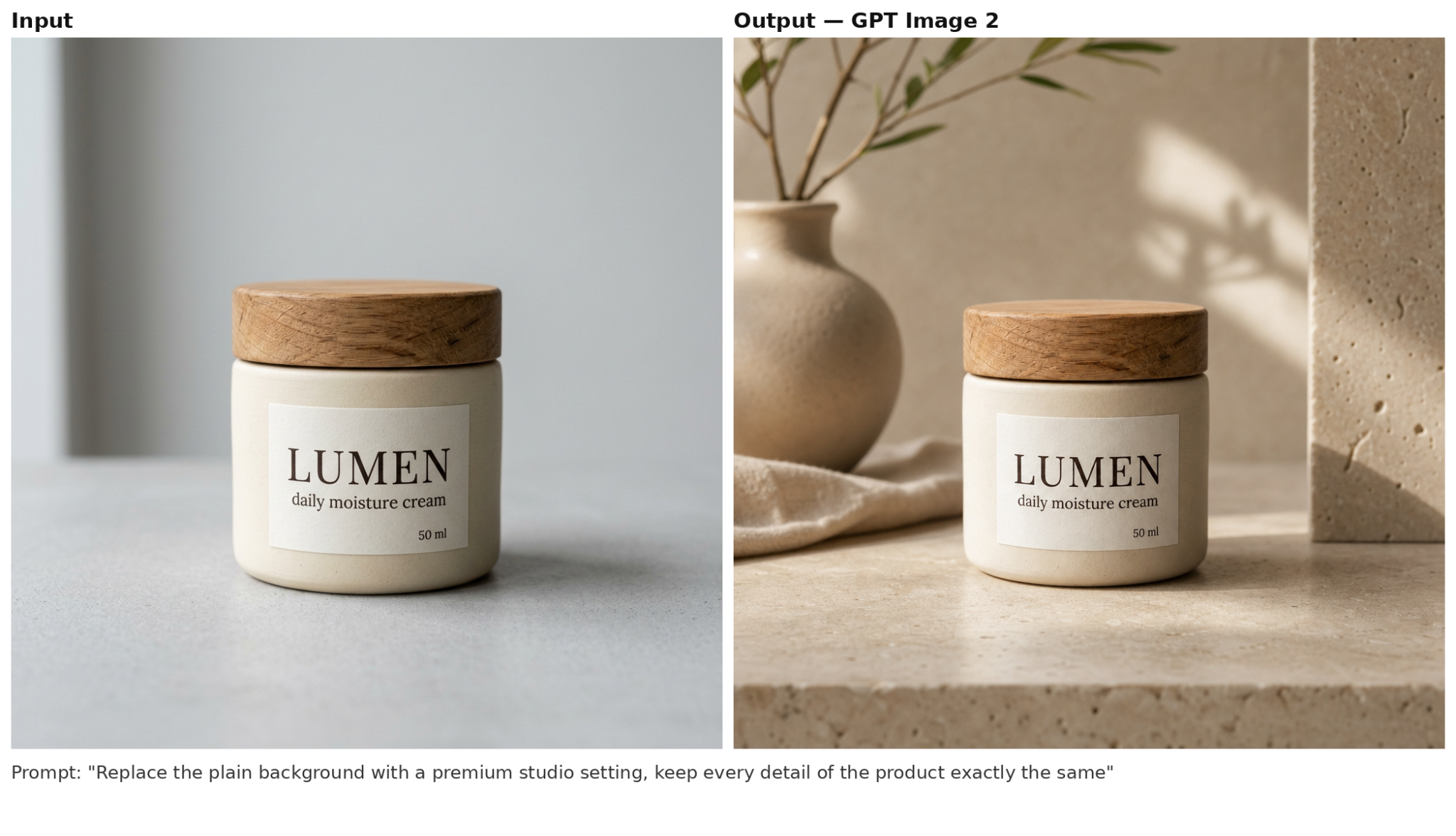
GPT Image 2 is OpenAI's production image model, released April 21, 2026 — the same model that generates images in ChatGPT, available directly through the API. It both creates images from scratch and edits existing ones, and it is the only model in this list with a separate /v1/images/edits endpoint. The endpoint takes the photo plus a mask, that is, a copy of the image with the editable area simply erased, and repaints only that erased area, leaving every other pixel untouched. The other editors in this list take only a text prompt, so the model itself decides which part of the image your words refer to.
Its main skill is prompt adherence — the autoregressive architecture follows dense, multi-part layout descriptions and negative constraints more faithfully than any other editor in this list. The results look realistic, without the typical AI sheen, and text in the image stays accurate across alphabets — background signs and labels come out correctly in Japanese, Arabic, and Korean, not only in English. Standard lower-quality requests resolve in about 3–5 seconds, so drafts iterate quickly, but top quality settings and the longer processing they involve make it the most expensive model in OpenAI's image lineup.
API model ID: openai/gpt-image-2
Limitations:
- Sequential layered edits of the same image gradually lose sharpness — plan one precise edit, or upscale between passes.
- Fine repetitive textures (sand, gravel) can come out mushy, and lighting runs slightly darker than competitors'.
2. Nano Banana 2 (Gemini 3.1 Flash Image)
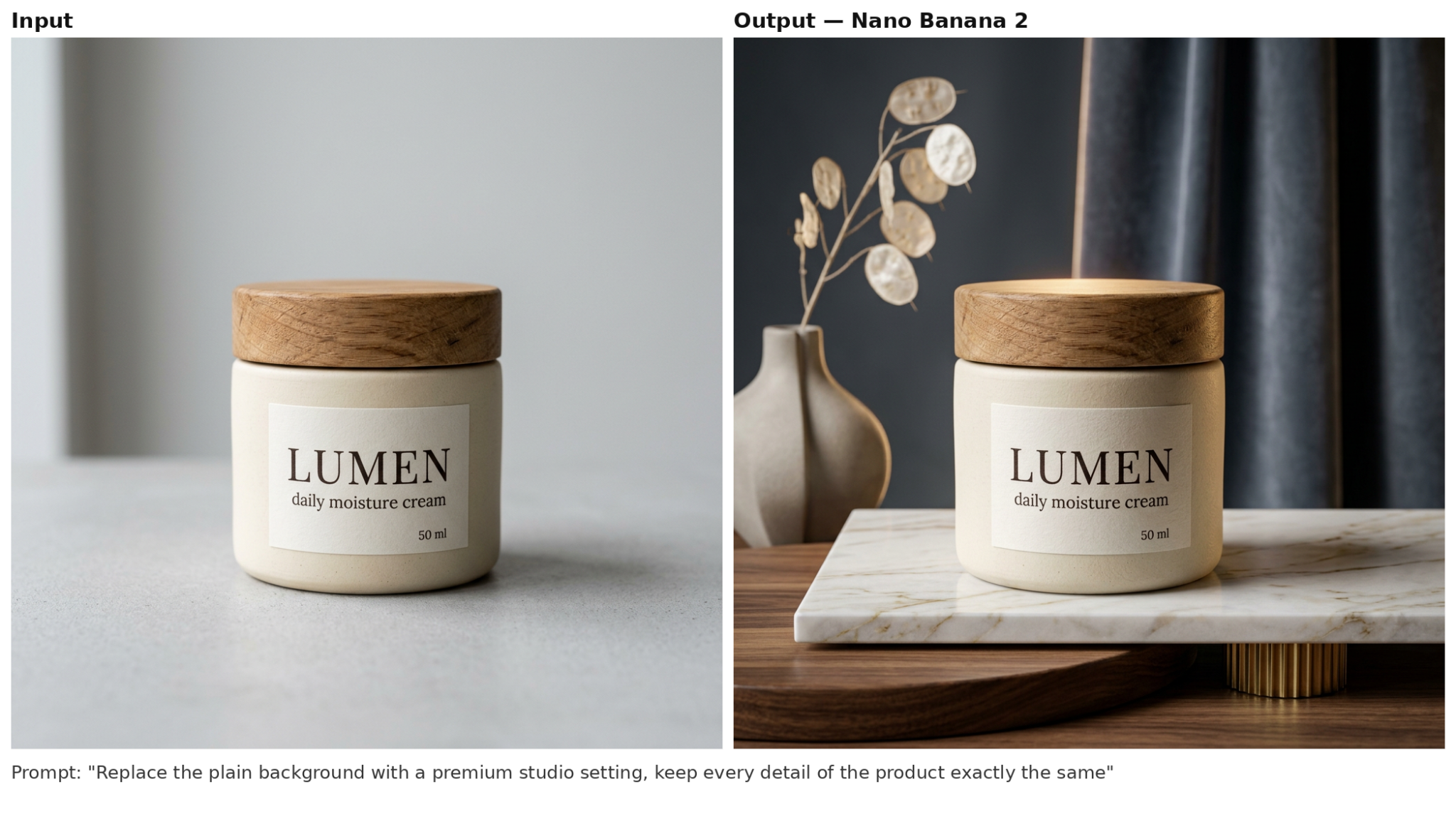
Nano Banana 2 — officially Gemini 3.1 Flash Image from Google DeepMind — has been generally available since February 26, 2026. It edits through sequential conversational turns, changing only what the request names while keeping the other characters and objects locked, which prevents the usual character consistency problem of faces or clothing drifting between consecutive edits. Generation also leans on Live Image Search Grounding — the model pulls current web data to depict a real landmark, car, or product accurately instead of hallucinating it from memory. Taken together, this makes it a cheaper alternative to heavy diffusion models, combining search accuracy and complex layouts in a single framework. Every output carries Google's invisible SynthID watermark.
API model ID: google/nano-banana-2
Limitations:
- Fine detail is traded for speed and price — small repetitive textures (fabric, hair, sand) come out noticeably softer than on Nano Banana Pro.
- Only 5 aspect ratios versus 10 on Nano Banana Pro, and one output per request.
3. MAI-Image-2.5
MAI-Image-2.5 is Microsoft's image model, announced June 2, 2026. Microsoft built the line for precise, localized edits with no collateral damage. Where classic diffusion models slightly redraw the whole canvas on every edit, MAI-Image-2.5 fully locks the untouched areas: ask it to swap a background or insert an object, and the rest of the image stays pixel-for-pixel identical to the original. That makes the line an ideal fit for e-commerce, where the background of a product shot can change endlessly but the product itself must stay untouched. The model's ability to dynamically compute reflections, shadows, and textures from the scene's existing light source makes the images more grounded and physically accurate.
API model ID: microsoft/mai-image-2.5
Limitations:
- Editing is not reachable through the API yet — text-to-image only; MAI-Image-2.5-Pro is not in the catalog.
- A strong English bias — text in Cyrillic or Arabic renders with errors.
- Needs detailed prompts: short ones underperform, and an aggressive safety filter occasionally blocks innocuous requests.
4. Seedream 5.0 Pro
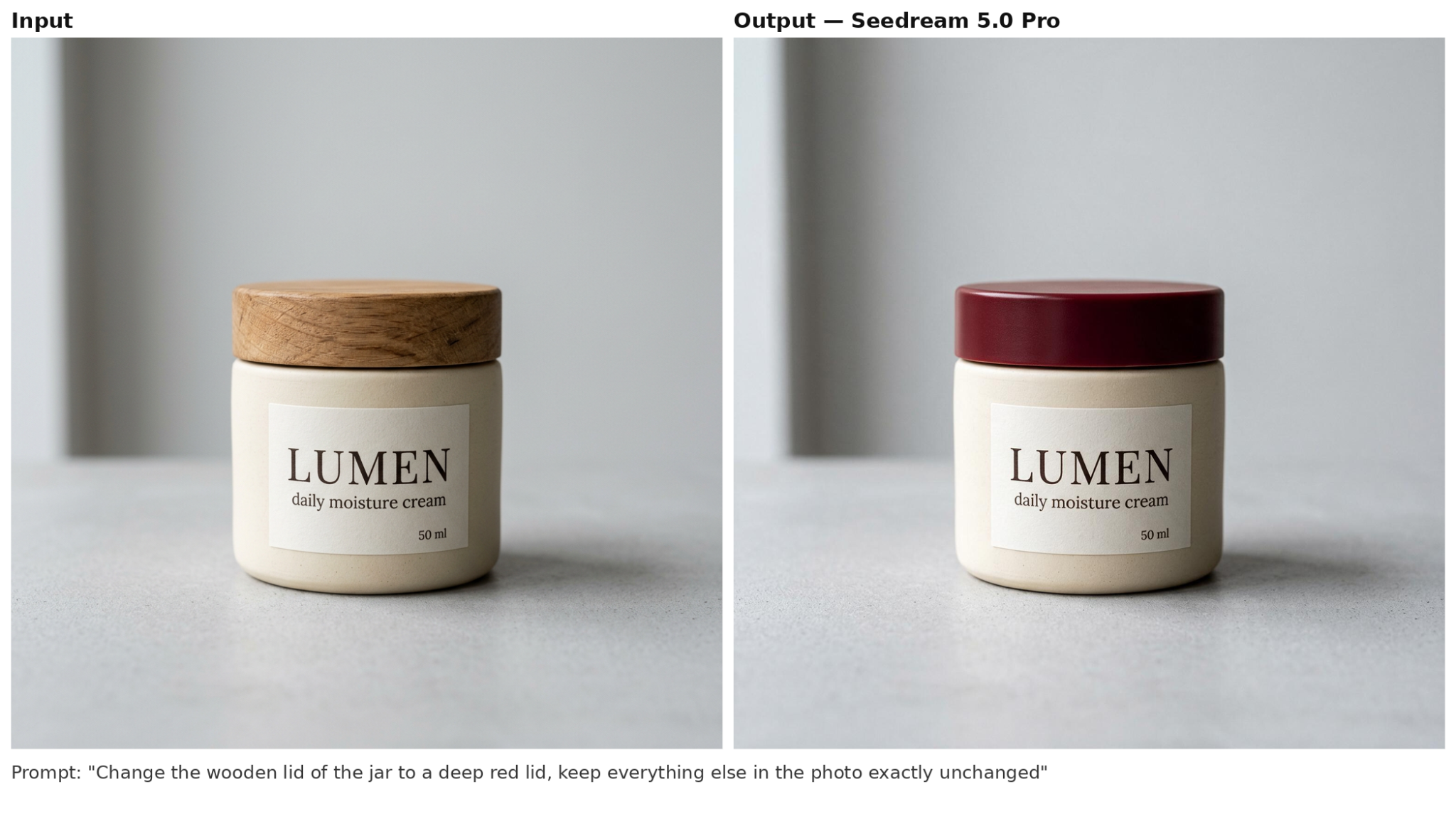
Seedream 5.0 Pro is ByteDance's flagship editing model, announced July 8, 2026. The release describes point, box, and lasso selection tools that work with hand-drawn or digital sketches — they deliver precise structural edits without damaging neighboring pixels. There is also layer separation: a poster splits into more than 10 independent transparent layers, so every element can be moved and edited on its own. No prompt-only model in this list offers any of that, and in practice it sharply cuts the number of regenerations — the model follows the selected region and the sketch instead of re-guessing the whole image.
The price per image is higher than that of lightweight consumer models, and that is a deliberate trade. Seedream 5.0 Pro is built for professionals whose precision pays for itself: in e-commerce and localized advertising, users report that product geometry and brand colors survive background swaps noticeably better than with competitors, and layer separation plus sketch-to-image accuracy justify the cost. For basic stylization or quick ideation, a lighter model is cheaper and faster.
API model ID: bytedance/seedream-5-0-pro
Limitations:
- The selection tools from the announcement are not exposed as API parameters — editing via the API is prompt-driven.
- No aspect-ratio presets, so you manage output dimensions in pixels yourself.
5. FLUX.2 Pro
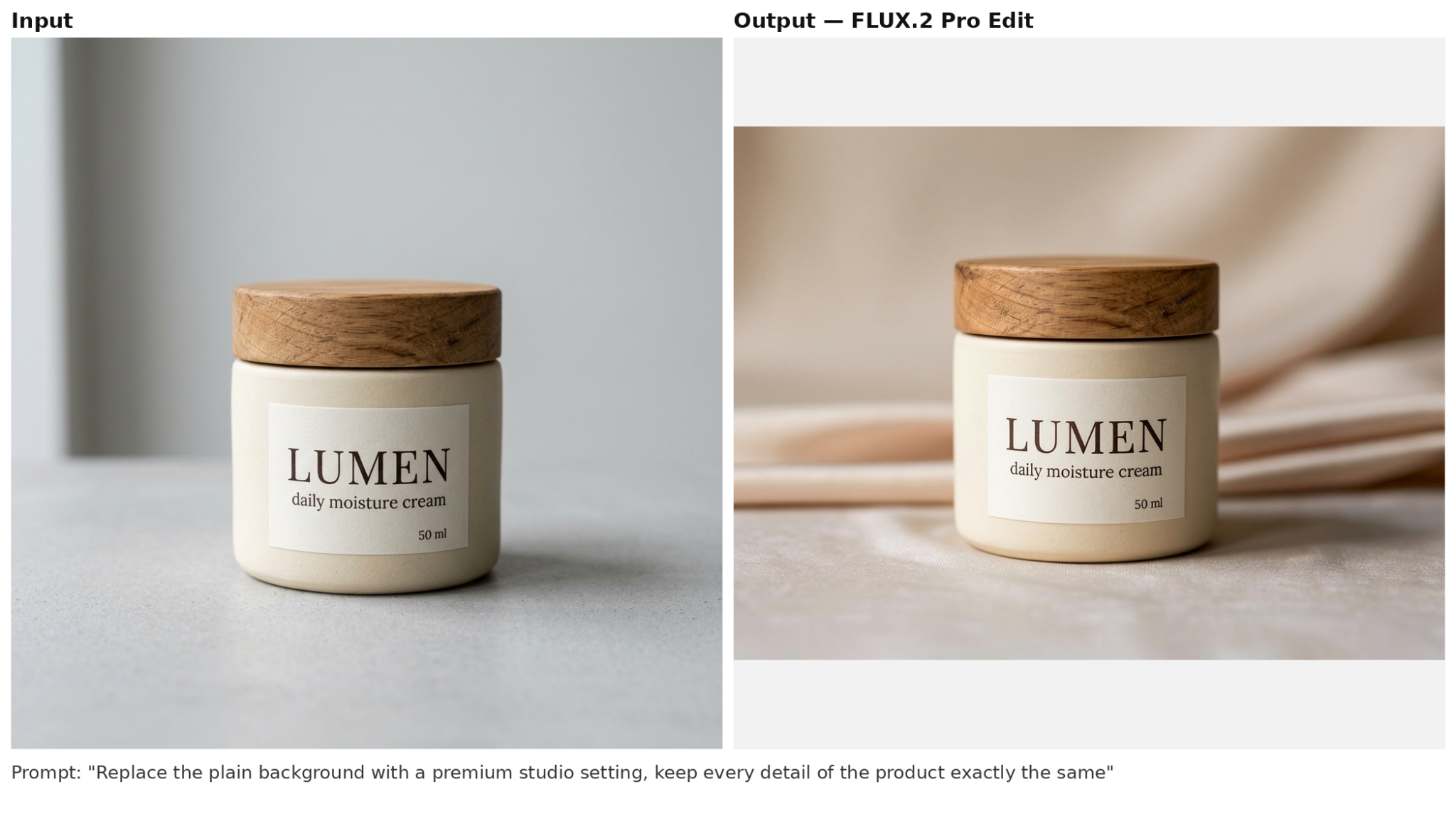
FLUX.2 Pro is Black Forest Labs' flagship, announced November 25, 2025. The model is at its strongest working from several references plus a prompt: it combines objects from different images into one result and holds the same look from generation to generation — an edit lands on every frame the same way without touching the object itself. The same mechanism works for a brand over time: once a product or character look is established, it can be reused in later generations without drifting from campaign to campaign.
API model ID: blackforestlabs/flux-2-pro-edit
Limitations:
- This endpoint takes at most 3 reference images — versus the 10 Black Forest Labs advertises for the FLUX.2 line.
- Multilingual lettering can drift — the model makes more mistakes with non-English text.
6. Grok Imagine Image
Grok Imagine Image 2.0 is xAI's image line, updated August 7, 2026; it debuted at #2 on the Arena Image Edit leaderboard (1,439 Elo). This model comes closest to a graphic designer. It plans headlines and small text structurally, like a layout, instead of painting letters as random texture — so posters, menus, and infographics come out with legible typography. Its second standout feature is Smart Resize, which instantly recomposes a finished visual into 9 different aspect ratios without awkward edge cropping, so one creative spreads across every placement format. There is also a magic wand — editing a single region without regenerating the whole layout.
Through the API in this list, its draw is different: it is the cheapest way here to mass-produce drafts, up to 10 images per request.
API model ID: x-ai/grok-imagine-image
Limitations:
- None of the Grok Imagine Image 2.0 tools — Magic Wand, segmentation, Smart Resize — are available through this API; they live in xAI's own API and app.
- It cannot edit your photo through this API — it only generates new images.
7. Nano Banana Pro (Gemini 3 Pro Image)
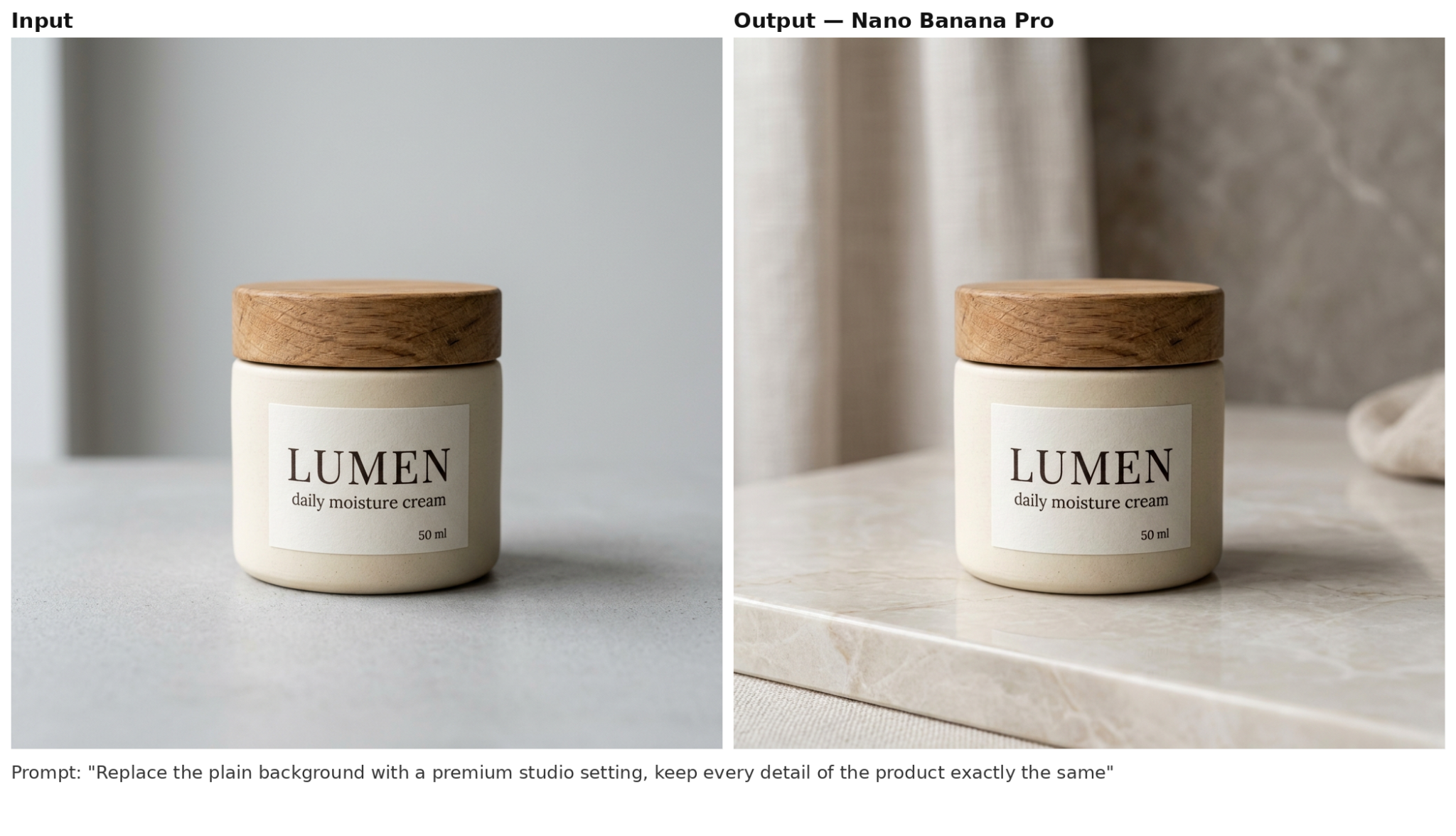
Nano Banana Pro — Gemini 3 Pro Image — is the senior model of the same Google line. It doesn't compete with Nano Banana 2, they complement each other. Pro is built on the more powerful Gemini 3 Pro and differs in that it spends longer thinking through a scene — which is why it handles complex prompts, object physics, and in-image text better. Its limits are higher too — multi-image reference up to 14 images per request, output up to 4K, and up to 4 variants per call.
Teams pick Nano Banana Pro for work where a mistake is expensive: a crooked letter on a label or a hero's face changing from frame to frame is visible at a glance, and such assets won't pass review. The price of these advantages is speed and cost — Nano Banana 2 on Gemini 3.1 Flash generates 2–3 times faster and noticeably cheaper, and on simple jobs it sometimes matches its senior. The rule of thumb is simple — Pro for final assets, Nano Banana 2 for fast, high-volume work.
API model ID: google/nano-banana-pro-edit
Limitations:
- Roughly twice the price of Nano Banana 2 — overkill for simple one-reference edits.
8. Qwen Image 3 Edit
Qwen Image 3 Edit is the editing variant of Alibaba's Qwen-Image-3.0, announced July 21, 2026. It is an image-to-image AI that modifies reference images from a text prompt, and its negative_prompt field is rare in this list — useful when an edit keeps reintroducing an element you want gone.
It handles stylization well — the mode is officially supported, and the community has built style-transfer fine-tunes on top of the model. But when an edit depends on understanding the image's structure and keeping the object recognizable, GPT Image 2 does it better. For example, moving a character into a different art style without losing their features.
The practical advice is simple — hand basic stylization to Qwen and save money, trust complex artistic transformation to GPT Image 2.
API model ID: alibaba/qwen-image-3-edit
Limitations:
- The tightest multi-reference cap among the dedicated editors here — Seedream 5.0 Pro and Nano Banana Pro take 14 images.
- No latency figures published anywhere — budget your own timeout testing before production.
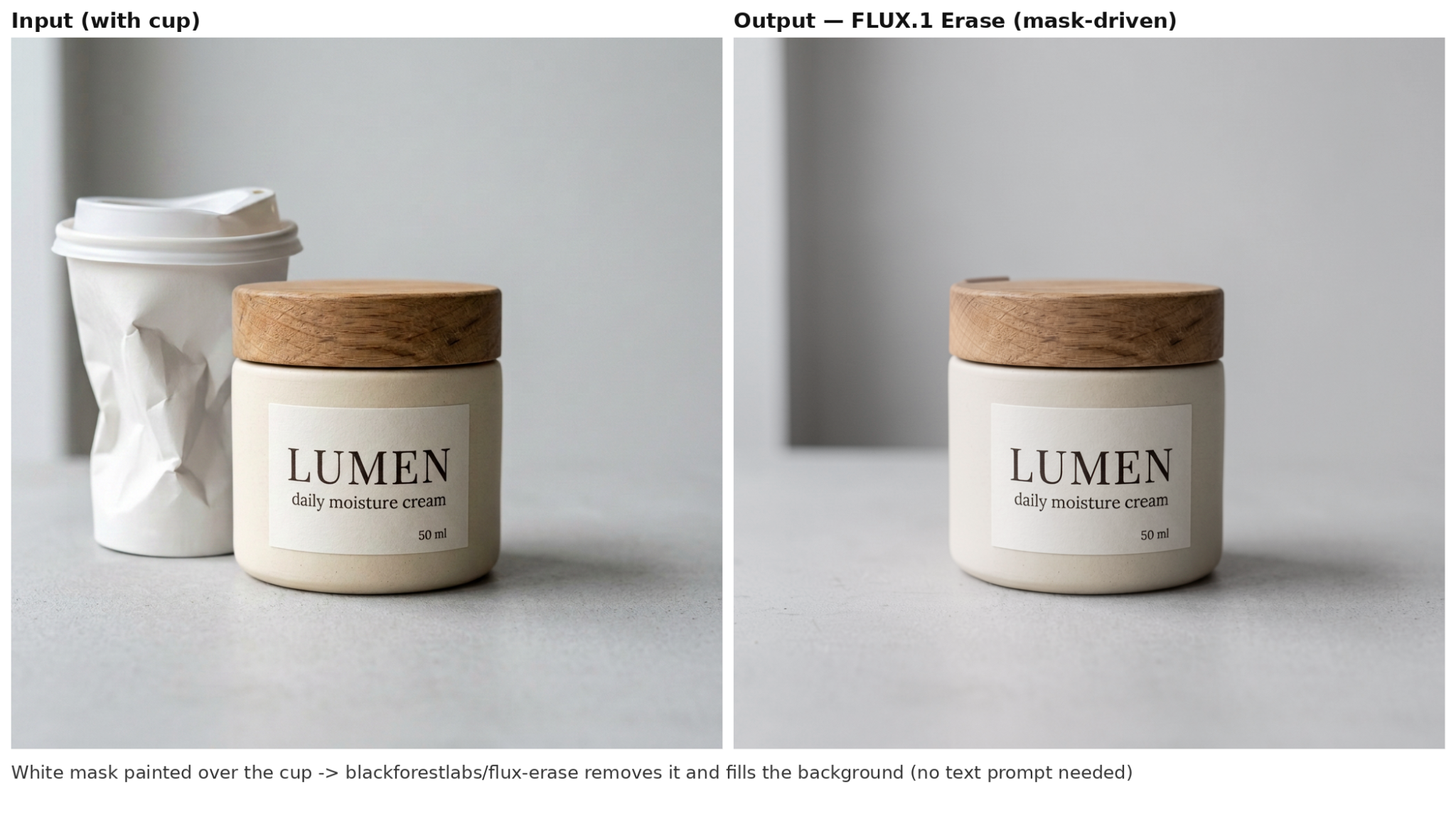
FLUX.1 Fill is Black Forest Labs' dedicated inpainting and outpainting model, released November 21, 2024 as part of the FLUX.1 Tools suite. It edits through a binary mask — black areas stay untouched, white areas are repainted — so the change lands exactly where you drew it — the API counterpart of Photoshop's Generative Fill. According to Black Forest Labs, Fill [pro] "outperforms all other competing methods, making it the state-of-the-art inpainting model to date."
The closest comparison in this list is GPT Image 2 — the only other model here that takes a mask. The difference is specialization. For GPT Image 2 the mask is just one mode of a general-purpose model — it understands complex instructions and renders text inside the edit, but you pay per token, and high quality gets expensive. FLUX.1 Fill is a narrow-specialist diffusion model — it does nothing except inpainting and outpainting, but does it at a flat $0.05 per image, keeps the original resolution of the frame, where GPT Image 2 is limited to three fixed sizes, and can extend the canvas beyond the original borders, which GPT Image 2 cannot do at all.
API model ID: flux-pro-1.0-fill
Limitations:
- A mask is required for every edit — it cannot remove an object from a prompt alone the way the prompt-only editors above can.
- The Fill [dev] variant with open weights on Hugging Face is under the non-commercial FLUX Dev License — production use goes through the API.
10. Recraft V3
Recraft V3 is a production-ready image generation and design model built specifically for graphic design workflows. In practice that focus shows immediately: multi-word text comes out spelled correctly and lands exactly where the layout needs it, brand colors stay fixed to the given RGB array from generation to generation, and the output is true SVG instead of a pixel picture. It excels at vector generation, precise typography, layout control, and brand consistency, often beating general-purpose models at professional design tasks. Photorealism, though, is not what to expect here — it trails FLUX.2 Pro and the other photo models above, and that is a deliberate trade.
API model ID: recraft-v3
Limitations:
- The background-removal and eraser utilities from Recraft's own app are not exposed as endpoints — photoreal editing belongs to the models above.
- This card earns its slot on brand assets, not photo retouching.
11. Topaz Sharpen
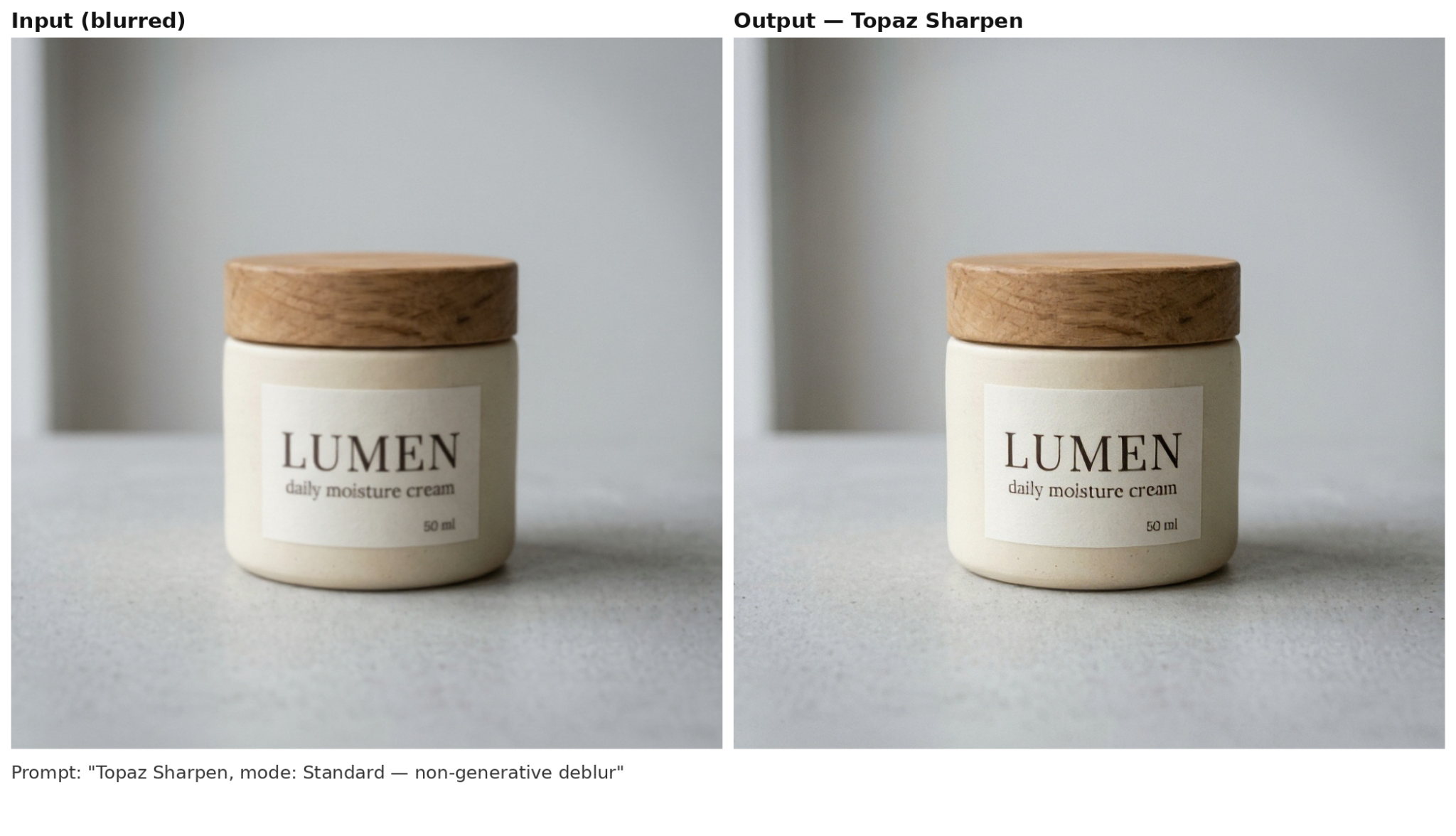
Topaz Sharpen is an AI-based restoration tool designed to reverse the root causes of photographic blur — camera shake, motion blur, and missed focus — rather than simply boosting edge contrast like traditional sharpening filters.
The model can rescue "trash-bin" shots — optical blur or camera shake — but only with correctly adjusted settings. Default settings are aggressive and work well for heavily blurred images. On properly focused or moderately soft images, however, they overprocess the file — skin turns to plastic, fine textures become rubbery, and artifacts appear along high-contrast edges.
API model ID: topaz-labs/sharpen
Limitations:
- No prompt-based editing at all — it sharpens what exists and cannot add, remove, or restyle anything.
- Batch processing requires one API call per photo.
- Aggressive default settings overprocess files — always test on a single frame before running at scale. Start with strength at 40–60% and apply locally to key areas rather than the whole frame.
Integrating AI Image Editing Models with AI/ML API
All models above are available through a single API endpoint at AI/ML API.
Here's a Python example calling alibaba/qwen-image-edit:
import requests

API_KEY = "your-api-key"

url = "https://api.aimlapi.com/v1/images/generations"

headers = {
    "Authorization": f"Bearer {API_KEY}",
    "Content-Type": "application/json"
}

data = {
    "model": "alibaba/qwen-image-edit",
    "image_urls": ["https://example.com/your-image.jpg"],
    "prompt": "Replace the background with a sunny beach scene",
    "aspect_ratio": "16:9",
    "convert_base64_to_url": True
}

response = requests.post(url, headers=headers, json=data)
print(response.json())
Get your API key and start integrating today — explore all models at aimlapi.com/models or read the full documentation at docs.aimlapi.com.
FAQ
What is the best AI Photo editing models?
The best AI Photo editing model depends on your use case. For the highest overall quality, GPT Image 2 is the best AI image editor on blind-preference leaderboards. For speed and cost, Nano Banana 2 generates images in under 1.5 seconds at the lowest price per image. For region-precise editing, Seedream 5.0 Pro supports point, lasso, and box selection tools.
Can AI edit an existing photo?
Yes — image to image AI models edit existing photos by taking an input image and a text prompt describing the desired change. Models like GPT Image 2, Nano Banana 2, and MAI-Image-2.5-Pro are specifically designed for instruction-based editing — replacing objects, changing backgrounds, adjusting styles, or removing artifacts.
What is the difference between an AI image generator and an AI photo editor?
An AI image generator creates images from a text prompt with no input image. An AI photo editor is an image to image AI: it modifies an existing photo according to a text prompt or region selection. Photo editing models preserve parts of the original image — composition, lighting, subject identity — while generators start from scratch. Many models support both modes.
Can ChatGPT edit photos?
Yes, ChatGPT's built-in image model in 2026 is GPT Image 2, which can edit photos through the ChatGPT interface. The same model is also available via API. To edit, upload an image and describe the change — "replace the background with a forest," "remove the person on the left," or "turn this into a watercolor painting."
What is the best free AI photo editor?
For API-based models, free tiers are limited. Most providers offer trial credits — for example, AI/ML API provides free credits to test models like GPT Image 2 and Nano Banana 2. For ongoing use, pricing starts from ~$0.01 per image for background removal (Bria RMBG 2.0) and ~$0.067 for full editing (Nano Banana 2). Check aimlapi.com/models for current pricing.
Can AI photo editors work with RAW files?
Yes, but only some models support RAW processing natively. Desktop tools like Topaz Photo AI and Adobe Photoshop handle RAW files directly. For API-based models, you typically need to convert RAW to JPEG or PNG before sending — most models accept standard formats (JPEG, PNG, WebP) but not camera-specific RAW formats like CR2 or NEF. If RAW workflow is critical, consider a desktop-first solution or integrate a pre-processing step in your pipeline.
Is it safe to upload my photos to AI editing tools?
It depends on the tool. Desktop applications like Topaz Photo AI process everything locally with no uploads required. Cloud-based API services (like AI/ML API) upload images to remote servers for processing. For sensitive or confidential images, use local-processing tools or verify the vendor's data privacy policy. AI/ML API processes images on secure servers and does not store them after generation. Always read each provider's privacy policy before uploading sensitive content.
Key Takeaways
- GPT Image 2 is the highest-rated overall editing model — #1 on Text-to-Image Arena (1,381 Elo) and dominates the Artificial Analysis Image Editing Arena. Its real strength is text rendering — handles logos, labels, and in-image text better than any other model.
- Nano Banana 2 is the fastest and cheapest production model — <1.5 seconds at ~$0.067 per image — making it ideal for high-volume workflows. It scored 29.0% on the Photoroom benchmark, the highest pass rate among all tested models.
- MAI-Image-2.5-Pro is the editing specialist — #1 on the editing arena with 1,272 Elo — at ~$0.1085 per image. Built for surgical, identity-preserving edits where precision matters more than speed.
- Seedream 5.0 Pro offers precision region selection (point/lasso/box) that prompt-only models don't support — ideal for professional retouching workflows.
- Topaz Sharpen/Upscale is the best restoration tool — sharpening and upscaling without generative artifacts — at ~$0.015–0.03 per image.
- No model passes more than 29% of product-fidelity checks — all current models fail a majority of detailed product edit tests. Choose based on your tolerance for artifacts versus speed and cost.
All models are available via a single API through AI/ML API, with predictable pricing, latency, and output formats. Get started with free credits at aimlapi.com.
.webp)