Grok Imagine Video vs Grok Imagine Video 1.5 Preview
What Are Grok's Video Generation Models?
xAI built a name for itself with large language models, but the Grok Imagine family extends that capability into a full multimodal suite covering image generation, editing, and now video creation. The video models sit inside xAI's broader "Imagine" platform, which also powers image generation and editing within the same API surface.
Two distinct video models are available today: Grok Imagine Video — the versatile everyday workhorse — and Grok Imagine Video 1.5 Preview, xAI's more computationally intensive, higher-fidelity generation model. They share an API interface and complement each other, but they are built for different jobs.
How video generation fits into multimodal AI workflows
Before these models existed, building a production video pipeline typically meant chaining together several third-party tools: one for text-to-image, another for image animation, and another for editing. The Grok Imagine family collapses that stack. A single API key can now handle image generation, image editing, image-to-video conversion, reference-based video creation, video extension, and video editing — meaning your workflow no longer requires multiple vendor accounts or data handoffs between disconnected systems.
Standard: Grok Imagine Video
$0.05 / sec (480p) · $0.07 / sec (720p)
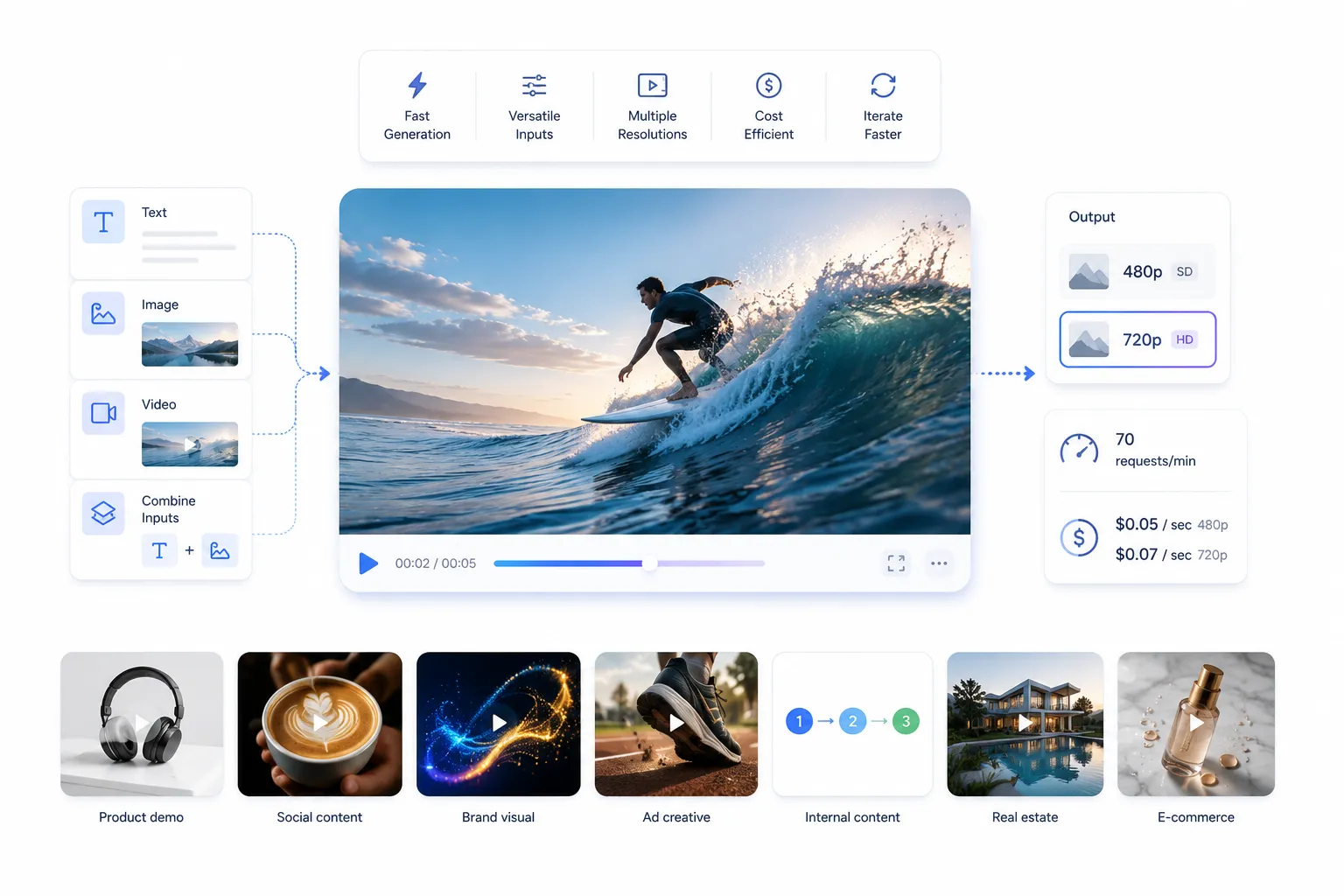
The go-to model for rapid iteration, high-volume generation, and production pipelines that need both speed and cost predictability. Supports text, image, and video as inputs.
Preview: Grok Imagine Video 1.5 Preview
$0.08 / sec (480p) · $0.14 / sec (720p)
The high-fidelity model for client-facing, cinematic, and brand-critical outputs. Accepts image and video inputs — text-to-video is not yet supported.
Model 1: Grok Imagine Video
Grok Imagine Video is xAI's broadly capable video generation model. It was built to handle the full range of everyday production tasks — from short social clips to product demos — while staying fast enough and cheap enough to support iterative workflows where you might generate dozens of variations before settling on the right one.
One thing that immediately sets it apart from the 1.5 Preview is its multimodal input support: this model accepts text, images, and video as inputs, making it the only model in the pair capable of true text-to-video generation. If you're starting from a prompt with no reference media, this is your starting point.
What it can do
- Generate video directly from natural language prompts (text-to-video)
- Animate a still image into a moving video clip (image-to-video)
- Extend an existing video clip, adding new frames at the end
- Edit video content based on a text instruction
- Generate video from a reference image while preserving visual identity
- Produce both 480p and 720p output resolutions
Where it excels
The model's strengths cluster around speed and versatility. At 70 requests per minute, you can run concept testing in parallel, batch-generate variations, and build automated content pipelines that produce usable video at scale. The per-second pricing — $0.05 at 480p and $0.07 at 720p — is low enough that the economics work for content operations teams with daily publishing requirements.
Motion consistency across most commercial-use prompts is solid. Characters and objects maintain coherent motion arcs across frames, which is often where cheaper models fall apart. The model handles scene transitions, basic camera movements, and object-in-motion well, especially for clips under 10 seconds.
Limitations to be aware of
- Complex multi-subject scenes with precise spatial relationships can lose consistency over longer clips
- Camera movement vocabulary is somewhat limited compared to 1.5 Preview — elaborate crane shots or precise rack focuses may not resolve as expected
- Fine-grained physics simulation (cloth dynamics, fluid interactions) is serviceable but not cinematic
- Less suited to projects where visual quality alone carries the deliverable
Best use cases
This model earns its place in marketing automation pipelines, product video generation at scale, social content factories, A/B testing across creative variations, and any situation where iteration speed matters more than maximum image quality. It's also the right starting point for concept development — generate twenty directions cheaply, then take your winner into 1.5 Preview for final delivery.
Example prompts
Product demo
A sleek wireless headphone rotates slowly on a white surface, studio lighting, clean shadows, 5 seconds
Social content
Time-lapse of a barista crafting a latte art heart, overhead angle, warm cafe lighting, 4 seconds
Brand visual
Abstract flowing particles in cobalt blue and gold coalesce into a company logo shape, black background, 6 seconds
Ad creative
A pair of running shoes on a track, slow-motion dust kick-up at heel strike, natural outdoor light, 4 seconds
Internal content
A simple animated infographic showing three steps connecting left to right with arrows, clean flat design, white background, 5 seconds
Real estate
Drone-style rising shot revealing a modern villa with pool, golden hour, Mediterranean setting, 8 seconds
E-commerce
A cosmetics bottle falls in slow motion onto a wet marble surface, macro lens close-up, product stays in focus, 5 seconds
Model 2: Grok Imagine Video 1.5 Preview
Grok Imagine Video 1.5 Preview is xAI's current upper tier for video generation quality. "Preview" here means it's actively being developed — the versioned alias (grok-imagine-video-1.5-2026-05-30) tells you it reflects the model state as of May 30, 2026. New preview versions will likely ship as capabilities improve.
This model was designed for the situations where output quality is not a nice-to-have but a requirement. Think: a brand campaign video that a CMO will sign off on, a film previs shot that a director will review, or a premium ad that will run across channels at significant media spend. The standard model is a capable workhorse; this is the thoroughbred.
Improvements over the standard model
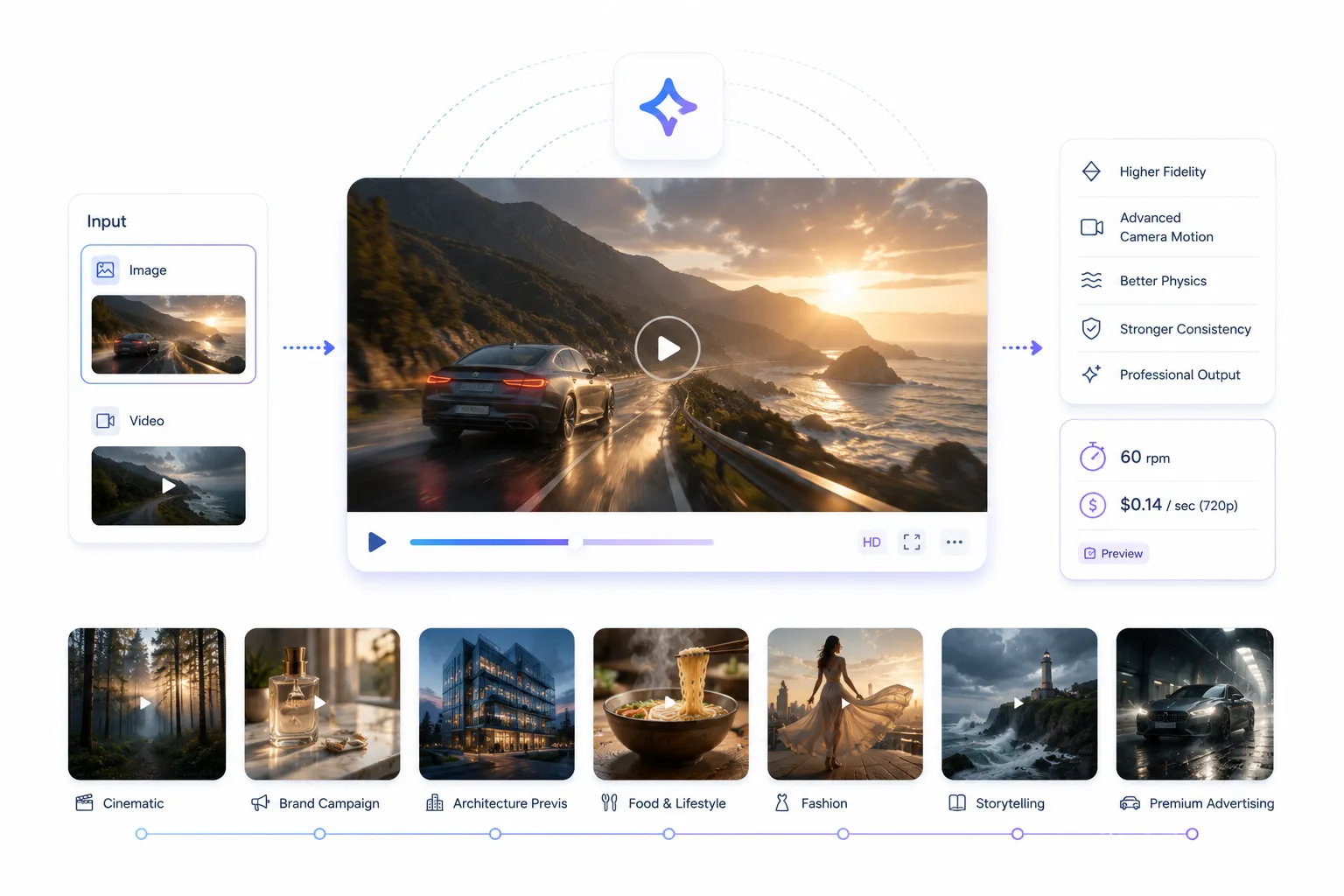
- Higher visual fidelity and sharper detail in both static elements and motion
- Improved temporal consistency — subjects hold their appearance more reliably across all frames
- More sophisticated camera motion understanding — dolly, tilt, pan, and rack focus prompts resolve more accurately
- Stronger physics simulation for cloth, hair, water, and particle effects
- Better adherence to complex, multi-clause prompts with several scene requirements
- Professional-grade 720p output at $0.14 per second — a meaningful jump up in quality headroom
The text-to-video caveat
One important constraint: Grok Imagine Video 1.5 Preview does not support text-to-video generation. It requires image or video as an input. In practice, this means the most effective workflow is to generate your base frame or short clip with the standard model (or with Grok's image generation capabilities), then pass that into 1.5 Preview for high-quality video output. This is not a limitation so much as a clear signal about what the model is optimized for: transforming visual input into premium video, not bootstrapping from scratch.
Limitations and preview considerations
- No native text-to-video — requires image or video input to generate output
- Slower generation time compared to the standard model at comparable resolution
- Higher per-second cost — 60% more expensive at 480p, 100% more at 720p
- Preview status means the API interface and pricing are subject to change
- Rate limit is 60 rpm vs. 70 rpm for the standard model
Best use cases
This is the right model for finished deliverables that will be judged on their visual quality: brand campaigns, premium digital advertising, film or commercial previsualization, creative agency deliverables for named clients, and storytelling content where atmosphere and visual language carry emotional weight.
Example prompts (image-to-video)
Cinematic
[Input: still of forest at dusk] Camera slowly pushes in through the tree canopy as mist rises from the forest floor, warm amber light filtering through branches, cinematic color grade, 8 seconds
Brand campaign
[Input: product image] A glass perfume bottle catches morning light on a marble vanity; the scene breathes with a subtle rack focus pulling from background bokeh to the label, 6 seconds
Architecture previs
[Input: building render] Exterior of a glass office tower at blue hour; the camera arcs slowly right revealing the full facade as interior lights flicker on, 10 seconds
Food & lifestyle
[Input: plated dish photo] Steam rises from a freshly plated bowl of ramen; chopsticks lift a tangle of noodles in slow motion while broth ripples, shallow depth of field, 5 seconds
Fashion
[Input: model photo] A flowing silk dress catches wind as the model turns on a rooftop at golden hour; cloth dynamics are soft and natural, camera tilts down slightly, 7 seconds
Storytelling
[Input: environmental concept art] A lighthouse keeper's cottage on a stormy cliff; rain streaks across the windows while the light rotates above, crashing waves below, 9 seconds
Premium advertising
[Input: car exterior photo] A luxury sedan exits a rain-slicked tunnel in slow motion; headlights cut through residual mist, puddle reflections shimmer, 6 seconds
Head to head: Grok Imagine Video vs Grok Imagine Video 1.5 Preview
The core question for most teams isn't "which is better" — it's "which is right for this job." Here's a full feature-by-feature comparison.
Who should use which model?
Marketers
Start with Grok Imagine Video
For high-cadence social content, ad variations, and A/B testing, the standard model's speed and lower cost per asset make it the natural fit. Use 1.5 Preview selectively for hero campaign videos.
Developers
Build on Grok Imagine Video
Its text-to-video support, higher rate limit, and lower cost make it the right backbone for most automated pipelines. Add 1.5 Preview as an upgrade tier for premium output.
Creative agencies
Use both, strategically
Concept and pitch with the standard model; deliver finals with 1.5 Preview. This keeps iteration costs low and quality high where clients actually see the work.
Content creators
Grok Imagine Video for daily use
Volume matters more than maximum quality for most creator workflows. Reach for 1.5 Preview for portfolio pieces, sponsored content, or anything going out to a large audience.
When Should You Use Each Model?
Choose Grok Imagine Video when…
- You need to generate multiple variations quickly before committing to a direction
- Your workflow requires text-to-video as a starting point
- You're publishing at high volume — daily social content, automated marketing feeds
- Budget per asset is a constraint
- You're testing prompts and concepts before investing in final production
- The output will be consumed on mobile or at smaller screen sizes where the quality delta is less visible
Choose Grok Imagine Video 1.5 Preview when…
- The output will be reviewed by a client, creative director, or C-suite before sign-off
- Camera movement is a key part of the creative — tracking shots, dollies, specific focal behavior
- Visual quality is a direct proxy for brand perception
- You're producing content for large screens, broadcast, or high-resolution distribution
- The video involves materials with complex visual properties: water, glass, fabric, hair
- You have a strong reference image and want the highest fidelity animating it
Using Both Models Together
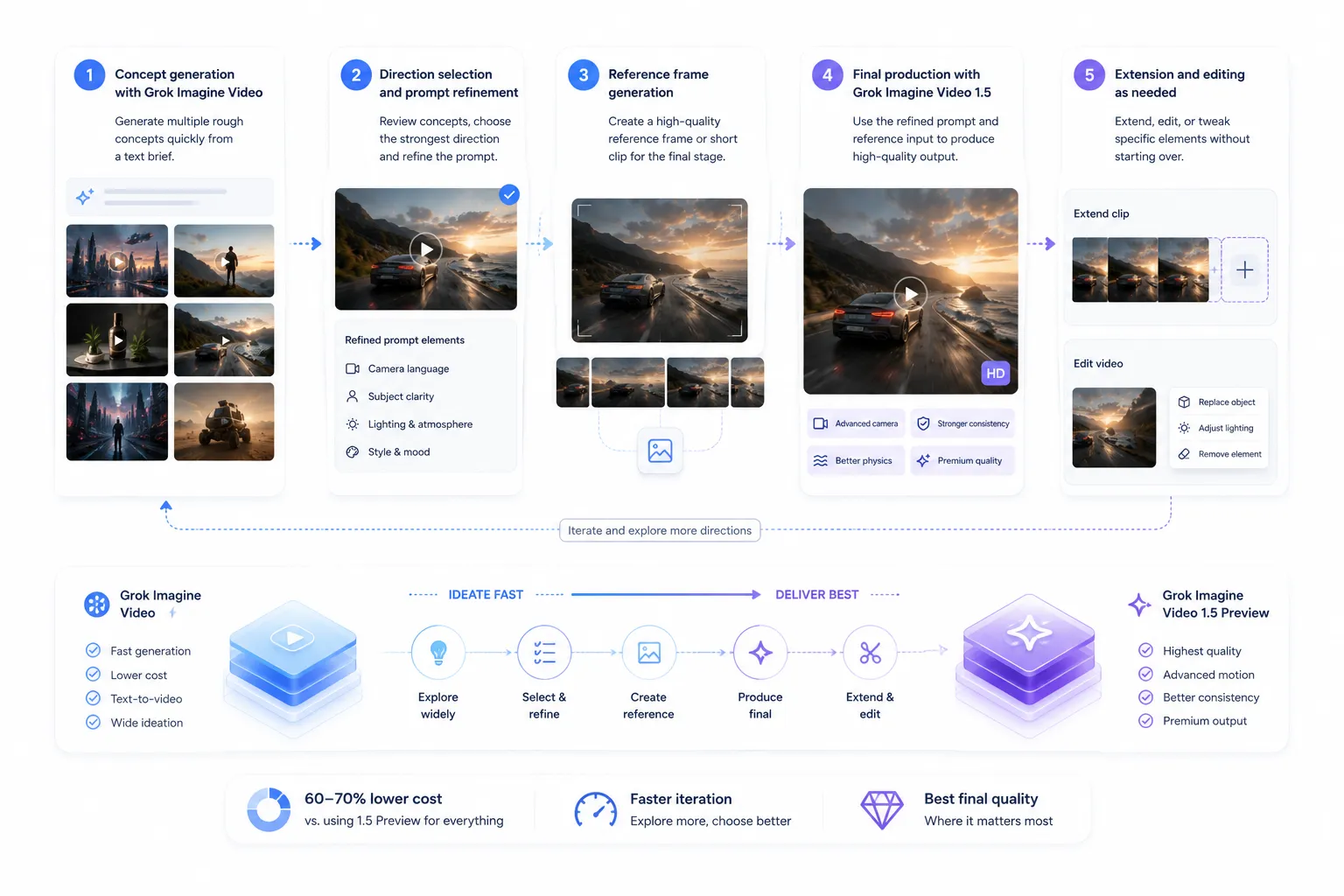
The best production video workflows aren't choosing one model over the other — they're routing the right tasks to each model at the right stage. This two-stage approach delivers the fastest iteration and the highest final quality while keeping costs under control.
Running every generation through the 1.5 Preview model roughly doubles your per-second compute cost vs. the standard model at 480p, and doubles it again at 720p. For a content team generating 50 clips a week, that adds up fast. Using the standard model for ideation and 1.5 Preview only for finals can cut your overall video generation spend by 60–70% without compromising deliverable quality.
The two-stage production workflow
1// Concept generation with Grok Imagine Video
Use text-to-video to generate 5–10 rough concept variations from your brief. The speed and cost of the standard model makes it practical to explore widely. This is where creative directions are established.
2// Direction selection and prompt refinement
Review the concept outputs internally. Select the one or two strongest directions. Refine the prompt language based on what worked and what didn't — camera language, subject clarity, lighting and atmosphere descriptors.
3// Reference frame generation
Use either Grok's image generation capabilities or the standard video model to produce a strong reference frame or short clip that will serve as the input for the 1.5 Preview stage. The quality of this input directly affects the quality of the final output.
4// Final production with Grok Imagine Video 1.5 Preview
Feed your refined prompt and reference image/video into 1.5 Preview. Generate at 720p for client-facing deliverables. This is where camera movement, temporal consistency, and physics fidelity pay off at full quality.
5// Extension and editing as needed
Use either model's video extension capability to lengthen the clip, or the video editing endpoint to make targeted changes without regenerating from scratch.
Prompt engineering tips that actually matter
Both models respond well to prompts that specify the how of the video, not just the what. These factors consistently improve output quality:
Final Decision Matrix
If you're not sure which model to reach for, use this table as a quick reference.
Access both Grok video models through one unified API
AI/ML API gives you a single key to Grok Imagine Video, Grok Imagine Video 1.5 Preview, and 500+ other AI models
Frequently Asked Questions
What is Grok Imagine Video?
Grok Imagine Video is xAI's standard video generation model, available via the xAI API. It supports text-to-video, image-to-video, video editing, video extension, and reference-to-video generation. It's designed for everyday production use, with pricing starting at $0.05 per second of output at 480p and a rate limit of 70 requests per minute.
What is Grok Imagine Video 1.5 Preview?
Grok Imagine Video 1.5 Preview is xAI's higher-fidelity video generation model, currently in preview. It accepts image and video inputs (not text prompts directly) and produces cinematic-grade output with improved temporal consistency, camera motion control, and physics realism. It's priced at $0.08 per second at 480p and $0.14 per second at 720p. The current version is dated 2026-05-30.
What is the key difference between the two models?
The standard model supports text-to-video and is faster and cheaper — it's the right tool for volume generation, iteration, and concept testing. The 1.5 Preview model requires image or video input, generates more slowly, costs more, but delivers noticeably higher visual fidelity and cinematic quality for finished deliverables.
Which Grok video model is better?
It depends on the job. Grok Imagine Video 1.5 Preview produces higher quality output, but Grok Imagine Video is better for workflows that require speed, text-to-video generation, or cost-efficient scale. For most production workflows, using both together — the standard model for ideation, 1.5 Preview for finals — gives you the best overall result.
Can I use both models in the same workflow?
Yes, and that's usually the best approach. Generate concepts and variations with Grok Imagine Video using text-to-video, select your strongest direction, then pass a refined reference image into Grok Imagine Video 1.5 Preview for final production. This approach gives you the speed of the standard model for ideation and the quality of 1.5 Preview where it counts.
Does Grok Imagine Video 1.5 Preview support text-to-video?
No. As of the current release, Grok Imagine Video 1.5 Preview only accepts image or video as input — it does not support generating video directly from a text prompt. If you need text-to-video, use the standard Grok Imagine Video model, and then use the output as input for the 1.5 Preview if needed.