From Conversation to Execution: A Comprehensive Guide to OpenClaw, Claude Code, and Claude Cowork

AI assistants are shifting from conversational tools to autonomous agents that execute tasks, with OpenClaw offering a powerful but security-intensive always-on personal assistant, while Anthropic's Claude Code and Claude Cowork provide specialized, safer solutions for developers and knowledge workers respectively. The choice depends on your technical comfort and specific needs, but together they represent a new paradigm where AI doesn't just advise, but actively performs work on your behalf.

AI assistants are evolving beyond simple chat interfaces into tools that act on your behalf. Recent developments highlight this fundamental shift from conversation to execution. The open-source personal assistant, originally known as Clawdbot and later renamed Moltbot, has evolved into OpenClaw and continues to gain traction because it runs locally on your devices and manages calendars, emails, and reminders via messaging platforms.

At the same time, Anthropic is expanding its agent ecosystem with Claude Code, an AI coding assistant for developers, and Claude Cowork, an approachable agent designed for non-coders that automates file organization, report drafting, and productivity workflows. Although all three tools leverage powerful AI foundations, they serve fundamentally different purposes. This comprehensive guide examines each tool in depth, compares their capabilities, security models, and ideal use cases, and helps you decide which ”or which combination” best fits your workflow.

Understanding the Three Tools

OpenClaw: The Self-Hosted Open-Source Agent

OpenClaw started life in November 2025 as a project called Clawdbot, built by Peter Steinberger, the Austrian software engineer best known for founding PSPDFKit. Within weeks of its quiet release, it attracted tens of thousands of GitHub stars and a vocal community of contributors. A trademark dispute with Anthropic led to a rename to Moltbot in late January 2026, and then to OpenClaw just days later. By that point, the project had accumulated over 200,000 GitHub stars and was growing faster than almost anything in recent open-source memory.

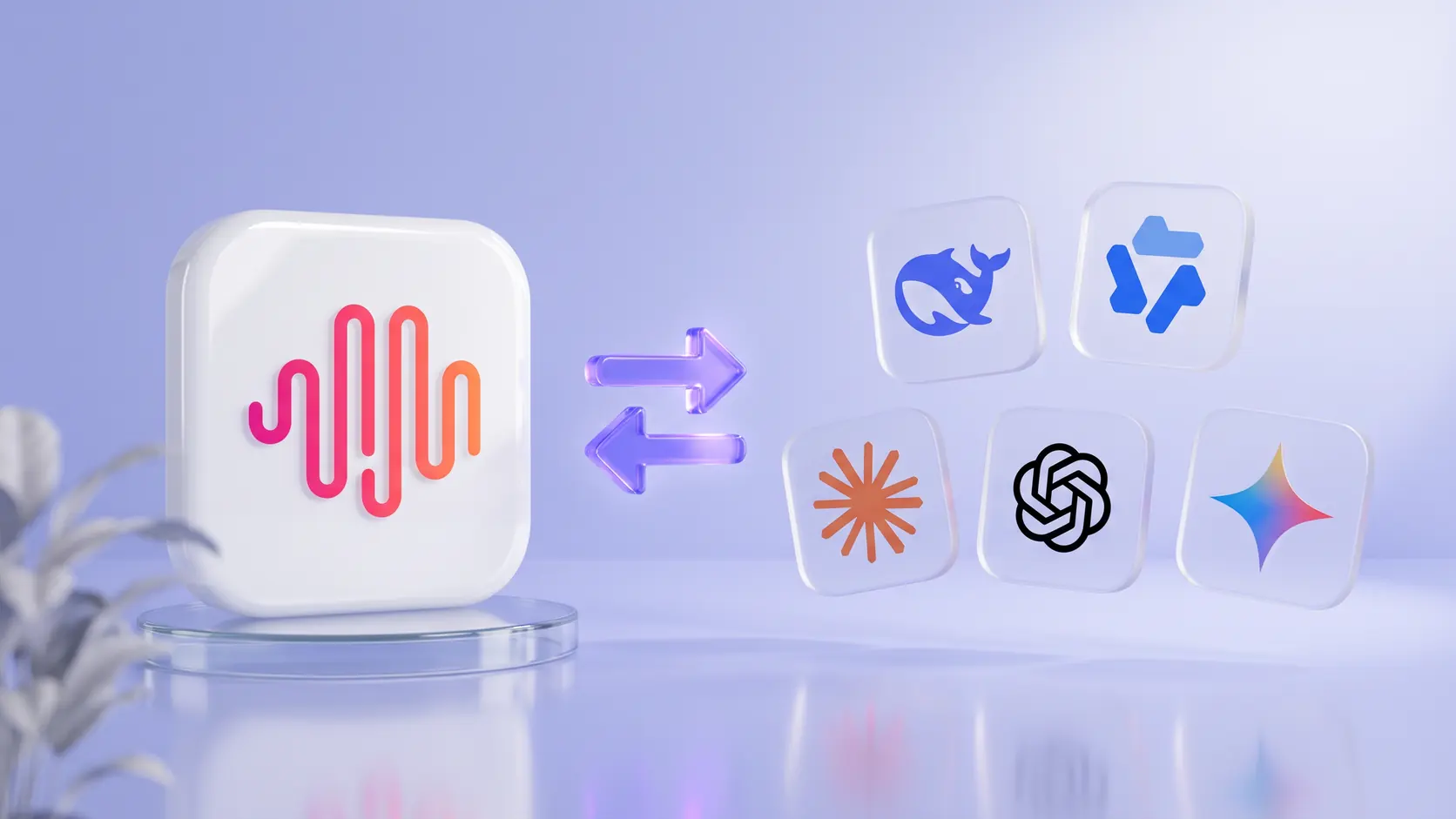
What Steinberger built is not a model and not a chatbot. It is an orchestration layer: a framework that sits on top of any language model you choose (Claude, GPT, DeepSeek, Gemini, or local models). and turns it into an always-on agent with real access to your computer, your files, and your communication channels. You supply the API keys. OpenClaw handles the rest.

The AI That Runs on Your Terms

The software is written in TypeScript, runs continuously on your own hardware (a Mac Mini, a Linux server, a Windows machine via WSL2, even a Raspberry Pi), and lets you interact with it through the messaging apps you already use: WhatsApp, Telegram, Slack, Discord, iMessage, Signal, and several others. Sending a message to your OpenClaw instance triggers an action on the host machine. That is the core of it.

Real-World Use Cases

Users have achieved impressive results with OpenClaw. One user automated unsubscribing from 500+ emails without manual work. Developers built flight search tools through messaging apps in under 20 minutes. Small teams use it for CRM updates, invoice generation, and automated reporting. Individuals rely on it for email summaries, file organization, RSS monitoring, and task scheduling.

Car negotiation on autopilot: One engineer had his OpenClaw scrape dealer inventories and forward competing PDF quotes back and forth for days. He showed up just to sign the paperwork, $4,200 below sticker.

Morning briefings before coffee: Pull from email, calendar, and news feeds at 7am, then send a formatted summary to Telegram before you're out of bed.

Inbox zero without lifting a finger: One user cleared a 4,000-email backlog in two days because the agent actually read and categorized every message.

Meal planning for the whole family: One user built a full weekly system in Notion—recipes, shopping lists sorted by aisle, weather-based dinner suggestions. Saves his family an hour a week.

Set Up Requirements and Costs

OpenClaw is free and open-source but requires Node.js version 22 or higher and comfort with command lines. The onboarding wizard (openclaw onboard) guides setup, which takes 30-60 minutes. Cloud API usage averages $50-150 monthly for moderate use, though aggressive automation can exceed $300 in a day. Local models eliminate API costs but offer lower quality.

Claude Code: The Developer's Power Tool

Purpose-Built for Professional Software Work

Claude Code is the tool Anthropic launched in May 2025, and it represents a different philosophy entirely. Where OpenClaw aims to be everything to everyone, Claude Code has a deliberately narrow focus: helping professional software engineers do better, faster work within the development sessions they are already having.

It integrates with terminals and IDEs, including a VS Code extension released in January 2026, as well as a web interface at claude.ai/code. It is powered by Claude models, including Sonnet and Opus variants, and it operates at the level of an entire codebase rather than an isolated file or snippet. It reads multiple files simultaneously, understands how they relate to each other, tracks dependencies, and makes coordinated changes that respect the existing architecture and conventions of a project.

Real-World Applications

Teams use Claude Code for test-driven development, writing tests first, then implementing code to pass them. Developers report 10x speedups on routine tasks like lint fixes and documentation updates. It excels at refactoring legacy code, writing test coverage, and helping new developers explore unfamiliar codebases.

The Setup and Cost Reality

Claude Code requires Claude subscriptions at $20 monthly for Pro or $100-200 for Max. Teams and Enterprise get custom pricing with additional security features. Pricing is predictable with no surprise bills, as usage is limited by plan limits. January 2026 updates included tool search that reduced token usage by 85%.

Limitations

Claude Code is not designed for non-technical users and assumes familiarity with development workflows. While it excels at well-defined patterns like API endpoints and test generation, it struggles with novel algorithms and unusual architectural patterns. It requires human oversight for architectural decisions and exploratory work.

Claude Cowork: The Non-Coder's Agent

Claude Cowork launched in January 2026 as a research preview inside the Claude Desktop app. Anthropic built it in approximately ten days using Claude Code, which is an interesting detail: the team used their own development tool to build a product in the time most comparable features would take weeks. That pace reflected both the maturity of the underlying infrastructure and what Anthropic described as a "vibe coding" approach, where AI accelerated its own tooling.

The pitch is straightforward: all the benefits of an AI agent, none of the technical setup. You grant Cowork access to a specific folder on your computer, describe the task you want done, and it works through the job autonomously while you do something else. It reads PDFs, images, spreadsheets, and text files. It produces structured outputs including Excel files with working formulas. It organizes, extracts, and synthesizes information across large collections of documents.

Initially available only to Max subscribers at one hundred to two hundred dollars per month, it opened to Pro users at twenty dollars per month by mid-January. It requires the Claude Desktop app and runs on macOS, with no Windows release date announced as of early 2026.

Real-World Applications

Users organize Downloads folders containing hundreds of unsorted files in minutes. Receipt photos are processed into Excel expense reports with automatic categorization and formulas. Researchers compile scattered notes into structured reports. Content creators generate social media clips from long videos. The tool excels at administrative and research-heavy tasks that are tedious but structured.

The Setup and Cost Reality

Cowork requires the Claude Desktop app (macOS only, Windows timeline not announced) and a paid Claude plan starting at $20 monthly. Setup takes only minutes with no technical configuration needed. Tasks involving hundreds of files use approximately 20% of the Pro plan's monthly allowance.

Limitations

Claude Cowork does not keep memory between sessions and operates on a single machine without cross-device sync. Connector reliability varies. While file operations work reliably, Gmail integration requires complex setup, and the Google Drive connector is unavailable. It's best suited for medium-sized tasks involving hundreds of documents under 10MB rather than very large datasets.

Part 2: Head-to-Head Comparison

Feature OpenClaw Claude Code Claude Cowork
Primary Users Tech-savvy individuals & small teams Professional developers & engineering teams Knowledge workers & business professionals
Platform Self-hosted (local machine) Cloud-based SaaS Cloud-based SaaS
Interface Messaging apps (WhatsApp, Telegram, Slack, etc.) Terminal with IDE integration Desktop app (macOS)
Setup Time 30-60 minutes (command-line) 5-10 minutes (browser + GitHub auth) 2-5 minutes (installer + tool connections)
Monthly Cost $0 software + $50-300 API usage $20-200 per developer (subscription) $20-200 per user (per-seat pricing)
Privacy Model Fully local (on your hardware) Cloud-based with encryption Cloud-based, sandboxed environment
Data Storage Persistent local memory (files) Session-based with project context Session-based with workspace isolation
File/Code Access Unrestricted system access Project-scoped, repository-based Folder-scoped, business tool integration
Proactive Actions Yes (sends reminders, alerts, updates) No (responds to requests only) No (responds to requests only)
AI Model Choice Any (Claude, OpenAI, LLaMA, Mistral) Claude only (Anthropic exclusive) Claude only (Anthropic exclusive)
Requires Coding Some (command-line setup needed) Yes (developers write prompts & review code) No (drag-and-drop, natural language)
Always-on Capability Yes (heartbeat daemon, 24/7) No (active sessions only) No (active sessions only)
Offline Capability Yes (with local models) No (cloud-dependent) No (cloud-dependent)
Customization Level Unlimited (open-source) Pre-configured workflows Limited to UI options
Best For Personal automation, CRM/email workflows Feature development, code generation, refactoring Report generation, file organization, scheduling
Availability Open-source (free) Subscription (Pro/Max tiers) Subscription (Pro/Max tiers)

Core Philosophical Difference

The Core Insight

Here is the key idea that explains everything:

Claude Code is a tool you use for sessions of focused work. OpenClaw is a system that runs your life 24/7.

Claude Code activates when you open a terminal and start a coding session. It is brilliant at that session. When you close the terminal, it stops.

OpenClaw never stops. It is running while you sleep. It answers your messages. It checks your calendar. It runs your cron jobs. It screens your calls. It exists as an ongoing presence in your digital life, not as a tool you pick up and put down.

They overlap in some capabilities - both can read files, both can reason about problems, both can write text. But the architecture, purpose, and daily role are fundamentally different.

Analogy: The Brain Surgeon and the Personal Assistant

Imagine you run a busy life. You need two kinds of help.

The Brain Surgeon (Claude Code): When you have a specific, complex technical problem - writing software, debugging code, refactoring a codebase - you call in the specialist. The brain surgeon arrives, performs precise, expert-level work in a focused session, and leaves. The surgeon is extraordinary at the procedure but does not manage your life between surgeries.

The Personal Assistant (OpenClaw): Your personal assistant manages everything else - your calendar, your inbox, your reminders, your communication with other people, your daily briefings. The assistant is always there, always aware of your context. The assistant is not a surgeon, but the assistant makes sure you get to your appointment on time and that your next meeting is rescheduled.

You would never ask your brain surgeon to manage your calendar. You would never ask your personal assistant to perform surgery. But you desperately need both.

Where Claude Cowork Fits

Claude Cowork occupies a middle ground - it's a session-based tool like Claude Code, but designed for non-technical knowledge work rather than coding. Think of it as a skilled administrative assistant you can bring in for specific projects: "Organize these files," "Create a report from these documents," "Process these receipts." It works in focused sessions, not continuously, but requires no technical expertise to operate.

Security Model Comparison

OpenClaw Security

OpenClaw's security is opt-in and user-configured, not enforced by default. This is the fundamental security challenge.

What's available:

  • Tool Policies: Hierarchical allow/deny lists
  • Approval Workflows: User approval prompts for dangerous commands
  • Safe Binaries: Allowlist of read-only utilities that bypass approval
  • Docker Sandboxing: Per-agent or per-session container isolation
  • Group Tool Policies: Per-sender restrictions in group chats
  • DM Pairing: Challenge-response authentication for new contacts
  • Built-in Security Auditor: openclaw security audit --deep

What's broken in practice:

  • Sandboxing is OFF by default - sandbox.mode defaults to off
  • DM sessions collapse into shared main session by default (cross-contamination risk)
  • Most users grant Full Disk Access and Terminal Access for convenience
  • Quick-start guides lead to weak security postures
  • ClawHub supply chain attacks: Bitdefender found ~900 malicious skills (~17–20% of total). Snyk's ToxicSkills audit found 13% of skills contain critical flaws, with active credential theft campaigns.
  • AMOS Stealer malware delivered through at least 3 distinct skills targeting macOS
  • Prompt injection is explicitly acknowledged as unsolved - OpenClaw's own docs state: "System prompt guardrails are soft guidance only; hard enforcement comes from tool policy, exec approvals, sandboxing"
  • "Lethal trifecta" (term from Simon Willison): access to private data + exposure to untrusted content + ability to communicate externally. OpenClaw's persistent memory makes this worse - attacks become "stateful, delayed-execution attacks"

In January 2026, security researchers identified exposed Moltbot installations leaking API keys and data through misconfigured gateways. Blockchain security firm SlowMist warned about gateway exposure risks. Bitsight researchers discovered over 30,000 publicly exposed OpenClaw instances. Security researcher Jamieson O'Reilly found exposed instances leaking API keys, chat histories, and credentials for third-party services. He was able to execute commands with full admin privileges on misconfigured servers.

Critical vulnerabilities: CVE-2026-25253 (CVSS 8.8) - one-click remote code execution. An attacker only needed a victim to visit a malicious webpage. 512 total vulnerabilities found in a January 2026 audit. Eight were classified as critical.

Claude Code Security

Terminal-based with human-in-the-loop by default. Asks permission before executing commands. No sandboxing by default (similar to OpenClaw in this regard, but scoped to a terminal session). Single-vendor model control: Anthropic manages the model behavior and safety training. No community skill marketplace with the same supply chain risk.

Claude Cowork Security

Cowork takes a deliberately constrained approach:

  • Apple Virtualization Framework sandbox: Runs inside a VM, isolated from host OS
  • Folder-permission model: Users explicitly grant access to specific directories; Claude cannot touch anything outside
  • Explicit confirmation gates: Asks before destructive or significant actions
  • No persistent system access: No always-on daemon; operates only during active sessions
  • No third-party skill ecosystem (initially): Plugins released Jan 30 are Anthropic-reviewed, with 11 open-sourced starters
  • Single-vendor model: Only uses Claude models - Anthropic controls the full inference stack
  • Built on Claude Agent SDK: Same underlying framework as Claude Code, with safety behaviors baked into the model layer

Limitations/risks: Prompt injection still possible through files Claude reads. Anthropic explicitly warns about risks of vague instructions. Plugin ecosystem is new and will face similar (if smaller-scale) supply chain risks as it grows. Currently macOS only.

Security Comparison Matrix

Dimension OpenClaw Claude Cowork Claude Code
Execution isolation Docker sandbox (opt-in, off by default) Apple VM sandbox (always on) None (user's terminal permissions)
File access scope Full disk if granted; configurable Explicitly selected folders only Working directory + user permissions
Model control Any model (user's choice) Claude only (Anthropic-controlled) Claude only (Anthropic-controlled)
Extension ecosystem 5K+ skills on ClawHub (17–20% malicious) 11 Anthropic-reviewed plugins + custom Hooks/MCP, no public marketplace
Always-on capability Yes (heartbeat daemon, 24/7) No (active sessions only) No (active sessions only)
Network exposure WebSocket server, optional remote access None (local app) None (local CLI)
Default security posture Permissive (convenience-first) Restrictive (safety-first) Moderate (permission prompts)
Prompt injection defense Model-dependent; docs say "not solved" Model-layer + sandbox isolation Model-layer safety training
Supply chain risk Critical (active malware campaigns) Low (vendor-curated) Low (no public marketplace)
Enterprise controls None built-in SSO, RBAC, audit logs, managed settings SSO, RBAC, audit logs, managed settings
Compliance None SOC 2 Type II, HIPAA-ready, GDPR SOC 2 Type II, HIPAA-ready, GDPR

Memory Architecture Comparison

Aspect OpenClaw Claude Code Claude Cowork
Memory type Persistent local memory (JSONL + Markdown + hybrid search) Session-based with project context Session-based with workspace isolation
Memory scope Your entire life Current project/repository Current task/folder
Persistence Lasts across days/weeks Resets between sessions Resets between sessions
Storage format JSONL transcripts, MEMORY.md files, hybrid vector search CLAUDE.md project instructions Session-scoped only
Learns over time Yes, automatically No, manual updates to CLAUDE.md No
Cross-session recall Yes No No

OpenClaw maintains session memory on your host machine. It knows what you said on WhatsApp yesterday and can reference it in a Slack conversation today. That kind of cross-session memory makes it perfect for long-running automation.

Claude Code's memory is more focused. It resets each session, but it does use a file (CLAUDE.md) to store project instructions, architecture decisions, and coding guidelines. So when you re-launch Claude in that project, it reads that file to restore context.

Claude Cowork has no persistent memory between sessions - each task starts fresh, which is actually a security feature but limits its ability to learn your preferences over time.

When to Use Each Tool

When to Use OpenClaw

OpenClaw is the right choice for technically capable users who want persistent, always-on automation across their digital life. If you are comfortable with command lines, understand basic network security, and are willing to invest in proper configuration and ongoing maintenance, the capability ceiling is extraordinary.

If you are not, it will be frustrating at best and a genuine security liability at worst. It is not suitable for deployment on company devices without dedicated security review, and it is not suitable for users in regulated industries without serious professional oversight.

When to Use Claude Code

Claude Code is the right choice for professional software engineers and development teams who want to move faster on real projects. It is reliable, predictable, enterprise-grade, and integrates cleanly into existing development workflows.

It is not for non-technical users, and it is not for tasks that happen without a human at the keyboard. But for what it does, it is currently the best available tool.

When to Use Claude Cowork

Cowork is the right choice for knowledge workers, business professionals, and anyone who wants to automate repetitive document-heavy tasks without learning a single technical concept. The setup is minimal, the security is strong by design, and the results for the right tasks are genuinely impressive.

Its limitations are real: no persistent memory, no cross-device operation, macOS only for now. But within its scope, it is accessible in a way the other tools are not.

How They Work Together

The Build-and-Deploy Pattern

The most powerful setup is using both tools in their respective strengths and letting them complement each other.

The Build-and-Deploy Pattern is the most natural way the two tools collaborate:

  1. You use Claude Code to build something - a new feature, a script, an automation
  2. You deploy the result
  3. You configure OpenClaw to orchestrate running it, monitoring it, and alerting you about it

Think of it like creating a company. You bring in Claude Code as the engineering team that designs and builds the product. Once it is built, you hand operations to OpenClaw—the team that runs the business day-to-day, handles customer communication, monitors uptime, and executes the recurring processes that keep things moving.

The build phase is intense and focused. The operations phase is steady and ongoing. Different phases, different tools, same goal.

Practical Examples of Combined Use

Example 1: Building and monitoring a side project

  • Use Claude Code to build the project (frontend, backend, database, deployment)
  • Use OpenClaw to monitor the deployed site, alert you if it goes down, send you daily analytics summaries, and handle user support messages

Example 2: Content creation workflow

  • Use Claude Code to build a content pipeline tool (scripts for formatting, publishing, SEO analysis)
  • Use OpenClaw to run the pipeline on a schedule, research topics, draft outlines, and notify you when drafts are ready for review

Example 3: Automating your development workflow

  • Use Claude Code to write the code for a PR review automation
  • Use OpenClaw to watch for new PRs on GitHub, trigger the review process, and send you a summary in Slack with the results

Example 4: Personal CRM

  • Use Claude Code to build a personal CRM system (database, API, dashboard)
  • Use OpenClaw to populate it—parsing emails for new contacts, tracking when you last spoke to someone, reminding you to follow up, and drafting outreach messages

Example 5: A Day in the Life

7:00 AM — OpenClaw sends you a morning briefing via iMessage. Weather, calendar, top emails, news. You did nothing to trigger this. It ran automatically via a cron job.

8:30 AM — A client messages your OpenClaw assistant on Slack asking about project timelines. OpenClaw checks your project files and responds with the current status. You were in the shower.

9:15 AM — You sit down at your computer, open a terminal, and start a Claude Code session. You spend 2 hours refactoring the authentication module. Claude Code navigates the codebase, makes coordinated changes across dozens of files, runs tests.

11:30 AM — You close the Claude Code session. The refactor is done and pushed to GitHub. OpenClaw detects the new commit and notifies the team in Slack that the auth module has been updated.

12:00 PM — While you eat lunch, OpenClaw screens an incoming phone call, takes a message, and texts you the summary.

2:00 PM — You open another Claude Code session to build a new API endpoint. Deep technical work for 90 minutes.

3:30 PM — Claude Code session closes. You tell OpenClaw to monitor the new endpoint's error rate every 15 minutes and alert you if it exceeds 1%.

6:00 PM — OpenClaw sends you a daily wrap-up. Tasks completed, messages received, tomorrow's calendar preview. You reply with a voice note adding a few items to tomorrow's to-do list.

11:00 PM — You are asleep. OpenClaw is still running. It processes an incoming webhook, files a support ticket, and queues a response for morning review.

Claude Code was active for about 3.5 hours. OpenClaw was active for 24.

The Feedback Loop

The relationship between the tools is not just additive: it is genuinely circular in useful ways. OpenClaw can trigger Claude Code workflows programmatically. Claude Code results can feed into OpenClaw monitoring pipelines. A broken deployment can send its error logs to OpenClaw, which routes them to Claude Code for diagnosis, which pushes a fix, which OpenClaw then validates and reports on. None of that requires you to be watching.

The $285 Billion Question

What Happened on February 3rd, 2026

On February 3rd, 2026, roughly 285 billion dollars in market capitalization disappeared from software company stocks over the course of a few days. Thomson Reuters fell sixteen percent. LegalZoom dropped twenty. RELX, Salesforce, ServiceNow, and SAP all posted sharp declines. The S&P 500 Software and Services Index lost roughly twenty percent from its year-to-date high. Journalists called it the SaaSpocalypse.

The immediate catalyst was not OpenClaw, despite its viral momentum. It was Claude Cowork, and more specifically the eleven open-source plugins Anthropic released on January 30th targeting specific professional verticals: legal work, sales automation, marketing, finance, data analysis, and human resources.

Why Cowork Was the Catalyst, Not OpenClaw

Both tools demonstrated the same underlying capability: AI models that can now sustain autonomous, multi-step workflows reliably enough to replace meaningful chunks of structured human work. So why did Cowork trigger the panic and not the open-source alternative that had accumulated more GitHub stars and more community energy?

1. Credible Enterprise Threat Vector

OpenClaw is an open-source hobbyist/power-user tool. Cowork is backed by a $60B+ company (Anthropic) with Amazon and Google as investors. When Anthropic ships a legal automation plugin, Morgan Stanley writes a note saying it's "a sign of intensifying competition." When an indie developer ships an open-source agent, it's a cool GitHub project. Markets react to credible competitive threats from well-funded incumbents.

2. The Plugin Specificity Problem

The generic Cowork launch on Jan 12 didn't cause the selloff. The specific plugins released Jan 30 did. A "legal" plugin that automates contract review, NDA triage, and compliance workflows directly threatens Thomson Reuters' Westlaw, LexisNexis, and the entire legal tech stack. A "sales" plugin that generates leads and drafts outreach threatens Salesforce's core CRM value. OpenClaw can theoretically do all of this via community skills, but it hadn't shipped named, polished, Anthropic-branded replacements for specific enterprise products.

3. The Business Model Attack

Cowork's pricing ($100–200/mo flat subscription) represents a fundamentally different model than per-seat SaaS licensing. As one analyst put it: "If 10 AI agents can do the work of 100 sales reps, you don't need 100 Salesforce seats." Cowork makes this math concrete. OpenClaw makes the same math possible in theory but requires significant setup, API cost management, and technical expertise - it doesn't have the same "anyone can do this tomorrow" quality.

4. The Demonstration Effect

When CNBC's Deirdre Bosa tweeted that she built her own Monday. com replacement using Cowork in one hour, Monday. com lost $300M in market cap in 30 minutes. The Cowork interface makes the threat visible to non-technical observers—investors, analysts, journalists. OpenClaw's power is hidden behind terminal commands and YAML configuration files. Markets react to what they can see and understand.

5. OpenClaw's Security Problems Actually Protected the Market

Ironically, OpenClaw's security issues (17–20% malicious skills, AMOS stealer campaigns, Korean tech firms banning it) made it less threatening to enterprise incumbents, not more. Bitdefender's primary recommendation was "do not run OpenClaw on a company device." An agent framework that security teams are actively banning isn't one that will replace your Salesforce instance. Cowork's sandboxed, vendor-managed approach is precisely what makes it an enterprise-credible threat.

6. Open Source vs. Productized Disruption

Open-source tools rarely trigger market panics because they lack the go-to-market engine to achieve rapid enterprise adoption. Anthropic has enterprise sales, $4B+ in funding, partnerships with AWS and GCP, and a product team. Peter Steinberger has a viral GitHub repo. The adoption curves for these tools will look very different at the enterprise level, and markets are pricing in enterprise disruption, not developer enthusiasm.

The Contrarian View

Several analysts (BofA's Vivek Arya, SaaStr's Jason Lemkin, BTIG's Jonathan Krinsky) argue the selloff is irrational or at minimum overdone:

  • BofA argues investors are pricing in two mutually exclusive scenarios simultaneously: AI capex deteriorating and AI adoption being so pervasive it destroys SaaS
  • Lemkin argues the crash is really about "the market finally pricing in the deceleration that started in 2021" - AI just gave Wall Street a narrative
  • Jensen Huang called the "software industry being replaced by AI" thesis "illogical"
  • JPMorgan's Mark Murphy said it "feels like an illogical leap" to say a plugin will "replace every layer of mission-critical enterprise software"
  • Cybersecurity SaaS (CrowdStrike, Palo Alto Networks) is actually showing resilience because AI agents increase the need for security

The truth is likely in between: the per-seat SaaS model is genuinely under long-term pressure, but the Feb 2026 selloff priced in a decade of disruption in a week.

Step-by-Step Implementation

1. Access to Claude Code

First, you need access to Claude Code. Claude Code offers three subscription tiers: $20, $100, and $200 per month. Once you have access, run:

bash

claude setup-token

This creates a token you'll provide to OpenClaw. Never share this token with anyone.

2. Docker Images on a Separate Computer

Install OpenClaw through the official repository. Another way, which might be simplest, is to tell Claude Code to set it up for you. Provide Claude Code the token above, and it can set up your assistant.

When setting up your assistant, tell Claude Code to set it up as different Docker images on your computer. This has multiple advantages:

  • The agent runs in an isolated environment and doesn't get access to things it shouldn't
  • Running as a Docker image makes it easy to move and create backups
  • You can simply tell Claude Code to set everything up in Docker automatically

3. Personalizing OpenClaw

After setup, personalize your agent. Open the OpenClaw dashboard in your browser and start chatting. The agent will ask for your name and what it should be called. You can give it a personality.

Set up multiple bots for different purposes:

  • Personal assistant: Rational, concise summaries of everything you need to do
  • Sales bot: Positively minded, access to sales materials
  • Development bot: Technical focus, GitHub integration

Simply chat with your agent and tell it to remember things. OpenClaw will store important information in memory.

4. Granting Access

Follow the principle of least privilege - give only the access necessary. For a personal bot, consider:

  • Slack (team communication)
  • Email and calendar (read emails, book meetings)
  • Linear/Jira (check tasks)
  • GitHub (perform actions on your behalf)

For a sales bot: CRM system access, Slack for communication.

5. Creating Skills

Skills are modular abilities you can plug into OpenClaw. To create a skill, simply tell it "store this as a skill" after providing information.

Examples of useful skills:

  • GitHub skill: How to act on GitHub - pull request reviews, commit patterns
  • Gmail skill: Which emails to flag, ignore, or include in daily briefings
  • Slack skill: How to interact - always respond in threads, not new messages
  • Calendar skill: How to read calendar, book meetings, interact with Google Calendar API

Skills are loaded dynamically whenever the agent is asked to do something related to that skill.

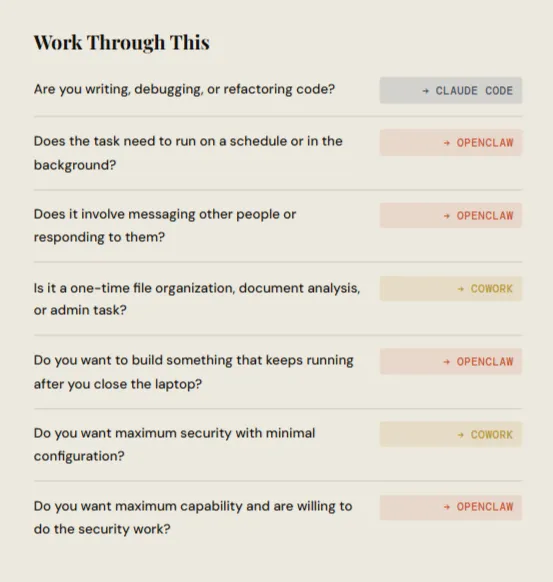
The Decision Tree

Still not sure which to use for a specific task? Walk through this:

Is the task about writing, editing, or managing code?
├── Yes → Use Claude Code
└── No
    ├── Does the task need to happen on a schedule or in the background?
    │   ├── Yes → Use OpenClaw
    │   └── No
    │       ├── Does the task involve messaging other people or services?
    │       │   ├── Yes → Use OpenClaw
    │       │   └── No
    │       │       ├── Is it a one-time focused analysis or creation task?
    │       │       │   ├── Yes → Use either (Claude Code if at your terminal, Claude Cowork if file-based)
    │       │       │   └── No → Use OpenClaw
    │       │       └──
    │       └──
    └──

Most tasks fall clearly into one camp or the other. For the small number of tasks in the gray zone, default to whichever tool you happen to have open.

Where This Is Going

A year before this guide was written, Claude was a chatbot. By early 2026, it had a command-line interface, a desktop agent running inside a virtual machine, an ecosystem of plugins, and a framework connecting to thousands of external tools. OpenClaw had turned the same underlying models into a persistent home automation system for anyone with a spare computer and a few hours to configure it.

The line between AI tool and AI agent is blurring fast. The next development is probably convergence. Claude Code will likely add safe connectors to external services over time, gaining some of the always-on capability that currently belongs to OpenClaw. OpenClaw will likely move toward more secure-by-default configurations, either through its community or through a managed offering, to capture enterprise use cases it currently cannot reach. Cowork will expand to Windows, deepen its integrations, and build on the plugin ecosystem Anthropic has carefully curated.

What is certain is that the model of AI as a conversational assistant you consult on demand is giving way to AI as infrastructure you rely on continuously. That shift is worth taking seriously, whether you are a developer, a knowledge worker, a business leader, or simply someone with a very full email inbox and not enough hours in the day.

The three tools described here are the earliest mature expressions of that shift. They are already useful. They will be more useful next year. The right question now is not whether to use them, but which ones, for what, and how to do it responsibly.

Frequently Asked Questions

1. What is the difference between OpenClaw, Claude Code, and Claude Cowork?

OpenClaw, Claude Code, and Claude Cowork serve different purposes even though they all use AI agents. OpenClaw works as a persistent personal AI that automates tasks across apps and chats, running 24/7. Claude Code is focused on software development and helps developers write, debug, and refactor code. Claude Cowork is designed for productivity and collaboration, allowing users to work with files, documents, and workflows beyond coding, but only during active sessions.

2. Which is better for developers - OpenClaw or Claude Code?

Claude Code is better for developers because it is built specifically for programming tasks. It understands codebases, supports multiple programming languages, and assists with debugging, testing, and refactoring. OpenClaw is not developer-focused and is more suitable for automation and personal productivity rather than deep coding workflows.

3. Can OpenClaw replace Claude Code for coding tasks?

No. While OpenClaw can trigger code -related actions and even run Claude Code loops remotely, it lacks the deep codebase understanding and file manipulation capabilities that make Claude Code effective for development work. Use the right tool for each context.

4. Is OpenClaw useful for non-technical users and business teams?

Yes, OpenClaw is well-suited for non-technical users and business teams, but only if they have technical support for setup. It helps automate repetitive tasks, manage reminders, handle messages, and integrate workflows across tools. However, the setup requires command-line familiarity and security configuration.

5. Does Claude Code or Claude Cowork require a paid subscription?

Claude Code and Claude Cowork are part of the Claude ecosystem and require access through paid plans: $20/month for Pro, $100-200/month for Max. Claude Cowork is available through the Claude desktop app with the same subscription tiers.

6. Do I need a Claude subscription for both OpenClaw and Claude tools?

OpenClaw is model-agnostic and works with Anthropic, OpenAI, or local models. If you have a Claude Pro or Max subscription, OpenClaw can reuse those credentials via OAuth. Claude Code requires an Anthropic subscription directly.

7. What are the hardware requirements for OpenClaw?

Surprisingly minimal: 1GB RAM and 500MB disk space. The gateway runs on Mac, Linux, Windows, Raspberry Pi, or a VPS. The software is free; costs come from your model provider subscription and optional hosting.

8. Is OpenClaw safe to use?

Security depends largely on how you configure it. Because it runs locally, you control access rules, allowed senders, and group behavior. However, OpenClaw's security is opt-in, not enforced by default. Default configurations are often insecure, and there have been multiple security incidents including malware in the skill marketplace. It's secure because you define the boundaries - if you take security seriously and implement proper isolation, access controls, and monitoring. If you're not willing to do that work, it's not safe.

9. What is the actual cost difference between these tools?

  • OpenClaw: Software free, API usage $50-300/month typical, plus hosting costs if using VPS ($5-50/month). Time cost for setup and maintenance is significant.
  • Claude Code: $20-200/month per developer, all-inclusive, zero maintenance.
  • Claude Cowork: $20-200/month per user, all-inclusive, zero maintenance.

10. Can OpenClaw and Claude Code work together?

Yes, and this is the recommended approach for developers. OpenClaw can trigger Claude Code tasks, monitor repositories, and coordinate workflows. They complement each other perfectly - OpenClaw for life automation, Claude Code for development work.

11. What happened with the February 2026 market selloff?

Anthropic's release of Claude Cowork with industry-specific plugins (legal, sales, marketing) triggered a ~$285 billion selloff in SaaS stocks. The market perceived AI agents as a direct threat to per-seat licensing models. The selloff was likely overdone but highlighted genuine long-term pressure on traditional SaaS business models.

12. Who should probably not use OpenClaw?

If you're looking for a polished app that works out of the box with zero setup, OpenClaw will feel overwhelming. If you're not comfortable with command lines, security configuration, and ongoing maintenance, it's not for you. If you're in a regulated industry without dedicated security staff, stick to Claude's enterprise offerings.

Share with friends

Ready to get started? Get Your API Key Now!

Get API Key