AI Image Generation: Mastering Prompts and Tools
How AI Image Generation Actually Works
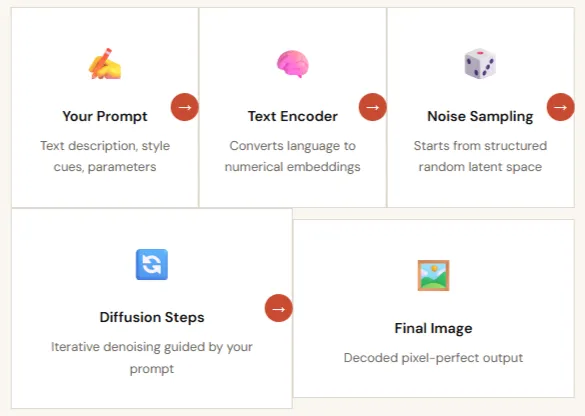
Before crafting a single prompt, you need to understand what's happening under the hood. Most modern image generators use diffusion models — a class of deep learning systems that learn to reconstruct images from structured noise.
The pipeline is elegantly simple in concept: you provide a text description, the model interprets it through billions of learned associations from its training data, and it "denoises" a random field of pixels step by step until a coherent image emerges. But the devil is in the details, each model was trained on different data, prioritizes different visual qualities, and responds to language in subtly distinct ways.
This is why the same prompt can produce dramatically different results across Midjourney, DALL·E 3, and Stable Diffusion. Understanding these differences is the foundation of mastery.
Key insight: prompt fidelity
How faithfully a model follows your instructions — varies enormously. DALL·E 3 tends to be highly literal; Midjourney interprets poetically; Stable Diffusion can be tuned to either extreme. Choosing the right tool for your creative intent is half the battle.
The Anatomy of a Masterful Prompt
Every high-performing AI image prompt is built from the same six structural components. Master this formula, and you'll never stare at a blank input field again.
Subject+ Action+ Setting+ Style+ Visual Details+ Technical Parameters
Subject & Action
The anchor of every prompt. Define who or what is in the scene and what they're doing. Be specific: "a weathered lighthouse keeper" beats "an old man." Add action verbs to inject energy.
Setting & Context
Establish environment, time period, and mood. "Inside a fog-drenched harbor at dusk, 1920s" immediately layers atmosphere, era, and lighting — far more evocative than "near the ocean."
Style & Medium
Reference art movements (Impressionism, Cyberpunk, Art Nouveau), media (oil on canvas, 3D render, ink wash), or specific artists. Style keywords are among the most powerful prompt tokens available.
Visual Design
Specify lighting (golden hour, rim light, studio softbox), color palette (desaturated teals and amber), composition (low angle, rule of thirds), and atmosphere (cinematic, dreamy, harsh).
Technical Directives
Tool-specific parameters that control output precision: aspect ratios (--ar 16:9), quality levels, stylize values, seeds for reproducibility, and CLIP weight syntax like keyword::1.5.
Negative Prompts
Equally important: tell the model what to exclude. Common exclusions include "deformed fingers, blurry, watermark, oversaturated, low quality." Negative prompting can resolve 80% of output artifacts.
The Prompt Crafting Workflow
Exceptional results come from a systematic iterative process, not a single lucky prompt. Here's the five-phase workflow used by professional AI artists and creative directors.
Planning: Define Goal, Audience, and Use Case
Before touching a prompt field, clarify what success looks like. Is this for a social media hero image, a product mockup, concept art for a game? Your target use case determines aspect ratio, style register, and required resolution. Define who will see it and what emotion you want to evoke.
Drafting: Start Simple, Layer Complexity Gradually
Begin with just Subject + Setting. Run a generation batch of 4 images. Evaluate what the model understood correctly and what it missed. Then progressively layer in style, lighting, and technical parameters. Dumping a 200-word prompt on the first attempt is one of the most common beginner mistakes.
Iteration: Change One Variable at a Time
Treat prompt refinement like a scientific experiment. Isolate variables, swap only the style reference, or only the lighting keyword, so you understand exactly what each element contributes. Use fixed seeds to isolate compositional changes from random variation.
Refinement: Apply Negative Prompts and Advanced Parameters
Once you have a promising direction, use negative prompts to eliminate recurring artifacts. Dial in stylize and guidance scale values. For anatomy problems, add targeted exclusions. For style drift, increase the weight of style keywords using platform-specific syntax.
Post-Processing: Polish the Final Asset
Most professional AI workflows end with post-processing: upscaling to production resolution (4× via tools like Magnific or built-in upscalers), inpainting to fix specific regions, and compositing in Photoshop or Figma. The AI generates the raw material, your creative judgment shapes the final output.
Choosing the Right Tool for Your Project
No single AI image tool dominates every use case. Here's a definitive breakdown of the major platforms, their strengths, ideal use cases, and prompt styles, so you can make an informed choice every time.
Midjourney
Best for artistic creativity
Creative Leader
Favors concise, poetic prompts and produces visually stunning outputs with a distinct aesthetic sensibility. Powerful parameter system (--ar, --style raw, --chaos) gives fine-grained creative control. Ideal for concept art, mood boards, and artistic experimentation.
- Aesthetic quality
- Style range
- Parameter control
DALL-E 3 / GPT-4o
Best for prompt adherence
Most Accurate
Excels at interpreting detailed, conversational prompts with exceptional fidelity. If you write "a red umbrella in the bottom-left corner," it will be there. Integrated inside ChatGPT, enabling iterative dialogue-based refinement. Best for illustrations requiring specific compositional control.
- Instruction following
- Natural language
- Iterative chat
Stable Diffusion
Best for customization & control
Maximum Control
Open-source and endlessly extensible via ControlNet (pose & structure), LoRAs (custom styles), and inpainting workflows. Runs locally for unlimited free generations. Requires more technical setup but offers unmatched flexibility, including fine-tuning on your own image datasets.
- Open source
- ControlNet
- LoRA support
- Local run
Adobe Firefly
Best for commercial safety
Enterprise Ready
Trained exclusively on licensed Adobe Stock imagery, making outputs commercially safe to use without copyright risk. Seamlessly integrates with Photoshop, Illustrator, and Express. Ideal for agencies, marketing teams, and any professional workflow requiring IP-clean assets.
- IP-safe
- Adobe integration
- Professional
Ideogram
Best for text in images
Text Rendering
Uniquely strong at rendering legible, styled text inside generated images — a historically weak area for AI models. Perfect for logo concepts, typographic posters, signage, and any design requiring readable on-image text. Also features strong community style presets.
- Text legibility
- Typography
- Logos
Prompt Templates by Genre
Copy, customize, and launch. These production-tested prompt templates cover the most common AI image use cases, just swap the bracketed placeholders for your specifics.
- Realistic Portrait:
Photograph of a [age] [occupation], with [specific features], in [lighting], looking at viewer, [camera lens/style], photorealistic, skin texture, detailed eyes.- Concept Art:
Concept art of a [subject] in [environment], [style/mood], [color scheme], intricate details, trending on ArtStation.- Product Mockup:
Professional product photo of a [product] on [surface], [background style], studio lighting, clean composition, advertisement quality.Advanced Techniques & Optimization
Once you've mastered the fundamentals, these techniques separate professional-grade AI image workflows from casual experimentation.
Prompt Chaining
Generate a base image, then feed it back as an image-to-image input for a follow-up prompt. Iterate from rough sketch → refined concept → final polish in sequential generations, preserving compositional DNA across steps.
ControlNet
In Stable Diffusion, ControlNet lets you supply a pose reference, depth map, or edge detection layer. The model generates a new image that exactly matches your supplied structure, eliminating anatomy guesswork entirely.
LoRA Fine-Tuning
Low-Rank Adaptation (LoRA) models train on a small custom dataset (15–50 images) to teach Stable Diffusion a specific character, product, or style. Trigger words activate the LoRA during generation for perfectly consistent results.
Inpainting & Outpainting
Inpainting lets you mask a specific region and regenerate only that area, fix a distorted hand without touching the rest of the image. Outpainting extends an image beyond its original borders to reveal more of the scene.
LLM-Assisted Prompting
Use ChatGPT or Claude to expand a short brief into a detailed, structured prompt. Ask it to suggest style references, lighting setups, and composition choices you wouldn't have thought of, then paste the output into your image tool.
Your Creative Vision Deserves Precision Execution
You now have the framework — prompt anatomy, tool knowledge, workflow discipline, and ethical grounding. The only thing left is to start iterating. Take control of your AI generation with AI/ML API, offering quick, centralized access to hundreds of AI models.
.webp)